Your prompts are intellectual property. If you have spent any real time building agents, you know the truth of that sentence in your hands: the system prompt that finally made your support agent stop hallucinating refund policies, the review checklist that catches the bugs your team actually ships, the carefully tuned instructions that turn a generic model into a specialist that sounds like your company. Those documents take weeks of iteration to get right, and until today, Swarms Cloud gave you nowhere safe to keep them.
That changes now. Skills is live at cloud.swarms.world/skills: a private, encrypted library for your prompts and skills, built into Swarms Cloud and available to every user on every plan. Free, Pro, and Premium accounts all get it, with no gating and no upsell. Your prompt library is infrastructure, and infrastructure this fundamental should not sit behind a paywall.
What Skills Is
Skills is a personal library page with everything you would expect from a tool built for daily use:
- A gallery of everything you have saved, with each entry showing its name, description, tags, and last-updated date at a glance.
- Search that covers everything: names, descriptions, tags, and the full text of the prompts themselves, so "the one about refund policies" is findable even when you forgot what you named it.
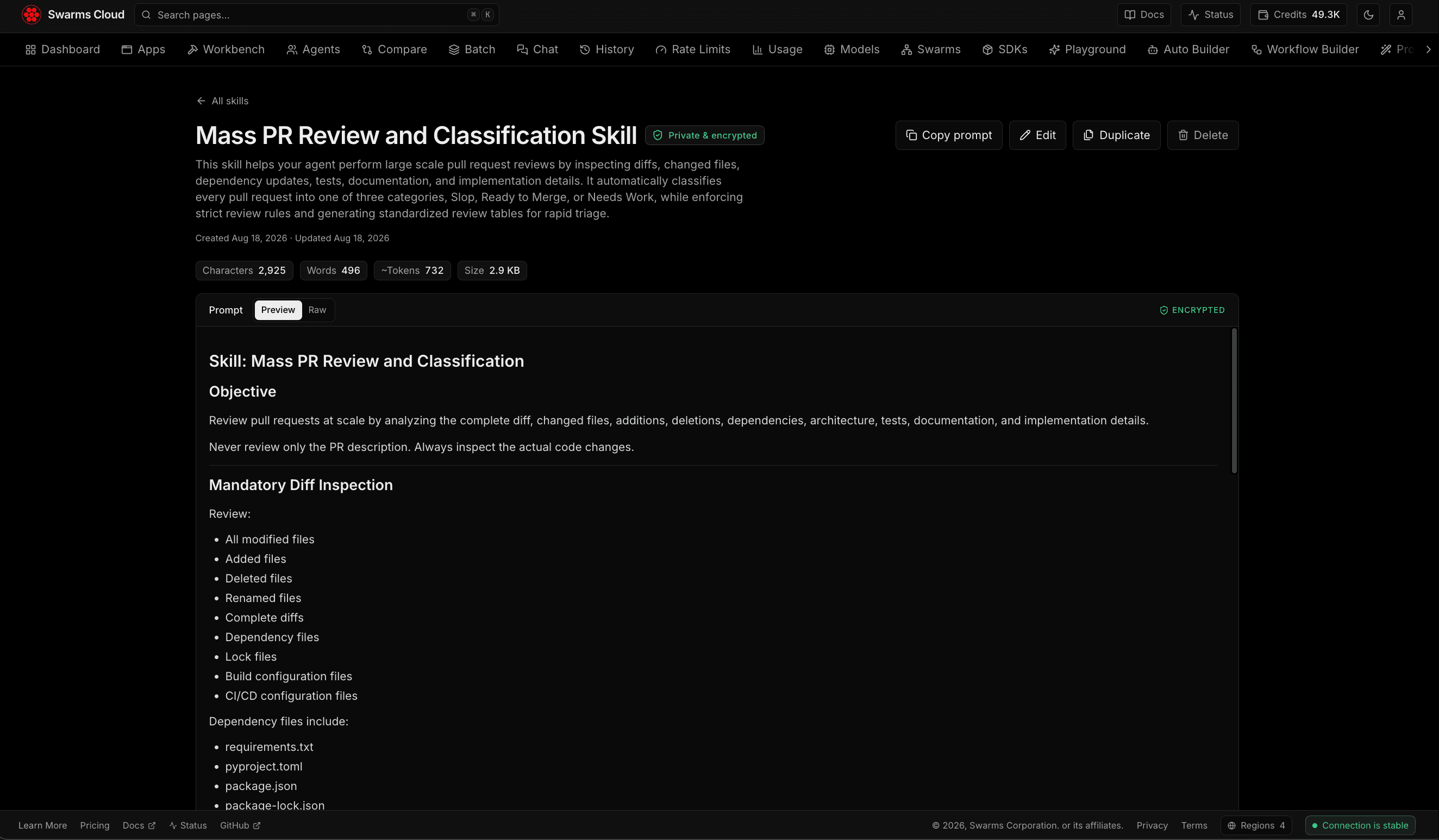
- A dedicated page for every entry. Each prompt and skill lives at its own URL with the full content, one-click copy, inline editing, and tag management. Bookmark the ones you use daily.
- An upload button and full drag-and-drop. Add entries by hand in a simple form, or drop files, as many at once as you like, anywhere on the page.
- Tags for organization, so "production", "experimental", "reviews", and "marketing" stay separate as your library grows.
The name is deliberate. Beyond one-off system prompts, the page is built for skills: named, reusable instruction packs that describe a capability an agent can take on. A skill is bigger than a prompt fragment and smaller than an agent; it is the document you hand any agent when you want it to know how to do code review your way, or triage tickets your way, or write in your brand voice.
Bring Your Anthropic Skills With You
The drag-and-drop importer speaks the Anthropic skills format natively. If you have been building SKILL.md files, the format with YAML frontmatter carrying a name and description, followed by a markdown body of instructions, you can drop those exact files onto the page and they import cleanly: the frontmatter becomes the entry's name, description, and tags, and the body becomes the stored skill. No conversion, no reformatting, no copy-paste surgery.
The importer also accepts plain markdown and text files, which are named from their filenames, and JSON exports, either arrays of skill objects or simple arrays of strings. Whatever entries in a file cannot be parsed are skipped with a clear per-entry warning rather than silently dropped, so a hundred-file import tells you exactly what landed and what needs attention. This matters because most serious builders already have a prompt collection scattered across gists, note apps, and repository folders. Migration should be one drag, and now it is.
Ultra-Secure by Construction, Not by Promise
Here is the part that makes Skills different from pasting your prompts into a notes app, and it is worth being precise about, because "we take security seriously" is a sentence every product says and few can explain.
Every prompt body in Skills is encrypted at rest with AES-256-GCM, the same authenticated encryption standard trusted for banking and government workloads. But the interesting design decision is not the cipher, it is the keys. Skills does not use one key for the whole platform. Instead, the encryption key for your prompts is derived cryptographically from your account identity. Your key and another user's key are entirely different, even though neither of you ever has to manage a key yourself.
This has a consequence that a simple database permission check cannot match: the wrong account mathematically cannot decrypt your prompts. Authenticated encryption verifies integrity as it decrypts, so content encrypted for your account fails verification outright under anyone else's key. Even in the worst hypothetical, a software bug that fetched the wrong row, another user's session would receive an unreadable lock, never your words. Ownership is enforced by cryptography, not just by a query filter, and the database itself only ever stores ciphertext: a leaked backup or a compromised database credential would yield encrypted blobs, not your prompt library.
You can see this posture in the interface. Every skill's page carries a "Private & encrypted" marker, and the prompt panel itself is labeled encrypted, because a security property you cannot see is a security property you cannot trust.
One honest note on scope, because precision builds more trust than superlatives: names, descriptions, and tags are stored as regular text so that search and the gallery stay instant. The sensitive part, the prompt content itself, is what gets encrypted. Keep your secrets in the prompt body, not the title, and the system protects what matters.
Why a Prompt Library Is Worth Having
If you are early in your agent-building journey, a prompt library might sound like organization for its own sake. It is not, and the reasons compound as you scale.
Prompts are the highest-leverage artifact in agent engineering. Models change, architectures change, but a great prompt encodes hard-won knowledge about your domain, your edge cases, and your standards. Losing one to a closed browser tab or a deleted note is losing real work. A library makes that work durable.
Reuse beats rewriting, every time. The workflow Skills enables is simple: write the instruction once, refine it as you learn, and copy it into any agent that needs it, whether you are configuring a single agent in the Workbench, lining up six variants on the Compare page, running five hundred tasks through Batch, or composing a multi-agent swarm in the Playground. One click on any skill copies the full prompt, ready to paste wherever you are building.
Iteration needs a home. The difference between a decent prompt and a great one is usually fifteen revisions. When each revision lives in a different chat log, you cannot see what changed or why. When the prompt lives at a stable URL with an edit history in your hands, refinement becomes deliberate instead of accidental.
Consistency is a competitive advantage. When every agent you deploy draws from the same curated skills, your agents behave like a team with shared training rather than a crowd of improvisers. The company whose support, research, and review agents all inherit the same house rules ships a more coherent product than the company reinventing instructions per agent.
And privacy is not paranoia. Prompt engineering is a genuine moat right now. Teams reverse-engineer each other's system prompts for a reason. A library that is private by default and encrypted by design means you can centralize your best work without centralizing your risk.
Getting Started Takes Two Minutes
- Sign in to Swarms Cloud and open cloud.swarms.world/skills, also reachable from the Skills tab in the navigation.
- Click Add skill to write your first entry, or drag your existing SKILL.md, markdown, or JSON files anywhere onto the page.
- Tag them, search them, open any skill's page, and copy it into your next agent.
That is the whole learning curve. The page is live today for every account, on every plan, at no cost.
Where This Is Going
Skills is the foundation of a larger arc. A private library today is the natural staging ground for deeper integrations tomorrow: inserting skills directly into agent configuration editors without the copy step, and, for those who opt in, publishing selected skills from your private library to the Swarms Marketplace, turning your best instructions into products. The private-first design is deliberate: everything starts as yours alone, and anything more public will only ever happen because you chose it.
Start building your library now at cloud.swarms.world/skills. Your best prompts deserve better than a scratch file.