对比指南
2026 年 AutoGen 替代方案:AutoGen 之后该何去何从
AutoGen 已进入维护模式。本文对比每一个 AutoGen 替代方案(Microsoft Agent Framework、AG2、Swarms、LangGraph、CrewAI),并说明如何迁移你的代码。
Swarms 团队20 分钟阅读

AutoGen 已进入维护模式。本文对比每一个 AutoGen 替代方案(Microsoft Agent Framework、AG2、Swarms、LangGraph、CrewAI),并说明如何迁移你的代码。
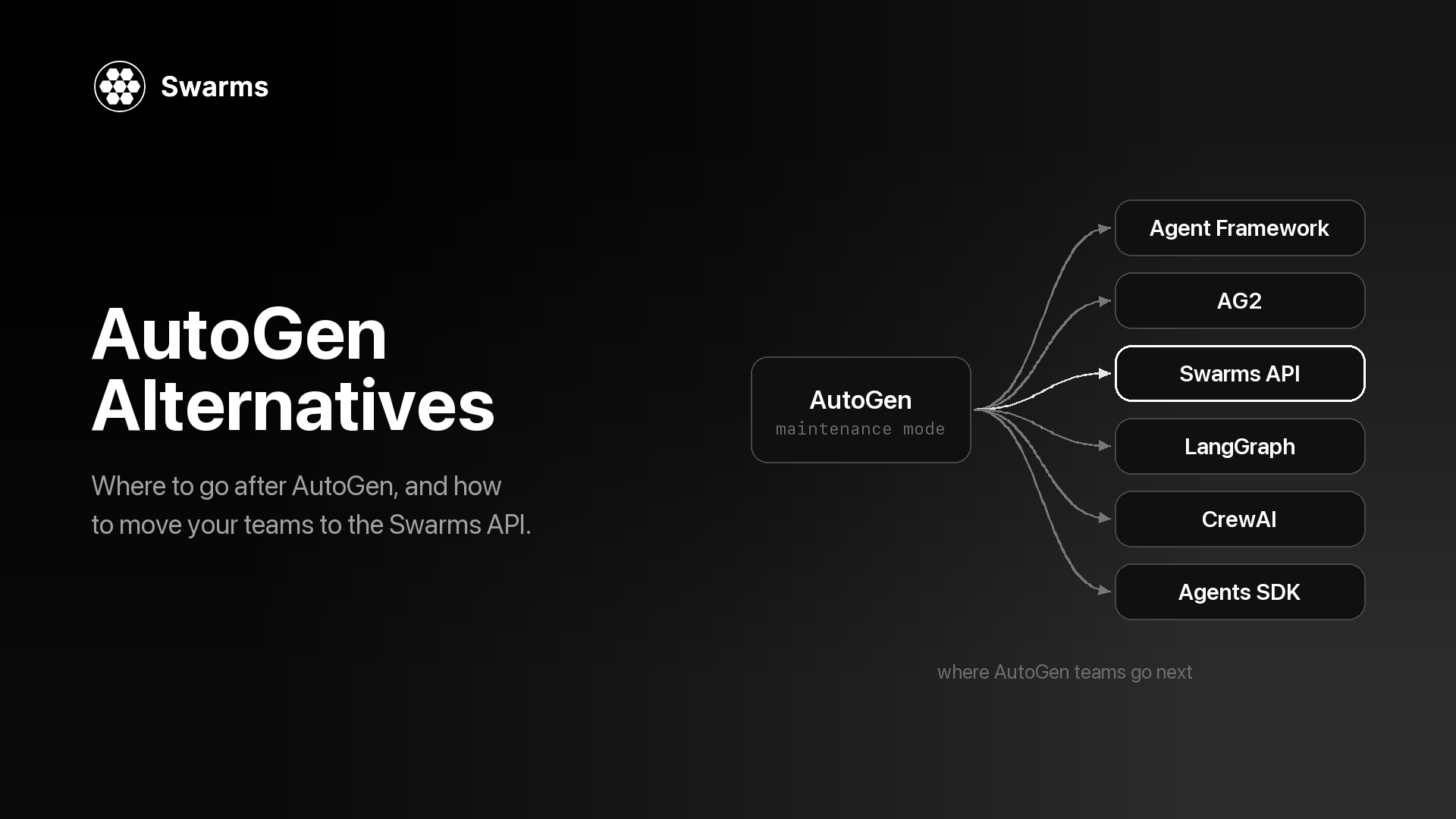
如果你正在寻找 AutoGen 替代方案,原因多半是 AutoGen 仓库顶部的那条横幅。Microsoft 已将 AutoGen 置于维护模式,并引导新用户转向 Microsoft Agent Framework。你的 AutoGen 代码仍然可以运行,但不会再有新功能,所以迟早要决定三件事:代码迁往哪里,需要改动多少,以及什么时候迁移。
本文逐一回答这三个问题。内容包括:AutoGen 发生了什么、何时发生;替代方案应该具备什么;六个选项(Microsoft Agent Framework、AG2、Swarms、LangGraph、CrewAI 和 OpenAI Agents SDK);一张对比表;以及针对大多数 AutoGen 项目使用的三种团队模式,从 AutoGen AgentChat 到 Swarms API 的逐段对照迁移。Swarms 是我们的产品,所以在其他选项更合适的地方,我们会直接说明。
AutoGen 起源于 Microsoft Research,是一个用于多智能体对话的开源框架。按照官方迁移指南的说法,0.4 版本是"a from-the-ground-up rewrite adopting an asynchronous, event-driven architecture"(一次采用异步、事件驱动架构的彻底重写),并包含破坏性变更。这次重写带来了 AgentChat API(AssistantAgent、RoundRobinGroupChat、SelectorGroupChat 以及各种终止条件),目前大多数 AutoGen 代码用的就是它。
之后,Microsoft 把智能体方面的工作转移到了一个新框架上:
autogen-agentchat 的最新版本。main 分支上最近的一次提交是 2026 年 4 月 6 日,正是这次横幅更新。今天什么都不会坏。代码采用 MIT 许可,锁定版本的包照常可以安装,你的智能体也照常工作。变化在于未来:新的模型功能、新协议和新的编排模式都会在其他项目中发布,而修复工作现在依赖一个由社区管理的仓库。对生产系统来说,这已足以成为规划迁移的理由,即使还谈不上紧急。
有三样不同的东西都叫 AutoGen,适合你的 AutoGen 替代方案取决于你运行的是哪一个。
autogen-agentchat、autogen-core 和 autogen-ext;导入语句形如 from autogen_agentchat.agents import AssistantAgent。进入维护模式的就是这个项目。ConversableAgent API 的延续,通过 import autogen 导入。它的 README 说明它以 autogen 包的名字发布在 PyPI 上,并且本身也处于维护模式。pyautogen。 Microsoft 的迁移指南写道"We no longer have admin access to the pyautogen PyPI package"(我们已不再拥有 pyautogen PyPI 包的管理权限),并说明从 0.2.34 版本起,该包的发布已不再来自 Microsoft。如果你的代码导入的是 autogen_agentchat,本文其余部分可以直接套用。如果导入的是 autogen,并使用 ConversableAgent 和 initiate_chat,请先阅读 AG2 一节。
在比较各个选项之前,先列出你的 AutoGen 代码实际用到了什么。决定大多数迁移的是下面这些问题:
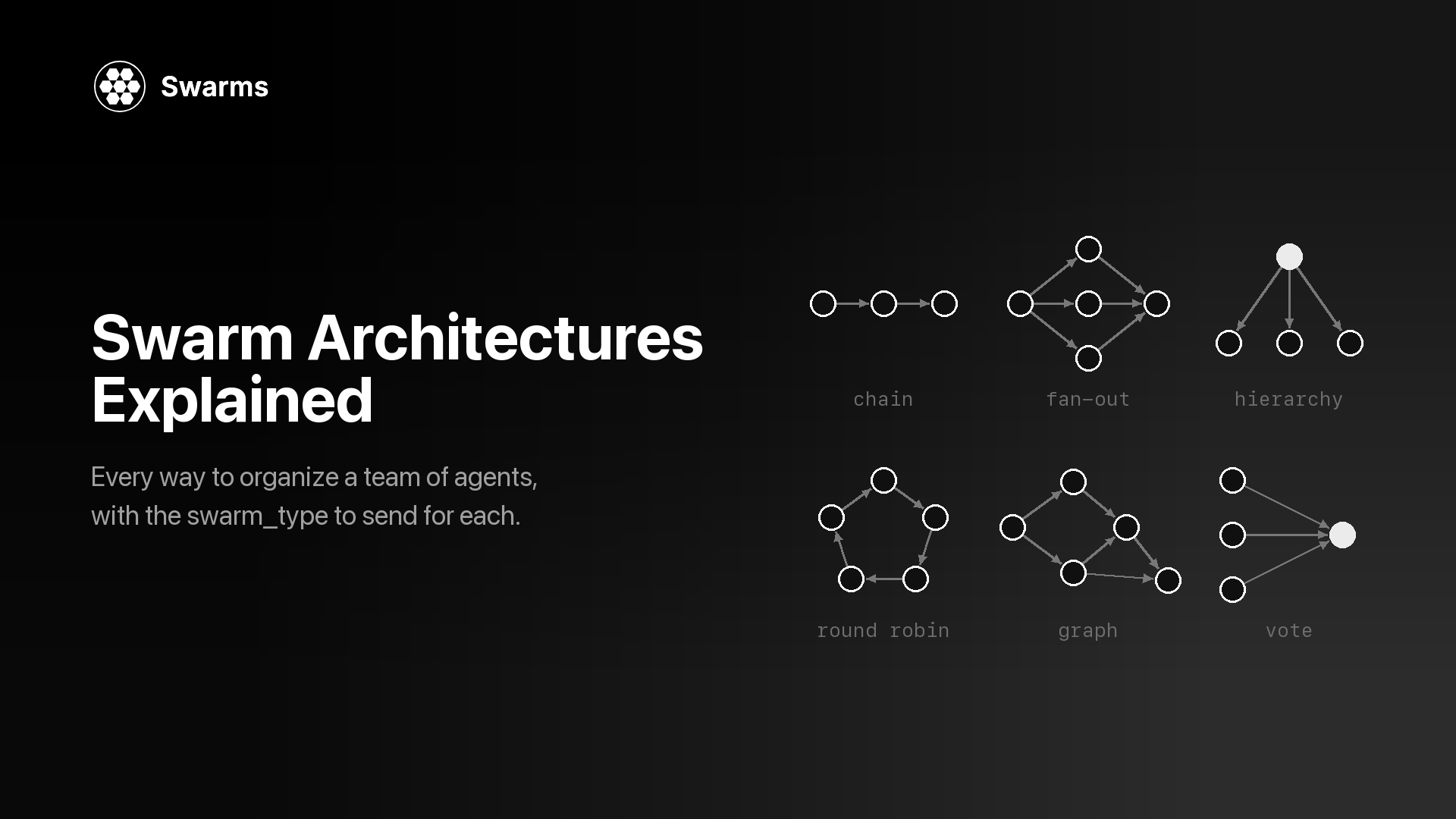
RoundRobinGroupChat、SelectorGroupChat、Swarm(AutoGen 的交接式团队,与 Swarms 无关)、MagenticOneGroupChat 和 AgentTool。每个替代方案覆盖的子集都不同,蜂群架构详解很好地梳理了这些模式所对应的结构。TextMentionTermination、MaxMessageTermination、TokenUsageTermination、TimeoutTermination、HandoffTermination 等,可以用 | 和 & 组合)是防止群聊无限进行下去的关键。确认替代方案提供什么:轮次上限、评审智能体,还是由你自己写循环。失控的对话是多智能体系统的静默失败模式之一。McpWorkbench 接入的 MCP 服务器,以及代码执行,都需要有地方安放。reset();UserProxyAgent 则把人引入循环。想清楚你是否需要持久化检查点和暂停后恢复,还是自己携带历史记录就够了。Microsoft Agent Framework(MAF)是 Microsoft 为同时取代 AutoGen 和 Semantic Kernel 而打造的项目。它的迁移指南说,它由"the core AutoGen and Semantic Kernel teams at Microsoft"(Microsoft 的 AutoGen 和 Semantic Kernel 核心团队)开发。它采用 MIT 许可,支持 Python 和 .NET(Go SDK 在一个单独的仓库中),通过 pip install agent-framework 安装。多智能体工作运行在基于图的 Workflow API 之上,内置顺序、并发、交接、群聊和 Magentic-One 编排,另有检查点、人工参与支持、OpenTelemetry 追踪、中间件、DevUI 调试器,以及 MCP 和 A2A 支持。发布频繁:agent-framework 于 2026 年 10 月 8 日在 PyPI 上发布了 1.21.0。
对 AutoGen 用户的优势。 单智能体 API 与你现有的非常接近:Eric Zhu 的公告说 MAF 的单智能体接口"almost identical to AutoGen's"(与 AutoGen 的几乎相同),而 AutoGen 迁移指南逐项对照讲解了模型客户端、工具、MCP、流式输出和团队。群聊保持了熟悉的形态:GroupChatBuilder 接受 selection_func 来实现轮询或自定义选择,也可以接受一个用模型挑选发言者的 orchestrator_agent,这覆盖了 SelectorGroupChat 的功能。你还能获得 Microsoft 的长期支持承诺。
权衡。 团队变成了 Workflow,所以编排层仍然需要重写。如果你用过 AutoGen Core 的分布式运行时,迁移指南写道"Agent Framework focuses on single-process composition today; distributed execution is planned"(Agent Framework 目前专注于单进程组合,分布式执行仍在计划中)。示例偏重 Azure 和 Microsoft Foundry;仓库中有 Anthropic、Gemini、Bedrock、Mistral、Ollama 等提供商的包,但其中一些在 PyPI 上仍是预发布版本。编排仍由你自己运行,所有提供商的密钥也由你自己持有。
适合: 已经在使用 Azure、Foundry 或 .NET 的团队,以及希望在厂商支持下以最短代码路径离开 AutoGen 的人。如果你要留在 Microsoft 技术栈中,这就是正确的选择,下面其他选项主要在你需要 MAF 不提供的东西时才值得考虑。
AG2 自称"AG2 (formerly AutoGen)"(AG2,原 AutoGen)。它采用 Apache 2.0 许可,由来自多个组织的志愿者维护,Chi Wang 和 Qingyun Wu 被列为项目管理员。AG2 现在有两条产品线:
autogen.* 命名空间及其中的类:ConversableAgent、AssistantAgent、UserProxyAgent、GroupChat 和 GroupChatManager,以及嵌套对话和顺序对话。它位于 ag2ai/ag2-classic,处于维护模式,只提供"security and critical bug fixes only"(仅安全修复和关键 bug 修复)。pip install ag2,import ag2)是正在积极开发的框架。1.0.0 版于 2026 年 7 月 27 日发布到 PyPI,1.1.2 版于 2026 年 10 月 3 日跟进。它的核心是一个异步的 Agent,多个智能体通过由一个中心节点(hub)和类型化通道组成的 Network 进行协调。优势。 如果你的代码是旧的 ConversableAgent 风格,AG2 Classic 能让它无需重写就继续运行,而且下一版本也由同一个社区在开发。AG2 v1 通过 ag2[openai]、ag2[anthropic]、ag2[gemini] 等扩展支持多个提供商。
权衡。 Classic 同样处于维护模式,所以它只是为你争取时间。AG2 README 明确表示 v1"is not a drop-in upgrade from Classic. The agent model, orchestration, and imports all changed."(不能直接替换 Classic,智能体模型、编排和导入方式都变了。)而如果你使用的是 Microsoft 的 AgentChat(导入 autogen_agentchat),AG2 也没有捷径:它的 API 与 AgentChat 不同,所以迁移过去同样是一次重写,工作量与其他选项相当。
适合: 拥有 v0.2 风格 AutoGen 代码、并希望继续使用以对话为核心、由社区运营的项目的团队。
Swarms API 是一个托管的多智能体服务。向 POST /v1/swarm/completions 发送一次请求,就能描述智能体(名称、系统提示词、模型)、协调它们的架构(swarm_type)以及任务。服务器运行这些智能体,并返回每个智能体的输出以及 token 用量和费用。swarm_type 接受 14 个取值,包括 RoundRobin、GroupChat、HierarchicalSwarm、MultiAgentRouter、PlannerWorkerSwarm、MixtureOfAgents、MajorityVoting 和 DebateWithJudge。单个智能体则运行在 POST /v1/agent/completions 上。
对 AutoGen 用户的优势。 常见的 AutoGen 团队都能对应到有名字的架构:RoundRobinGroupChat 对应 RoundRobin,由规划者主导的 SelectorGroupChat 对应 HierarchicalSwarm,MagenticOneGroupChat 最接近 PlannerWorkerSwarm。切换模式只需改一个字段,智能体定义保持不变,因此可以低成本地测试辩论、投票或评审会是否比你的群聊效果更好。不需要托管编排运行时,任何能发送 HTTP 请求的语言都可以调用它。每个智能体各自选择 model_name,所以一个团队可以混用多家提供商,并可用 fallback_models 做故障切换。智能体可以通过 mcp_url 访问 MCP 服务器,输出可以通过 stream: true 流式返回,每个响应都会报告用量和费用。
权衡。 API 是无状态的:每个请求都从零开始,上下文需要你通过 history(智能体端点)或 messages(蜂群端点)传入。它没有像 SelectorGroupChat 那样在每条消息后由模型挑选下一位发言者的机制,也没有可组合的终止条件:max_loops 限制轮数(最多 50),而遇到"APPROVE"之类的短语就提前退出,需要你自己写循环,下面的示例 1 会展示。Python 函数工具不会在服务器上运行;tools_list_dictionary 返回结构化的工具调用,由你的代码执行,而 MCP 服务器(以及智能体端点上内置的 auto_search 和 web_scraper 工具)在服务器端运行。由于是托管服务,提示词和数据会发送到 API;如果所有东西都必须留在你自己的进程内,开源的 Swarms 框架(docs.swarms.world)是自托管的途径,本文只使用 API。单次蜂群端点对所有套餐开放,而批量蜂群运行和 GraphWorkflow 需要付费套餐。
适合: 原本为了团队模式而使用 AutoGen、希望把这些模式变成一次 API 调用的团队;想在同一组智能体上比较不同架构的团队;或想混用多家模型厂商、又不想运行编排基础设施的团队。下面的迁移部分给出了代码。
LangGraph(MIT 许可,来自 LangChain)自称"low-level orchestration framework for building, managing, and deploying long-running, stateful agents"(用于构建、管理和部署长时间运行、有状态智能体的底层编排框架)。你定义类型化的状态、节点和边,LangGraph 则提供可在故障后恢复的持久化执行、人工参与中断,以及短期和长期记忆。它有 Python 和 JavaScript 两个版本,langgraph 在 2026 年 10 月 6 日的版本是 1.2.14。
优势。 控制流是显式的,原生支持循环和条件边,并内置检查点。如果你的 AutoGen 团队本质上是一个披着对话外衣的状态机,LangGraph 会让这个结构清晰可见。
权衡。 群聊需要你自己设计,包括状态模式、节点和路由函数,所以一行 RoundRobinGroupChat 会变成一张小图。追踪和托管部署来自 LangSmith,这是一个独立的商业产品。
适合: 需要持久化执行、分支和可恢复状态的工作流。如果之后想比较图引擎,可以阅读 Swarms GraphWorkflow 与 LangGraph 对比,以及逐个模式讲解的 LangGraph 到 Swarms 迁移指南。
CrewAI(MIT 许可)是一个 Python 框架,有两个基本构件:Crews,即基于角色、围绕任务协作的智能体团队;以及 Flows,即用于精确控制的事件驱动工作流。一个 crew 可以按顺序流程运行,也可以按层级流程运行,后者会"automatically assigns a manager to the defined crew to properly coordinate the planning and execution of tasks through delegation and validation of results"(自动为 crew 指派一名管理者,通过委派和结果验证来协调任务的规划与执行)。crewai 包在 2026 年 10 月 9 日的版本是 1.15.27,支持 Python 3.10 到 3.13。
优势。 角色、目标和任务易于阅读,能直接对应业务流程的描述方式。层级流程接近由规划者主导的 SelectorGroupChat。
权衡。 工作单元是带有预期输出的任务,这与自由形式的对话是不同的思维模型,所以提示词和控制逻辑都需要重新设计。托管部署和可观测性来自商业产品 CrewAI AMP Suite。
适合: 每个智能体都有明确角色和交付物的业务流程自动化。代码层面的比较请看 Swarms 与 CrewAI 对比。
OpenAI Agents SDK(MIT 许可)是一个"lightweight yet powerful framework for building multi-agent workflows"(轻量而强大的多智能体工作流框架),并且"provider-agnostic, supporting the OpenAI Responses and Chat Completions APIs, as well as 100+ other LLMs"(不绑定提供商,支持 OpenAI Responses 和 Chat Completions API,以及 100 多种其他 LLM)。它的基本组件包括智能体、交接、智能体即工具、护栏、会话、人工参与和追踪。它有 Python 和 JavaScript 版本;openai-agents 在 2026 年 10 月 2 日的版本是 0.23.1。
优势。 AutoGen 的 Swarm 团队(交接)和 AgentTool 可以直接对应到交接和智能体即工具。会话负责跨多次运行管理对话历史,并内置追踪。
权衡。 没有群聊预设;轮询和选择器模式需要你自己编写。这个包仍处于 0.x 版本。
适合: 围绕专家之间相互交接而构建的助手。更深入的比较请看 OpenAI Agents SDK 与 Swarms 对比。
| 维护方 | 许可证 | 语言 | 运行位置 | 多智能体模型 | 最新版本(PyPI,2026 年 10 月 11 日) | |
|---|---|---|---|---|---|---|
| Microsoft Agent Framework | Microsoft | MIT | Python、.NET(Go 单独提供) | 你的进程(可选 Foundry 托管) | 图工作流:顺序、并发、交接、群聊、Magentic | 1.21.0 |
| AG2 | 志愿维护者 | Apache 2.0 | Python | 你的进程 | 由中心节点和通道组成的 Network(Classic:GroupChat) | 1.1.2 |
| Swarms API | Swarms | 托管服务 | 任何支持 HTTP 的语言 | 托管 | 14 种 swarm_type 架构 | 不适用 |
| LangGraph | LangChain | MIT | Python、JavaScript | 你的进程(可选 LangSmith) | 类型化状态图 | 1.2.14 |
| CrewAI | CrewAI | MIT | Python 3.10 到 3.13 | 你的进程(可选 AMP) | Crews(顺序、层级)和 Flows | 1.15.27 |
| OpenAI Agents SDK | OpenAI | MIT | Python、JavaScript | 你的进程 | 交接和智能体即工具 | 0.23.1 |
| AutoGen(作为参照) | 社区管理 | MIT(代码) | Python、.NET | 你的进程 | RoundRobin、Selector、Swarm、MagenticOne 团队 | 0.7.5(2025 年 9 月 30 日) |
更广泛的框架比较请看 2026 年多智能体框架对比。
迁移并不总是迫在眉睫。在以下情况下,暂时继续使用 AutoGen 是合理的:
如果选择继续使用,请锁定版本,关注仓库中的安全修复,并记录每个服务使用了哪些团队模式,因为这份清单就是你的迁移计划。
本文余下部分把三个 AutoGen AgentChat 团队迁移到 Swarms API。AutoGen 代码遵循最新版本(0.7.5)的 AgentChat 文档:围绕模型客户端构建的异步智能体、带终止条件的团队,以及返回 TaskResult 的 team.run()。Swarms 代码使用 aiohttp 发送普通的 HTTP 请求,并从 SWARMS_API_KEY 环境变量读取密钥。智能体运行在 /v1/agent/completions 上,团队运行在 /v1/swarm/completions 上。
# AutoGen (before)
pip install -U "autogen-agentchat" "autogen-ext[openai]"
export OPENAI_API_KEY="..."

# Swarms API (after)
pip install aiohttp python-dotenv
export SWARMS_API_KEY="..."   # from https://swarms.world/platform/api-keys
每个示例中都有两处变化。第一,模型客户端消失了:每个智能体在 model_name 中写明自己的模型,一个密钥就能覆盖模型列表中的所有提供商。第二,不再有需要在任务之间保持存活或重置的团队对象:每次调用都是一个普通的 HTTP 请求。AutoGen AgentChat 本来就是异步的,所以 aiohttp 版本保留了你熟悉的 async/await 写法。
| AutoGen AgentChat | Swarms API | 说明 |
|---|---|---|
OpenAIChatCompletionClient(model=...) | 每个智能体上的 model_name | 按智能体设置,所以一个团队可以混用多家提供商。可添加 fallback_models 做故障切换 |
AssistantAgent(name, system_message=..., description=...) | 智能体配置中的 agent_name、system_prompt、description | description 有助于需要在智能体之间做选择的架构 |
agent.run(task=...) | POST /v1/agent/completions,携带 agent_config 和 task | |
team.run(task=...) | POST /v1/swarm/completions,携带 agents、swarm_type 和 task | |
RoundRobinGroupChat | swarm_type: "RoundRobin" | 固定顺序,共享完整历史 |
带规划者的 SelectorGroupChat | swarm_type: "HierarchicalSwarm" | 主管负责规划和委派,然后审核 |
挑选单个专家的 SelectorGroupChat | swarm_type: "MultiAgentRouter" | 每个任务做一次路由决策 |
MagenticOneGroupChat | swarm_type: "PlannerWorkerSwarm" | 最接近的匹配:规划者、执行者,以及决定是否再运行一轮的评审者 |
使用 HandoffMessage 的 Swarm 团队,或 AgentTool | 智能体配置中的 handoffs | 参见交接示例 |
MaxMessageTermination(n) | max_loops | 对 RoundRobin 来说,一个 loop 就是每个智能体各发言一次;最多 50 |
TextMentionTermination("APPROVE") | 你自己循环中的一个判断 | 见示例 1 |
TaskResult.messages | output,一个由 {"role", "content"} 轮次组成的列表 | 智能体端点上为 outputs |
团队上下文保留到 reset() 为止 | 无状态请求 | 通过 history(智能体)或 messages(蜂群)传入之前的轮次 |
tools=[python_function] | tools_list_dictionary | 返回工具调用,由你的代码执行 |
McpWorkbench | mcp_url、mcp_config 或 mcp_urls | 由服务器调用 MCP 工具;参见 MCP 集成 |
run_stream()、model_client_stream=True | stream: true(蜂群)或 streaming_on(智能体) | |
每条消息上的 models_usage | 响应中的 usage | 整次运行的 token 数和费用 |
UserProxyAgent | 两次请求,中间插入人工步骤 |
AgentChat 团队教程中的双智能体示例,是把一个写作者和一个评审者放进 RoundRobinGroupChat,在评审者说出"APPROVE"时停止。这里另外加了消息数量上限。
AutoGen AgentChat(迁移前)
import asyncio

from autogen_agentchat.agents import AssistantAgent
from autogen_agentchat.conditions import MaxMessageTermination, TextMentionTermination
from autogen_agentchat.teams import RoundRobinGroupChat
from autogen_ext.models.openai import OpenAIChatCompletionClient


async def main() -> None:
    model_client = OpenAIChatCompletionClient(model="gpt-4.1")

    writer = AssistantAgent(
        "writer",
        model_client=model_client,
        system_message="You write concise product announcements.",
    )
    critic = AssistantAgent(
        "critic",
        model_client=model_client,
        system_message=(
            "Review the latest draft and give specific feedback. "
            "Reply with APPROVE when the draft needs no more changes."
        ),
    )

    # Stop when the critic approves, or after the task plus 8 agent messages.
    termination = TextMentionTermination("APPROVE") | MaxMessageTermination(9)
    team = RoundRobinGroupChat([writer, critic], termination_condition=termination)

    result = await team.run(task="Write a 100-word announcement for our new usage dashboard.")
    for message in result.messages:
        print(f"{message.source}: {message.content}\n")
    print("Stopped because:", result.stop_reason)

    await model_client.close()


asyncio.run(main())
Swarms API(迁移后)
import asyncio
import os

import aiohttp
from dotenv import load_dotenv

load_dotenv()

API_KEY = os.environ["SWARMS_API_KEY"]
BASE_URL = "https://api.swarms.world"
HEADERS = {"x-api-key": API_KEY, "Content-Type": "application/json"}

WRITER = {
    "agent_name": "Writer",
    "description": "Writes and revises product announcements",
    "system_prompt": "You write concise product announcements.",
    "model_name": "gpt-5.4",
    "max_loops": 1,
}
CRITIC = {
    "agent_name": "Critic",
    "description": "Reviews drafts and approves them",
    "system_prompt": (
        "Review the draft and give specific feedback. "
        "Reply with APPROVE when the draft needs no more changes."
    ),
    "model_name": "claude-sonnet-5",
    "max_loops": 1,
}


async def run_agent(session, agent_config, task, history=None):
    """Run one turn on POST /v1/agent/completions and return the reply text."""
    payload = {"agent_config": agent_config, "task": task}
    if history:
        payload["history"] = history
    async with session.post(f"{BASE_URL}/v1/agent/completions", json=payload) as resp:
        if resp.status >= 400:
            body = await resp.text()
            raise RuntimeError(f"{resp.status}: {body}")
        result = await resp.json()
    # "outputs" is a list of {"role": ..., "content": ...} turns.
    turns = [
        turn
        for turn in result["outputs"]
        if str(turn.get("role", "")).lower() not in ("user", "system")
    ]
    return str(turns[-1]["content"])


async def main() -> None:
    task = "Write a 100-word announcement for our new usage dashboard."
    writer_history = []
    prompt = task

    # One session for the whole conversation; each call gets up to 120 seconds.
    timeout = aiohttp.ClientTimeout(total=120)
    async with aiohttp.ClientSession(headers=HEADERS, timeout=timeout) as session:
        for _ in range(4):  # 4 writer turns and 4 critic turns, like MaxMessageTermination(9)
            draft = await run_agent(session, WRITER, prompt, writer_history)
            print(f"Writer:\n{draft}\n")
            writer_history += [
                {"role": "user", "content": prompt},
                {"role": "assistant", "content": draft},
            ]

            review = await run_agent(session, CRITIC, f"Task: {task}\n\nDraft:\n{draft}")
            print(f"Critic:\n{review}\n")
            if "APPROVE" in review:  # the TextMentionTermination("APPROVE") check
                break
            prompt = f"Revise your draft using this feedback:\n{review}"


asyncio.run(main())
有什么变化。 终止条件变成了两行 Python:一个 for 循环负责消息上限,一个 if 负责批准短语。写作者按照对话历史指南通过 history 字段保留自己的上下文,而评审者只需要最新的草稿,所以不传历史,这也让它的 token 数保持稳定。两个智能体现在运行在不同的提供商上。如果你不需要提前退出,这两个智能体也可以作为一次 RoundRobin 请求运行(见示例 2),把 max_loops 设为轮数即可。
三位专家轮流讨论同一个方案,每个人都能看到之前说过的所有内容,共进行两整轮。
AutoGen AgentChat(迁移前)
import asyncio

from autogen_agentchat.agents import AssistantAgent
from autogen_agentchat.conditions import MaxMessageTermination
from autogen_agentchat.teams import RoundRobinGroupChat
from autogen_ext.models.openai import OpenAIChatCompletionClient


async def main() -> None:
    model_client = OpenAIChatCompletionClient(model="gpt-4.1")

    strategist = AssistantAgent(
        "product_strategist",
        model_client=model_client,
        system_message=(
            "You define positioning, target personas and differentiation. "
            "Build on what earlier speakers said."
        ),
    )
    marketer = AssistantAgent(
        "growth_marketer",
        model_client=model_client,
        system_message=(
            "You propose acquisition channels and a launch plan. "
            "Build on what earlier speakers said."
        ),
    )
    engineer = AssistantAgent(
        "sales_engineer",
        model_client=model_client,
        system_message=(
            "You cover integration requirements and a proof-of-concept plan. "
            "Build on what earlier speakers said."
        ),
    )

    # 1 task message + 3 agents x 2 rounds = 7 messages.
    team = RoundRobinGroupChat(
        [strategist, marketer, engineer],
        termination_condition=MaxMessageTermination(7),
    )

    result = await team.run(
        task=(
            "Draft a go-to-market plan for an AI code review tool "
            "for engineering teams of 20 to 100 developers."
        )
    )
    for message in result.messages:
        print(f"{message.source}:\n{message.content}\n")

    await model_client.close()


asyncio.run(main())
Swarms API(迁移后)
import asyncio
import os

import aiohttp
from dotenv import load_dotenv

load_dotenv()

API_KEY = os.environ["SWARMS_API_KEY"]
BASE_URL = "https://api.swarms.world"
HEADERS = {"x-api-key": API_KEY, "Content-Type": "application/json"}


async def main() -> None:
    payload = {
        "name": "GTM roundtable",
        "description": "Three specialists take turns on one go-to-market plan",
        "swarm_type": "RoundRobin",
        "task": (
            "Draft a go-to-market plan for an AI code review tool "
            "for engineering teams of 20 to 100 developers."
        ),
        "max_loops": 2,  # every agent speaks twice, in list order
        "agents": [
            {
                "agent_name": "Product Strategist",
                "description": "Positioning and target personas",
                "system_prompt": (
                    "You define positioning, target personas and differentiation. "
                    "Build on what earlier speakers said."
                ),
                "model_name": "gpt-5.4",
                "max_loops": 1,
            },
            {
                "agent_name": "Growth Marketer",
                "description": "Acquisition channels and launch plan",
                "system_prompt": (
                    "You propose acquisition channels and a launch plan. "
                    "Build on what earlier speakers said."
                ),
                "model_name": "claude-sonnet-5",
                "max_loops": 1,
            },
            {
                "agent_name": "Sales Engineer",
                "description": "Integration requirements and proof of concept",
                "system_prompt": (
                    "You cover integration requirements and a proof-of-concept plan. "
                    "Build on what earlier speakers said."
                ),
                "model_name": "gpt-5.4-mini",
                "max_loops": 1,
            },
        ],
    }

    # Multi-agent runs can take minutes, so give the whole request room.
    timeout = aiohttp.ClientTimeout(total=600)
    async with aiohttp.ClientSession(headers=HEADERS, timeout=timeout) as session:
        async with session.post(f"{BASE_URL}/v1/swarm/completions", json=payload) as resp:
            resp.raise_for_status()
            result = await resp.json()

    for turn in result["output"]:
        print(f"{turn['role']}:\n{turn['content']}\n")
    print("Seconds:", result["execution_time"])
    print("Usage:", result["usage"])


asyncio.run(main())
有什么变化。 这是本文中最接近一一对应的映射。RoundRobin 架构按你列出的顺序访问智能体,每个 loop 完整轮转一遍名单,并让每个智能体看到截至当前的完整对话,这正是 RoundRobinGroupChat 通过广播所做的事。唯一需要换算的是:MaxMessageTermination 计算的是消息数(包括任务本身),而 max_loops 计算的是轮数。把应该开启讨论的智能体放在第一位,把负责收尾的放在最后。
AutoGen 文档中主要的 SelectorGroupChat 示例,把一个负责拆解任务、分派子任务的规划智能体与几位专家搭配起来,同时由一个模型在每条消息之后挑选下一位发言者。Swarms API 没有逐条消息的发言者选择。它的 GroupChat 架构是一份共享记录,每个智能体依次发言,所以与规划者主导的选择器群聊行为相符的文档化架构是 HierarchicalSwarm:一个主管智能体拆解任务、委派给执行者,再审核并综合返回的结果。
AutoGen AgentChat(迁移前)
import asyncio

from autogen_agentchat.agents import AssistantAgent
from autogen_agentchat.conditions import MaxMessageTermination, TextMentionTermination
from autogen_agentchat.teams import SelectorGroupChat
from autogen_ext.models.openai import OpenAIChatCompletionClient


async def main() -> None:
    model_client = OpenAIChatCompletionClient(model="gpt-4.1")

    planner = AssistantAgent(
        "PlanningAgent",
        description="Plans the work. Should be the first to engage when given a new task.",
        model_client=model_client,
        system_message=(
            "You break the task into subtasks and assign each one as '<agent> : <task>'. "
            "Your team: MarketResearcher, PricingAnalyst. You do not do the work yourself. "
            "When every subtask is done, summarize the findings and end with TERMINATE."
        ),
    )
    researcher = AssistantAgent(
        "MarketResearcher",
        description="Researches competitors, segments and market size.",
        model_client=model_client,
        system_message="You research competitors, customer segments and market size.",
    )
    analyst = AssistantAgent(
        "PricingAnalyst",
        description="Analyzes competitor pricing and proposes price tiers.",
        model_client=model_client,
        system_message="You analyze competitor pricing and propose price tiers with reasoning.",
    )

    termination = TextMentionTermination("TERMINATE") | MaxMessageTermination(25)
    team = SelectorGroupChat(
        [planner, researcher, analyst],
        model_client=model_client,  # picks the next speaker after every message
        termination_condition=termination,
    )

    result = await team.run(
        task=(
            "Recommend launch pricing for an AI code review tool for teams of "
            "20 to 100 developers. Cover competitors, segments and three price tiers."
        )
    )
    print(result.messages[-1].content)

    await model_client.close()


asyncio.run(main())
Swarms API(迁移后)
import asyncio
import os

import aiohttp
from dotenv import load_dotenv

load_dotenv()

API_KEY = os.environ["SWARMS_API_KEY"]
BASE_URL = "https://api.swarms.world"
HEADERS = {"x-api-key": API_KEY, "Content-Type": "application/json"}


async def main() -> None:
    payload = {
        "name": "Pricing study",
        "description": "A director plans the work and delegates to two specialists",
        "swarm_type": "HierarchicalSwarm",
        "task": (
            "Recommend launch pricing for an AI code review tool for teams of "
            "20 to 100 developers. Cover competitors, segments and three price tiers."
        ),
        "director_model_name": "gpt-5.4",
        "director_settings": {"temperature": 0.2},
        "max_loops": 1,
        "agents": [
            {
                "agent_name": "Market Researcher",
                "description": "Researches competitors, segments and market size",
                "system_prompt": "You research competitors, customer segments and market size.",
                "model_name": "claude-sonnet-5",
                "max_loops": 1,
            },
            {
                "agent_name": "Pricing Analyst",
                "description": "Analyzes competitor pricing and proposes price tiers",
                "system_prompt": "You analyze competitor pricing and propose price tiers with reasoning.",
                "model_name": "gpt-5.4",
                "max_loops": 1,
            },
        ],
    }

    # Multi-agent runs can take minutes, so give the whole request room.
    timeout = aiohttp.ClientTimeout(total=600)
    async with aiohttp.ClientSession(headers=HEADERS, timeout=timeout) as session:
        async with session.post(f"{BASE_URL}/v1/swarm/completions", json=payload) as resp:
            resp.raise_for_status()
            result = await resp.json()

    for turn in result["output"]:
        print(f"{turn['role']}:\n{turn['content']}\n")


asyncio.run(main())
有什么变化。 PlanningAgent 离开了名单。HierarchicalSwarm 会自动创建主管,你在 agents 中列出的每个智能体都作为执行者运行,所以在那里再加一个规划者,只会让主管多一个执行者。规划者的模型移到 director_model_name,它的采样设置移到 director_settings;较低的 temperature 会让委派更一致。"TERMINATE"约定和选择器提示词都不再需要,因为由主管决定任务何时分派完毕、何时审核完成。这就是把管理者与执行者模式显式化。如果你的选择器群聊主要是为了把每个任务发给一位专家,请改用 MultiAgentRouter;如果它是一个长时间运行的 Magentic-One 式团队,可以试试 PlannerWorkerSwarm,它会在评审者判定目标完成时提前结束。
swarm_type,并把每个 system_message 原样移到 system_prompt。GET /v1/models/available 为每个智能体挑选 model_name,在宕机代价较高的地方加上 fallback_models。max_loops 轮数,并为任何基于短语的提前退出编写循环。tools_list_dictionary 返回的工具调用。history 或 messages 替代保存的团队状态,以你自己的会话 ID 作为键。usage 中的费用,然后一次切换一个团队。如需在 API 上从零构建团队的更长教程,请看如何用 Python 构建智能体蜂群;想了解背后的概念,请看什么是多智能体编排?
AutoGen 仍然可以使用,但 Microsoft 已将它置于维护模式。README 说它"will not receive new features or enhancements and is community managed going forward"(不会再获得新功能或增强,今后由社区管理),贡献仅限于 bug 修复、安全补丁和文档。Microsoft 建议新项目使用 Microsoft Agent Framework,并为现有用户发布了迁移指南。
取决于你要去哪里。如果你在 Microsoft 技术栈中,或想要最相似的 API 和厂商支持,Microsoft Agent Framework 最合适。AG2 适合拥有旧版 ConversableAgent 代码的团队,LangGraph 适合需要持久化状态和显式分支的工作流,而 Swarms API 适合希望把 AutoGen 的团队模式变成一次托管 API 调用、并为每个智能体选择不同模型的团队。
AutoGen 是 Microsoft 的项目,现已进入维护模式,当前的 API 是 AgentChat(autogen_agentchat)。AG2 是一个由社区运营、自称"formerly AutoGen"(原 AutoGen)的项目。它维护着 AG2 Classic,保留旧的 autogen.* API,并以 autogen 的名字发布在 PyPI 上;同时开发 AG2 v1(pip install ag2),这是一个新框架,不能直接替换 Classic。
单智能体变化不大:AutoGen 维护者表示 MAF 的单智能体接口与 AutoGen 的几乎相同,另外增加了中间件和托管工具等功能。变化最大的是团队,因为 MAF 用基于图的 Workflow API,以及用于顺序、并发、交接、群聊和 Magentic 编排的构建器,取代了 AutoGen 的 Team 类。如果你依赖 AutoGen Core 的分布式运行时,请先查看 Microsoft 的指南,因为 MAF 中的分布式执行仍被列为计划中。
没有基于模型、逐条消息的发言者选择。对于最常见的情况,也就是一个规划者把子任务分派给各位专家,HierarchicalSwarm 提供一个负责规划、委派和审核的主管。如果要把每个任务路由给最合适的单个智能体,请使用 MultiAgentRouter。
可以。每个 Swarms 团队就是一次 HTTP 请求,所以你可以在现有应用中只替换一个 AutoGen 团队,其余代码继续在 AutoGen 上运行。用相同的输入运行两个版本,比较输出和响应中的 usage 数据,满意之后再切换。