The agents list in Swarms Cloud used to be a dead end. It would show you every agent your account had ever run, more than a hundred of them on a busy account, and then stop. Name, description, model. Everything else about the agent, the system prompt that actually defines its behavior, the temperature it runs at, the tools it can reach, how much it has cost you this month, was unreachable from the browser.
That is fixed. Every agent now has a page of its own at cloud.swarms.ai/agents, and it answers the questions you actually opened the list to ask.
The Page, In The Order You Need It
The layout follows the order someone actually investigates an agent.
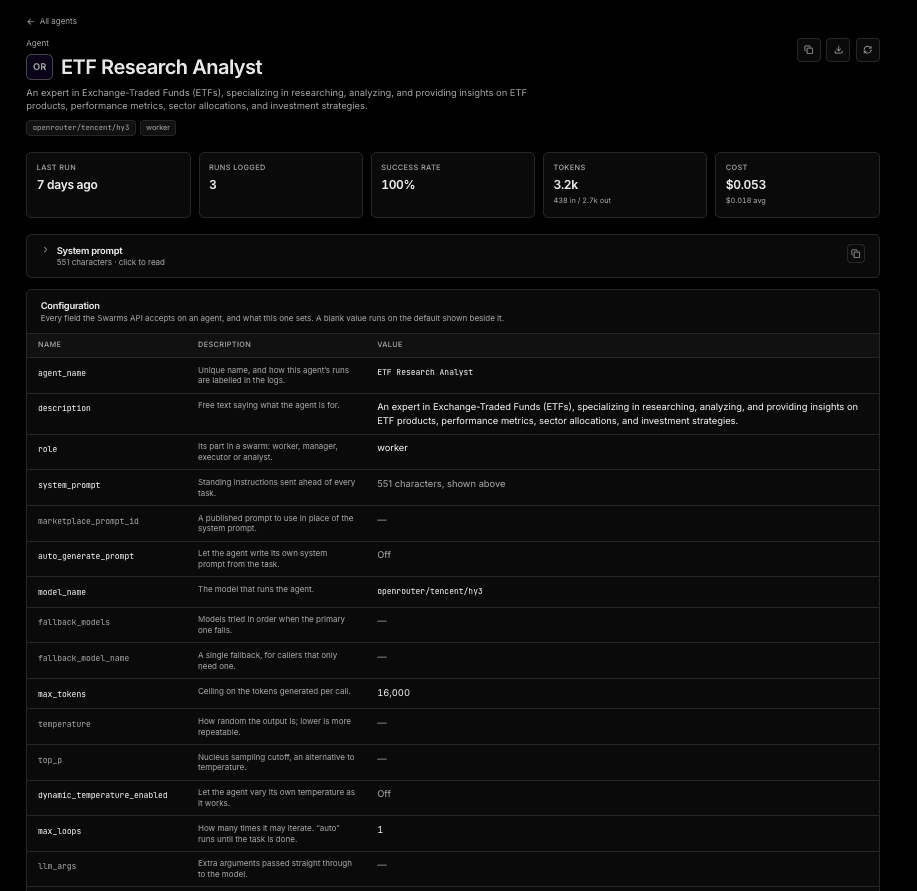
Activity first. At the top of every agent page is a row of five numbers: last run, runs logged, success rate, total tokens, and total cost. Tokens break down into sent and returned. Cost carries the per-run average alongside the total. These are rolled up from your real request logs and filtered to this one agent, so "what has this thing been doing and what has it been charging me" is answered before you scroll.
Then the system prompt. On this platform the system prompt is the agent. The model and the sampling knobs are settings wrapped around it. So the prompt comes before the configuration table, in a dropdown, because real prompts run long. One agent in our own account carries a system prompt of 35,774 characters, and inlined it would bury everything below it. Opened, it renders whole at full width and the page scrolls rather than the prompt, which means find-in-page reaches every word of it and it prints correctly. There is a copy button next to it.
Then the configuration. All 34 fields of the AgentSpec, laid out as name, description, and value. Not just the ones you happened to set. Every field the API accepts, each with a one-line explanation of what it does, in the order an agent gets built: who it is, what it is told, what runs it, how hard it thinks, what it can reach, how it is listed.
The important part is the value column. Anything you never set shows the API's own default in place of a blank, so the table tells you what will actually happen on the next run rather than only what somebody typed into a form. Rows sitting at their default go muted. The eight or so fields an agent actually overrides carry the contrast, and nothing is hidden to get that effect.
You can copy the whole configuration as JSON from the header of the page.
Context Window Usage, Per Run
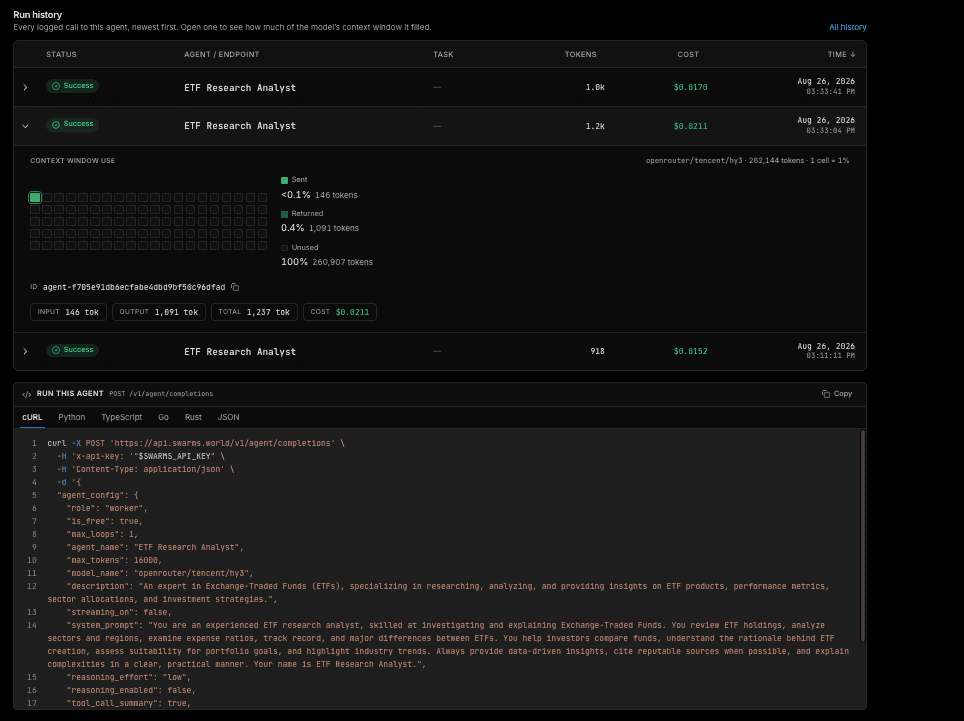
Below the configuration is the run history: the same log table as /history, filtered to this agent, paginated, sortable, and exportable to CSV.
Open a single run and you get something new. A grid of one hundred cells, one cell per percent of the model's context window, filling from the top left, split into what was sent and what came back.
This is the number that is hard to get any other way. An agent running on a million-token model and using eight thousand tokens per call is one lit cell in a hundred, and seeing that is the point: you are paying for headroom you are not using, or you are pushing toward a wall. Sent is the half that grows. A prompt that has been quietly accumulating history is the one that eventually runs out of room, and this shows it happening a run at a time instead of on the run where it finally breaks.
The window sizes come from OpenRouter's public model catalogue, because the Swarms API does not publish model limits. It is fetched server side, cached for hours, and only the resolved number ever reaches your browser. If a model publishes no window, the run says so plainly instead of guessing.
The List Got Fixed Too
Two things on /agents itself changed on the way here.
Every row now links to its agent. Names are free text on this platform, so they carry spaces, punctuation, and in principle a slash, and the URL round-trips all of it intact.
And "Most recent" sorting now works. It had been sorting by a created_at field the API never returns, which meant every row compared equal to every other and the sort silently did nothing. The list endpoint tracks only when an agent last ran, so that is what the column now says and sorts by: Last used.
Where To Find It
Open cloud.swarms.ai/agents, pick any agent, and the page is there. Everything on it is read from your own account: your specs from /v1/agents/list, your runs from the account logs. Nothing is synthetic, and nothing needs to be configured first.
If you have agents you have not looked at closely in a while, the cost column is a good place to start.