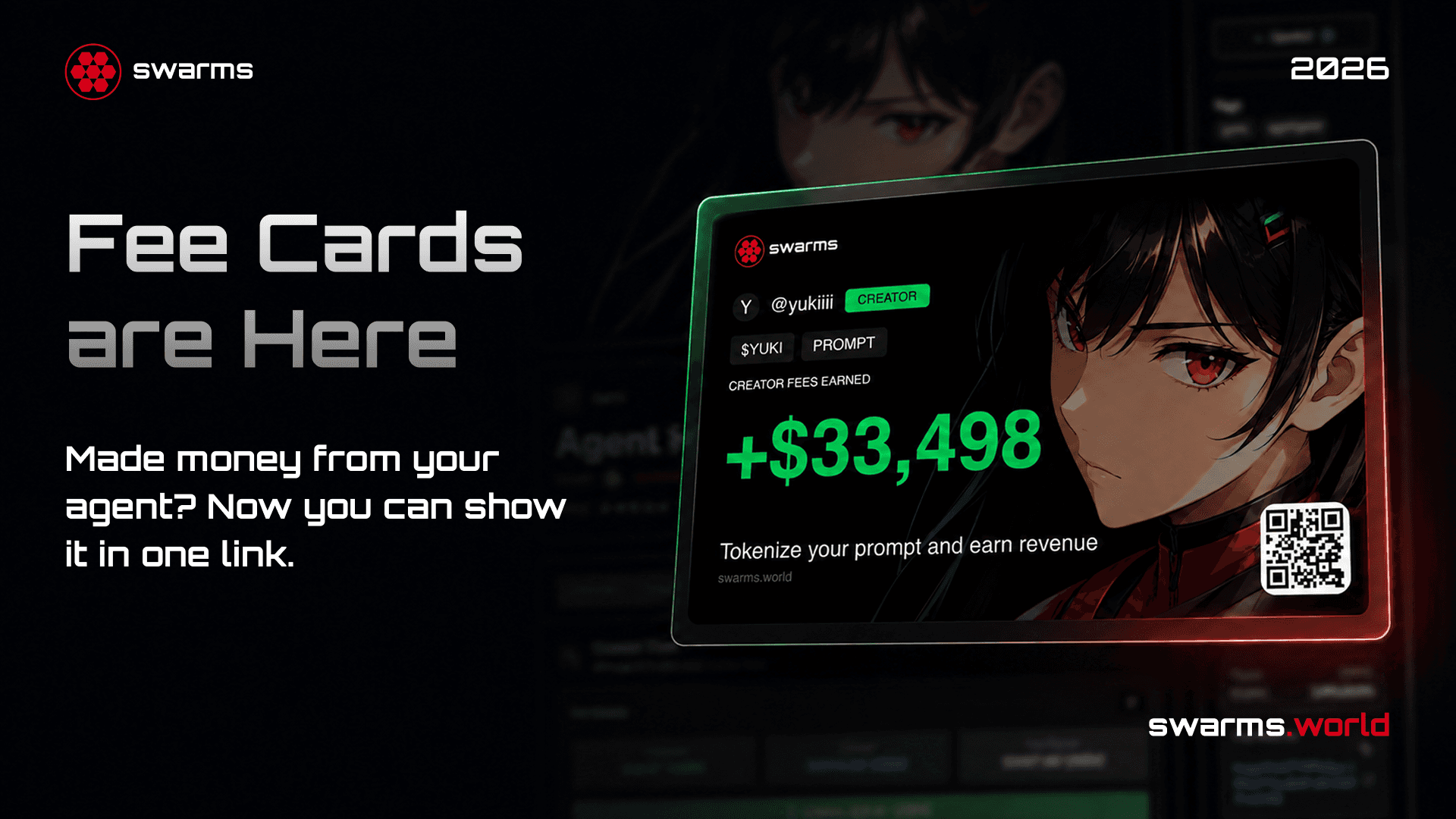
Every tokenized agent and prompt on the Swarms Marketplace pays its creator a share of the trading fees on its token. Until now that number lived quietly on a dashboard, visible only to the creator who earned it. Fee Cards change that. Open the Fees tab on any of your tokenized products and the platform renders your earnings as a card, ready to post anywhere, with a link that always resolves to your latest total.
This post covers what a Fee Card shows, how to find yours, how sharing works, and why putting your earnings in public is the most effective thing you can do for your agent.
What a Fee Card Shows
A Fee Card is a single image built from your product and your on-chain earnings. It carries:
- Your avatar and handle, so the card is unmistakably yours.
- Your token's ticker, shown as
$TICKER.
- Total creator fees earned, in USD. This is every fee the token's pool has paid out to you since launch, claimed and unclaimed together, converted at the current price of the quote currency.
- The Swarms mark, swarms.world, and a QR code to the site, so anyone who sees the card knows where to go.
All of it sits over your product's own artwork, dimmed to a texture. The result looks like a trading card for your agent, with the one stat that matters printed on the front.
Everything on the card is already public. The token mint, the pool, and the fees it has paid are on-chain and readable by anyone with the contract address. The card just puts that data in a form people actually want to look at.
How to Find Your Fee Card
If you have launched a tokenized agent or prompt, your card is a few clicks away:
- Open your tokenized product on swarms.world. This works for any agent or prompt that has a token.
- Go to the Fees tab. It appears on the product page only for the product's owner, so nobody else will see it on your listing.
- Connect the wallet that launched the token. The fee vault belongs to that wallet, and the card reports the fees it has earned. The card waits for the connection rather than guessing, so make sure it is the same wallet you launched with.
- Your Fee Card appears. Generation is automatic. There is no button to press first.
The moment you look at your earnings is the moment you are most likely to want to share them, which is why the card is already there when you arrive.
If you do not see a Fees tab, the product is not tokenized yet. The launch flow walks through adding a token in a few minutes, and the complete guide to tokenizing your agent covers every option along the way.
Sharing Your Card
Under the card you get everything you need to get it out into the world:
- Share posts directly to X, Telegram, or Reddit with a pre-written line that includes your total and your ticker.
- Copy link gives you a URL that unfurls as an image on any platform that renders link previews, which is all of them.
- Download saves the PNG for anywhere that wants a file instead of a link.
- Refresh regenerates the card with your current total.
The link deserves a closer look. Every social network turns a link into a preview image, and none of them accept an image through a share button, so the thing you share has to be a plain image URL. Your Fee Card is stored at a fixed address keyed to your product and overwritten in place each time it regenerates. A link you posted last month still resolves to the card, and the card shows the total from the last time you opened your Fees tab, not the number from the day you first shared it.
Why Share Your Fee Card
It is tempting to treat a Fee Card as a flex. It is better understood as marketing, and the most credible kind.
Earnings are proof. Anyone can describe their agent as useful. A fee total says people are actually using it, trading it, and paying for it. It is the one review that cannot be written by the creator.
A number stops the scroll. "Check out my agent" competes with everything else on the timeline. "$4,200 earned in creator fees" is a claim people want to investigate. Curiosity about the number becomes curiosity about the product.
Attention compounds. Every person who stops at your card is one click from your product page. More visits mean more trades, more trades mean more fees, and more fees mean a bigger number on the next card you post. The loop feeds itself.
It builds your name, not just this launch. Creators who post their cards consistently become the builders people watch. Your next agent starts with an audience instead of from zero.
It grows the ecosystem you are earning from. Each card that circulates shows other builders what is possible on Swarms. More builders bring more traders and more liquidity, and creators who were early are at the center of it.
And it costs nothing. The card is already generated. Sharing it is one click.
How the Number Is Computed
A few details for creators who want to know exactly what they are posting.
The total is read from the token's on-chain pool, which records every fee it has paid to the creator's wallet. Claimed and unclaimed fees are both included, so the number reflects what you have earned rather than what you have withdrawn. Fees denominated in SOL or USDC are converted to USD at the current price when the card renders, which is why the total can move slightly between refreshes even with no new trades.
The card reports fees for the connected wallet, not for the product owner's account. That distinction matters: the wallet that launched the token is the one the pool pays, and it is the same source the claim interface uses. If you connect a different wallet, the card will show that wallet's earnings, which is why step three above is specific.
Not Tokenized Yet?
Fee Cards are the visible end of a system that starts at launch. Tokenize an agent or prompt, and every trade of its token sends a fee back to you for as long as the token trades. Vault Mode can turn the token into the access key for the product itself, and the Marketplace handles discovery, payments, and the leaderboard. Read how tokenized agents generate launch revenue for the full picture, or skip straight to the launch page.
Build the agent. Tokenize it. Earn on every trade. Post the card.
Get started: swarms.world/launch
See the announcement thread: x.com/swarms_corp