Zena covers seven weeks of work on the Swarms framework — 68 commits between June 12 and July 31, 2026. It is the release where the framework stopped being only a library for composing agents and started being infrastructure you can operate: traced end to end, connected to external tool servers over authenticated transports, and hardened against a class of bugs that only show up under real production load.
The through-line is observability and correctness. Multi-agent systems fail in ways single-agent systems do not. A worker silently returns garbage and the director averages it into the answer. A thread pool sized for CPU cores throttles a workload that is entirely network-bound. A parameter is accepted, stored, and never used, so your traffic goes to the wrong provider with nothing in the logs. Zena fixes all three of those, and adds the tracing you need to see the next one.
This post walks through every change. New features first, each with a runnable example, then performance, then bug fixes, then examples and documentation. If you only read one section, read Observability — it is the largest change in the release and the one that most alters how you run Swarms in production.
Getting the Update
Upgrade with whichever package manager your project already uses.
# pip
pip install -U swarms

# uv
uv pip install -U swarms

# uv, in a project managed by uv
uv add swarms --upgrade

# poetry
poetry add swarms@latest

# pdm
pdm update swarms

# conda environments (swarms ships on PyPI, so pip inside the env)
conda activate your-env && pip install -U swarms
Pin the exact version if you want reproducible installs:
pip install "swarms==14.0.0"
uv pip install "swarms==14.0.0"
Then confirm what you actually got:
python -c "import swarms; print(swarms.__version__)"
Every example below runs on this version. If you are coming from a v13 release, read Upgrade Notes first: telemetry is on by default, and two modules were removed.
Learn more: Installation
Observability: OpenTelemetry Tracing Across Swarms
Every agent run, swarm run, tool call, and LLM request now emits an OpenTelemetry span. Spans nest correctly, so a HierarchicalSwarm run appears as a single trace with the director's planning call and each worker's execution as children — including workers running concurrently on separate threads. This is the piece that makes multi-agent latency and cost debuggable instead of guessable.
Telemetry is on by default and controlled by a single environment variable. Set SWARMS_TELEMETRY_ON to false, 0, no, off, or an empty value to disable it entirely; when off, the instrumentation is a single readiness check and a straight passthrough.
import os

# Opt out entirely — one switch, checked once per call
os.environ["SWARMS_TELEMETRY_ON"] = "false"

from swarms import Agent, SequentialWorkflow

researcher = Agent(agent_name="Researcher", model_name="gpt-5.4", max_loops=1)
writer = Agent(agent_name="Writer", model_name="gpt-5.4", max_loops=1)

# With telemetry on, this run emits one parent span with two child spans,
# each tagged with the agent name, model, token counts, and duration.
workflow = SequentialWorkflow(agents=[researcher, writer], max_loops=1)
workflow.run("Summarize the state of solid-state battery research.")
Instrumenting your own harness takes two calls — capture_init in the constructor and the trace_run decorator on the entry point:
from swarms.telemetry.otel import (
    ContextThreadPoolExecutor,
    capture_init,
    trace_run,
)


class MySwarm:
    def __init__(self, agents):
        self.agents = agents
        capture_init(self)

    @trace_run("MySwarm.run")
    def run(self, task: str):
        # ContextThreadPoolExecutor propagates trace context across the
        # thread boundary. A plain ThreadPoolExecutor drops it, and child
        # spans surface as orphans even when the caller is instrumented.
        with ContextThreadPoolExecutor(max_workers=8) as executor:
            return list(executor.map(lambda a: a.run(task), self.agents))
That last detail matters more than it looks. A standard ThreadPoolExecutor does not carry OpenTelemetry context into worker threads, so spans created inside detach from their parent. ContextThreadPoolExecutor is a drop-in replacement that carries it, and it is now used across every concurrent harness in the framework.
Learn more: Telemetry
Unified MCP Manager with OAuth
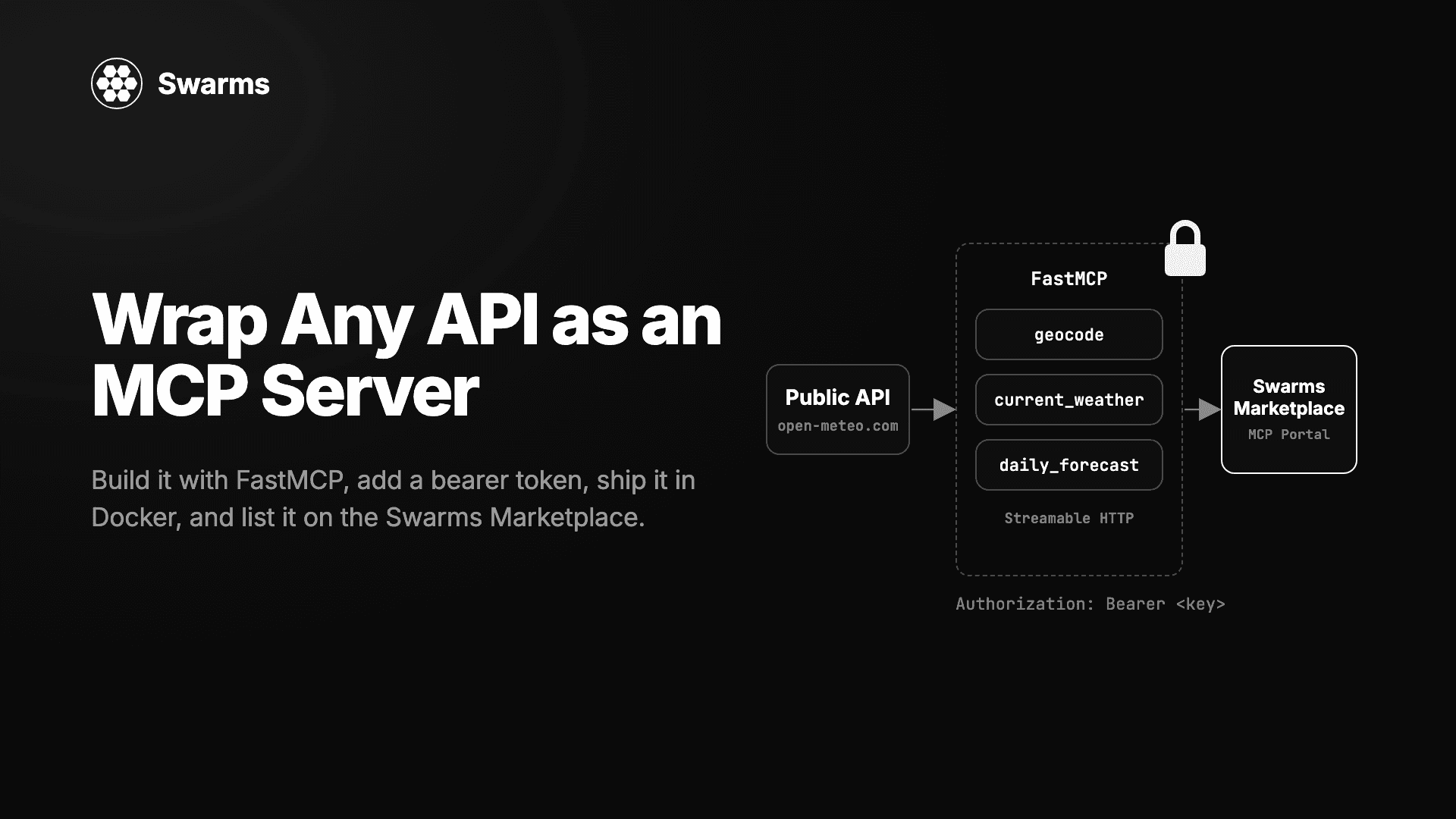
Model Context Protocol support was rewritten around a single MCPManager that owns connections, tool discovery, and authentication. The previous mcp_client_tools module is gone. The manager adds OAuth with pluggable token storage, multiple simultaneous servers, custom headers, per-server transport selection, and configurable timeouts — and the MCP server now serves streamable HTTP rather than stdio, so it works over a network instead of only as a subprocess.
from swarms import Agent

# A single server
agent = Agent(
    agent_name="MCP-Agent",
    model_name="gpt-5.4",
    mcp_url="http://localhost:8000/mcp",
    max_loops=1,
)

# Several servers at once, with auth and a timeout
agent = Agent(
    agent_name="Multi-MCP-Agent",
    model_name="gpt-5.4",
    mcp_urls=[
        "http://localhost:8000/mcp",
        "https://tools.internal.example.com/mcp",
    ],
    mcp_authorization_token="Bearer ...",
    mcp_headers={"X-Tenant-Id": "acme"},
    mcp_timeout=30,
    max_loops="auto",
)

result = agent.run("Use the available tools to reconcile yesterday's ledger.")
For servers behind OAuth, tokens are cached on disk. The cache file is written atomically with 0600 permissions, so it is not world-readable at any point — including the window between creation and chmod, which is where the naive version of this leaks:
from swarms.tools.mcp_manager import MCPOAuthConfig, MCPFileTokenStorage

agent = Agent(
    agent_name="OAuth-MCP-Agent",
    model_name="gpt-5.4",
    mcp_url="https://api.partner.example.com/mcp",
    mcp_oauth=MCPOAuthConfig(
        client_id="...",
        client_secret="...",
        storage=MCPFileTokenStorage("~/.swarms/mcp_tokens.json"),
    ),
)
Learn more: MCPManager API reference
AutoAgentBuilder: Generate the Roster, Keep the Architecture
AutoAgentBuilder turns a plain-English task into a list of agent configurations. A single builder agent is forced to call one function, build_agents, so the provider enforces the schema and there is no JSON to extract from prose. Each generated agent carries exactly the four fields Agent needs: name, description, system_prompt, and model_name.
It designs the team and stops. Unlike AutoSwarmBuilder, it does not choose an architecture or execute anything, which leaves you in control of what runs the roster.
from swarms import AutoAgentBuilder, SequentialWorkflow

TASK = (
    "Analyze why a B2B SaaS company's churn increased last quarter, "
    "and write a short brief for the leadership team."
)

# return_dict=True inspects the roster without constructing anything
for config in AutoAgentBuilder(max_agents=3, return_dict=True).run(TASK):
    print(f"{config['name']}  [{config['model_name']}]")
    print(f"  {config['description']}")

# Drop return_dict and you get live Agent objects instead
agents = AutoAgentBuilder(num_agents=3, agent_kwargs={"max_loops": 1}).run(TASK)
result = SequentialWorkflow(agents=agents, max_loops=1).run(TASK)
One parameter deserves attention. max_agents is a ceiling, not a target — the builder prompt instructs the model to prefer the smallest roster that covers the task, so max_agents=5 on a three-role problem returns three agents. Use num_agents when the count is a requirement:
AutoAgentBuilder(max_agents=5).run(task)   # a ceiling; may return 3
AutoAgentBuilder(num_agents=5).run(task)   # a hard requirement; returns 5
The builder validates what the model returns: entries missing any required field are dropped, duplicate names are dropped (agent memory is keyed on agent_name, so duplicates would corrupt each other's state), over-long rosters are truncated, and a shortfall against num_agents logs a warning rather than passing silently.
Learn more: AutoAgentBuilder API reference
AuctionSwarm: Let Agents Bid for the Work
In most orchestrators a boss agent decides which worker handles a task, which depends on the boss's model of each worker being accurate. AuctionSwarm inverts that: every agent self-assesses its fitness for the specific task and submits a confidence and cost bid, and the highest scoring bid wins. Set top_k above 1 to award the work to several bidders.
from swarms import Agent
from swarms.structs.auction_swarm import AuctionSwarm

specialists = [
    Agent(agent_name="SQL-Expert", model_name="gpt-5.4", max_loops=1),
    Agent(agent_name="Python-Expert", model_name="gpt-5.4", max_loops=1),
    Agent(agent_name="Infra-Expert", model_name="gpt-5.4", max_loops=1),
]

swarm = AuctionSwarm(
    agents=specialists,
    top_k=1,                          # single winner
    scoring="confidence_per_cost",    # default: value per unit spend
)

result = swarm.run("Optimize a slow analytical query over a 40M row table.")
Supply a callable to scoring when you want to weight quality over cost:
# Reward confidence heavily, treat cost as a mild tiebreaker
swarm = AuctionSwarm(
    agents=specialists,
    top_k=2,
    scoring=lambda confidence, cost: confidence**2 / max(cost, 0.1),
)
Learn more: Multi-Agent Structures Catalog
Turn-Based GroupChat with Bidding and a Recency Penalty
GroupChat was rebuilt around single-speaker turns. Each turn, every agent privately bids on whether to speak using a forced respond(score, message) tool call; the highest bidder above threshold takes the floor and its reply is the only message posted. A recency_penalty subtracts from the bid of any agent that spoke within the last recency_window turns, which stops one agent monologuing and keeps the floor moving.
from swarms import Agent
from swarms.structs.groupchat import GroupChat

agents = [
    Agent(agent_name="Optimist", system_prompt="You argue for the benefits.",
          model_name="gpt-5.4", max_loops=1, persistent_memory=False),
    Agent(agent_name="Pessimist", system_prompt="You argue for the risks.",
          model_name="gpt-5.4", max_loops=1, persistent_memory=False),
    Agent(agent_name="Realist", system_prompt="You seek balanced analysis.",
          model_name="gpt-5.4", max_loops=1, persistent_memory=False),
]

chat = GroupChat(
    agents=agents,
    max_loops=12,           # hard cap on total messages posted
    threshold=0.6,          # minimum bid to take the floor
    recency_penalty=0.3,    # discourage back-to-back speaking
    recency_window=1,
    idle_timeout=8.0,       # stop after a conversational lull
    auto_equip=True,        # attach the bidding tool automatically
)

result = chat.run("Should we adopt AI for medical diagnosis?")
auto_equip=True attaches the required RESPOND_TOOL schema to each agent for you. Raise threshold for a more selective room, lower it for a livelier one.
Learn more: GroupChat API reference
HierarchicalSwarm: Worker Recovery, Planning, and a Judge
HierarchicalSwarm gained the machinery it needed to survive a worker failing mid-run. Failed workers are retried up to max_agent_retries, and if a worker stays unavailable the director may reassign its task up to max_reassignment_attempts times rather than dropping the work. Separately, planning_enabled has the director produce a plan before delegating, and agent_as_judge scores worker output before it is synthesized.
from swarms import Agent, HierarchicalSwarm

director = Agent(agent_name="Director", model_name="gpt-5.4", max_loops=1)
workers = [
    Agent(agent_name="DataWorker", model_name="gpt-5.4-mini", max_loops=1),
    Agent(agent_name="WritingWorker", model_name="gpt-5.4-mini", max_loops=1),
]

swarm = HierarchicalSwarm(
    director=director,
    agents=workers,
    max_loops=1,
    planning_enabled=True,          # plan before delegating
    agent_as_judge=True,            # score worker output
    max_agent_retries=2,            # retry a failing worker
    max_reassignment_attempts=1,    # then hand the task to someone else
    parallel_execution=True,
    max_workers=8,
)

result = swarm.run("Produce a competitive analysis of the AI chip market.")
Director behavior is now configurable without subclassing. director_settings forwards arbitrary overrides to the director agent, alongside the dedicated director_model_name, director_temperature, and director_top_p parameters:
swarm = HierarchicalSwarm(
    director=director,
    agents=workers,
    director_model_name="claude-sonnet-5-5",
    director_temperature=0.2,
    director_settings={"max_tokens": 16000, "reasoning_effort": "high"},
)
Learn more: HierarchicalSwarm API reference
Sandboxed Computer-Use Tools
Zena adds a tested computer-use toolset: file reads and writes, edits and patches, directory listing, grep, and shell execution. Every tool runs behind an explicit policy layer rather than trusting the model. Paths are canonicalized and checked against deny lists, symlink escapes are rejected, NUL bytes are refused, binaries are allow-listed, and argv patterns can be denied outright.
from swarms import Agent
from swarms.tools.computer_use import create_computer_use_tools

tools = create_computer_use_tools()

agent = Agent(
    agent_name="Coding-Agent",
    model_name="gpt-5.4",
    tools=tools,
    max_loops="auto",
)

agent.run("Find every TODO in the src directory and summarize what they block.")
Individual tools can be imported directly when you want a narrower surface than the full set:
from swarms.tools.computer_use import read_file, grep_files, list_directory

# Read-only agent — no write, patch, delete, or shell access
agent = Agent(
    agent_name="Auditor",
    model_name="gpt-5.4",
    tools=[read_file, grep_files, list_directory],
    max_loops="auto",
)
The policy classes (ReadPolicy, WritePolicy, ShellPolicy) raise typed errors — PathPolicyError, SymlinkPolicyError, BinaryNotAllowedError, ConfirmationRequired — so a refusal is distinguishable from a genuine failure.
Learn more: Give an Agent Safe Computer Access
Generate Pydantic Schemas from Class Signatures
A class signature is already a schema: parameter names, types, which arguments are required, and a docstring describing each. class_init_to_pydantic_model turns that into a BaseModel subclass so it can be used for validation or structured LLM output, without maintaining a parallel definition that drifts from the constructor.
from swarms import Agent
from swarms.utils.class_to_pydantic import class_init_to_pydantic_model

AgentSchema = class_init_to_pydantic_model(
    Agent, include=("agent_name", "agent_description", "system_prompt", "model_name")
)

# Field descriptions are lifted from the Google-style Args: block,
# so the schema is usable for function calling as-is
print(AgentSchema.model_json_schema())

# Round-trips straight back into a real Agent
spec = AgentSchema(agent_name="Analyst", system_prompt="You analyze.")
agent = Agent(**spec.model_dump())
Parameters without a default become required fields; parameters with one keep it. Mutable defaults route through default_factory so instances do not share a list, and fields typed with non-Pydantic classes (an Agent, a Callable) are permitted by default rather than raising a schema-generation error.
Learn more: Schemas reference
ConcurrentWorkflow: Explicit Failure Policy
Previously, one agent raising could abort an entire ConcurrentWorkflow run and discard the work every other agent had already completed. The on_error parameter makes the policy explicit and validated at construction: "store" records the error as that agent's output and lets the others finish, "raise" propagates and aborts.
from swarms import Agent, ConcurrentWorkflow

workflow = ConcurrentWorkflow(
    agents=[Agent(agent_name=f"Worker-{i}", model_name="gpt-5.4", max_loops=1)
            for i in range(5)],
    on_error="store",   # a single failure no longer discards four good results
    max_workers=8,      # sized for network-bound work, not CPU count
)

results = workflow.run("List ten use cases for multi-agent AI systems.")
Learn more: ConcurrentWorkflow API reference
CSV Agents Folded Into the Agent Loader
The standalone CSV-to-agent module is gone; loading agents from CSV is now part of AgentLoader, alongside the Markdown loader. One import, one API, one set of validation rules.
from swarms.structs.agent_loader import AgentLoader

loader = AgentLoader()
agents = loader.load_agents_from_csv("agents.csv")
Learn more: Creating Agents
Performance
GraphWorkflow on Native rustworkx
GraphWorkflow previously reimplemented graph algorithms in Python over a rustworkx graph — paying for the Rust data structure without using its algorithms. Zena replaces those reimplementations with native rustworkx calls for topological sorting and layer computation, collapses compile-time and validation-time graph walks into a single adjacency pass, shares one thread pool across an entire run instead of allocating per layer, and executes single-node layers inline rather than dispatching them to a pool.
Nothing changes in the API. The same graph runs the same way, with less overhead per layer and less allocation per run.
from swarms import Agent, GraphWorkflow

wf = GraphWorkflow(auto_compile=True)
for name in ["research", "summarize", "critique", "editor"]:
    wf.add_node(Agent(agent_name=name, model_name="gpt-5.4-mini", max_loops=1))

# Fan out, then fan in
wf.add_edge("research", "summarize")
wf.add_edge("research", "critique")
wf.add_edge("summarize", "editor")
wf.add_edge("critique", "editor")

wf.set_entry_points(["research"])
wf.set_end_points(["editor"])

results = wf.run(task="Assess the market for solid-state batteries.")
A benchmark suite comparing GraphWorkflow against LangGraph on identical DAGs ships in tests/benchmarks/graph_workflow_benchmarks/, so the numbers are reproducible on your own hardware rather than taken on faith.
Learn more: GraphWorkflow API reference
Thread Pools Sized for I/O, Not CPU
Agent calls are network-bound LLM requests, so deriving pool size from os.cpu_count() was the wrong signal — it under-subscribed on small machines and over-subscribed relative to what the workload needs. Every concurrent harness now sizes its pool deliberately, and max_workers is exposed so you can override it.
ConcurrentWorkflow defaults to len(agents) capped at 32, since the pool never receives more tasks than there are agents and the ceiling guards against provider rate limits and HTTP connection-pool exhaustion. MixtureOfAgents, HierarchicalSwarm, and the multi-agent execution helpers all accept max_workers and share one clamped CPU heuristic where a heuristic still makes sense.
from swarms import ConcurrentWorkflow, MixtureOfAgents

ConcurrentWorkflow(agents=agents, max_workers=16)
MixtureOfAgents(agents=workers, aggregator_agent=aggregator, max_workers=8)
A related fix: batched_grid_agent_execution previously computed int(os.cpu_count() * 0.9), which yields zero workers on a single-core machine. It now clamps to a minimum of one.
Learn more: Scaling Swarms
Vision Images Fetched Once Per Process
An agent re-sends the same img into every loop iteration and every retry, and get_image_base64 had no caching — so a URL image was downloaded again on each pass. Remote fetches are now cached per process, bounded at 32 entries.
The scope is worth stating precisely: this only applies when direct-URL passing is off, which means local models (ollama, llama-cpp, custom base_url) and any model litellm does not flag as vision-capable. On hosted GPT, Claude, and Gemini the URL is passed to the provider verbatim and nothing is downloaded locally at all, so there was never a repeated fetch to eliminate.
Learn more: Vision Agent
Bug Fixes
-
SSRF guard hardening. The URL guard now resolves hostnames before checking them and blocks numeric IP encodings that previously slipped past: decimal, octal, and hexadecimal forms of private addresses. A regression suite covering the bypass classes ships alongside it.
-
OAuth token cache permissions. The MCP token cache is written atomically with 0600 permissions. The previous approach left a window where the file existed world-readable before permissions were tightened.
-
llm_base_url and llm_api_key reached the provider. Agent accepted both, stored both, and then dropped them on the primary LLM path, so an agent pointed at a custom OpenAI-compatible endpoint silently called the default provider instead, against the wrong host or billed to the wrong account, with nothing in the logs. Two layers were fixed: the manager now forwards both into its LiteLLM instance, and LiteLLM now passes api_key through to litellm.completion(). The key is only forwarded when set, so litellm's environment-variable fallback still works for everyone not using a custom endpoint.
-
Unique IDs per component instance. Component IDs are now produced by a single generator, so two instances of the same structure no longer collide.
-
Deprecated asyncio.get_event_loop() removed. Twelve call sites across base_structure.py, base_swarm.py, graph_workflow.py, social_algorithms.py, and multi_agent_exec.py moved to asyncio.to_thread. This also fixed a live TypeError: loop.run_in_executor() accepts no keyword arguments, so every async helper forwarding **kwargs (including base_structure.run_async, base_swarm.arun, base_swarm.aloop, and graph_workflow.arun) raised on any keyword argument.
-
Orphaned telemetry spans. Spans created inside runs and threads no longer detach from their parent trace.
-
MCP server transport. The server serves streamable HTTP instead of stdio.
-
Marketplace publish crash. Publishing no longer crashes when capabilities is unset.
-
Examples repaired. Eleven runnable examples imported swarm_models, a package that is not a dependency of this project and is absent from pyproject.toml, so every one of them failed at import with ModuleNotFoundError. All now use Agent(model_name=...) directly. onboard-basic.py was broken twice: beyond the import, it passed a model= argument that create_agents_from_yaml does not accept. The autoswarm.py prompt template also instructed models to write that same broken import, so every script generated from it failed on its first line.
-
Concurrent workflow error handling was simplified, and on_error is validated at construction rather than failing mid-run.
Learn more: LLMManager API reference
Examples and Documentation
The examples tree was reorganized around how people actually look for things. Model examples are grouped by provider, LLM definitions were unfurled into provider folders, and the README now carries a provider index. MCP examples are split into agents, servers, and client. A changelog folder collects version-specific examples.
New example suites in this release:
| Area | What shipped |
|---|
| Auction swarm | Basic auction, custom scoring, batch auction, plus a usage README |
| GraphWorkflow | Fan-out/fan-in graph example and the LangGraph benchmark suite |
| Kimi K3 | Agent, groupchat, Ollama, and OpenRouter examples |
| Hierarchical swarm | Worker recovery example demonstrating retry and reassignment |
| AutoAgentBuilder | Quickstart, exact-count, concurrent, SwarmRouter, and roster-caching examples |
| GroupChat | Reshoring debate example and simpler turn-based examples |
| AutoSwarmBuilder | Spec-only example returning a configuration without executing |
| Models | GPT-5.6, MiniMax 3, Gemini, and prompt-caching examples |
Documentation gained an OpenRouter multi-agent tutorial, rewritten MCP reference docs for the manager API, expanded HierarchicalSwarm and SwarmRouter docstrings covering director settings and retry parameters, documented auto_equip on GroupChat, and a documented telemetry opt-out in .env.example.
Learn more: Examples Overview
Upgrade Notes
Most of Zena is additive, but four changes are worth checking before you upgrade.
Telemetry is on by default. Set SWARMS_TELEMETRY_ON=false to opt out.
mcp_client_tools is removed. Code importing get_mcp_tools_sync or aget_mcp_tools from that module must move to the MCPManager API. Agent-level parameters (mcp_url, mcp_urls) are unchanged.
The standalone CSV-to-agent module is removed. Use AgentLoader instead.
HierarchicalSwarm.max_workers now resolves at construction. It reads back as a concrete integer rather than None when unset, and the default moved from 0.75 to 0.95 of CPU count. The internal _resolve_max_workers() helper is gone.
Also note that ConcurrentWorkflow.activate_auto_prompt_engineering() was removed as dead code, and swarm_models was never a dependency — if your own code imports it, that import has always been broken.
Learn more: Changelog Overview
Conclusion
Zena is a release about the difference between code that runs and code you can operate. Composing agents was already easy; the hard part has always been the second week — when a worker starts failing intermittently, when a swarm's latency doubles and you cannot say which agent caused it, when a custom endpoint silently routes to the wrong provider. Every major change here targets that gap.
OpenTelemetry tracing means multi-agent latency and cost are now measurable rather than inferred. The MCP manager means external tool servers are a first-class, authenticated integration instead of a subprocess. Worker recovery in HierarchicalSwarm and the on_error policy in ConcurrentWorkflow mean a single failure degrades a run instead of destroying it. The security pass on SSRF and token storage closes bypasses that a determined input could have exploited. And the thread-pool and graph-execution work removes overhead that was never doing anything for you.
The three new architectures — AuctionSwarm, the rebuilt turn-based GroupChat, and AutoAgentBuilder — are all variations on a single idea: let the agents decide. Which one is best suited to a task, which one should speak next, which ones should exist at all. That is a different posture from a central boss modeling every worker, and in our experience it degrades more gracefully as rosters grow.
Every example in this post is runnable and lives in the examples directory. The full commit history for this release spans June 12 to July 31, 2026. If you hit something that does not work the way this post describes, open an issue — several of the fixes above started as exactly that.
Frequently Asked Questions
What is Swarms v14 "Zena"?
Zena is the fourteenth major release of the Swarms multi-agent framework, covering 68 commits between June 12 and July 31, 2026. The headline changes are AutoAgentBuilder for generating agent rosters from a task description, a unified MCPManager with OAuth for connecting to external tool servers, and a GraphWorkflow rebuilt on native rustworkx. It also adds OpenTelemetry tracing, two new multi-agent architectures, sandboxed computer-use tools, and a security pass covering SSRF and token storage.
How do I upgrade to Swarms v14?
Run pip install -U swarms, or uv pip install -U swarms if you use uv. Poetry users run poetry add swarms@latest and pdm users run pdm update swarms. Confirm the result with python -c "import swarms; print(swarms.__version__)". See Getting the Update for every package manager.
Is telemetry enabled by default in Swarms v14?
Yes. OpenTelemetry tracing is on by default. Set the environment variable SWARMS_TELEMETRY_ON to false, 0, no, off, or an empty value to disable it. When it is off, the instrumentation reduces to a single readiness check and a straight passthrough, so there is no measurable overhead.
What is the difference between AutoAgentBuilder and AutoSwarmBuilder?
AutoAgentBuilder designs the team and stops. It returns agent configurations or live Agent objects, and leaves the choice of architecture to you. AutoSwarmBuilder goes further: it picks an architecture and executes the task. Use AutoAgentBuilder when you want to control what runs the roster, and AutoSwarmBuilder when you want an answer without making that decision.
What is the difference between max_agents and num_agents?
max_agents is a ceiling. The builder prompt asks the model to prefer the smallest roster that covers the task, so max_agents=5 on a three-role problem returns three agents. num_agents is a hard requirement: ask for five and you get five, and a shortfall logs a warning instead of passing silently.
Does the Swarms MCP integration support OAuth?
Yes. MCPManager supports OAuth with pluggable token storage through MCPOAuthConfig and MCPFileTokenStorage. Tokens are cached on disk in a file written atomically with 0600 permissions, so the cache is never world-readable, including in the window between file creation and the permission change.
Can an agent connect to more than one MCP server?
Yes. Pass a list to mcp_urls instead of a single mcp_url. The manager handles discovery across all of them, and you can set custom headers, an authorization token, per-server transport, and a timeout. The MCP server itself now serves streamable HTTP rather than stdio, so it works over a network instead of only as a local subprocess.
The mcp_client_tools module is gone. What do I use instead?
Move to the MCPManager API. Code importing get_mcp_tools_sync or aget_mcp_tools from mcp_client_tools will break on upgrade. Agent-level parameters are unchanged, so if you only ever set mcp_url or mcp_urls on an Agent, nothing in your code needs to change.
Is GraphWorkflow faster in v14?
Yes. GraphWorkflow previously reimplemented graph algorithms in Python on top of a rustworkx graph, paying for the Rust data structure without using its algorithms. Zena replaces those with native rustworkx calls for topological sorting and layer computation, collapses two graph walks into one adjacency pass, shares a single thread pool across a run instead of allocating per layer, and executes single-node layers inline. The API is unchanged. A reproducible benchmark suite comparing GraphWorkflow against LangGraph on identical DAGs ships in tests/benchmarks/graph_workflow_benchmarks/.
What is AuctionSwarm and when should I use it?
AuctionSwarm has every agent self-assess its fitness for a specific task and submit a confidence and cost bid, then awards the work to the highest scoring bid. Use it when a central boss agent's model of each worker is likely to be wrong or to go stale, and when the workers themselves have better information about their own fitness. Set top_k above 1 to award the work to several bidders, and pass a callable to scoring to weight quality over cost.
How does the new GroupChat decide which agent speaks?
Each turn, every agent privately bids on whether to speak through a forced respond(score, message) tool call. The highest bidder above threshold takes the floor, and only its reply is posted. A recency_penalty subtracts from the bid of any agent that spoke within the last recency_window turns, which prevents one agent from monologuing. Set auto_equip=True to attach the required tool schema to each agent automatically.
What happens when a worker fails in HierarchicalSwarm?
Failed workers are retried up to max_agent_retries times. If a worker stays unavailable, the director may reassign its task to a different agent up to max_reassignment_attempts times rather than dropping the work. You can also enable planning_enabled to have the director produce a plan before delegating, and agent_as_judge to score worker output before it is synthesized.
How do I stop one failing agent from killing a whole ConcurrentWorkflow run?
Set on_error="store". The error is recorded as that agent's output and every other agent finishes normally, so a single failure no longer discards work that already completed. Use on_error="raise" for the opposite behavior. The value is validated at construction, so a typo fails immediately instead of mid-run.
Are the computer-use tools safe to give an agent?
They run behind an explicit policy layer rather than trusting the model. Paths are canonicalized and checked against deny lists, symlink escapes are rejected, NUL bytes are refused, binaries are allow-listed, and argv patterns can be denied outright. The policy classes raise typed errors such as PathPolicyError and BinaryNotAllowedError, so a policy refusal is distinguishable from a genuine failure. You can also import individual tools to give an agent a narrower surface, such as read-only access with no shell.
Why did my custom llm_base_url not work in earlier versions?
Agent accepted llm_base_url and llm_api_key, stored both, and then dropped them on the primary LLM path. An agent pointed at a custom OpenAI-compatible endpoint silently called the default provider instead, against the wrong host or billed to the wrong account, with nothing in the logs. Zena fixes both layers: the manager forwards them into its LiteLLM instance, and LiteLLM passes api_key through to litellm.completion(). The key is only forwarded when set, so litellm's environment-variable fallback still works.
What are the breaking changes in Swarms v14?
Four things to check. Telemetry is on by default, so opt out with SWARMS_TELEMETRY_ON=false if you need to. The mcp_client_tools module is removed in favor of MCPManager. The standalone CSV-to-agent module is removed in favor of AgentLoader. And HierarchicalSwarm.max_workers now resolves at construction, reading back as a concrete integer rather than None, with the default moving from 0.75 to 0.95 of CPU count.
Do I need the swarm_models package?
No. swarm_models was never a dependency of Swarms and is absent from pyproject.toml. Eleven examples imported it and failed at import with ModuleNotFoundError; all of them now use Agent(model_name=...) directly. If your own code imports swarm_models, that import has always been broken.
Links and Resources
Documentation by Feature
Getting Started
Community and Source