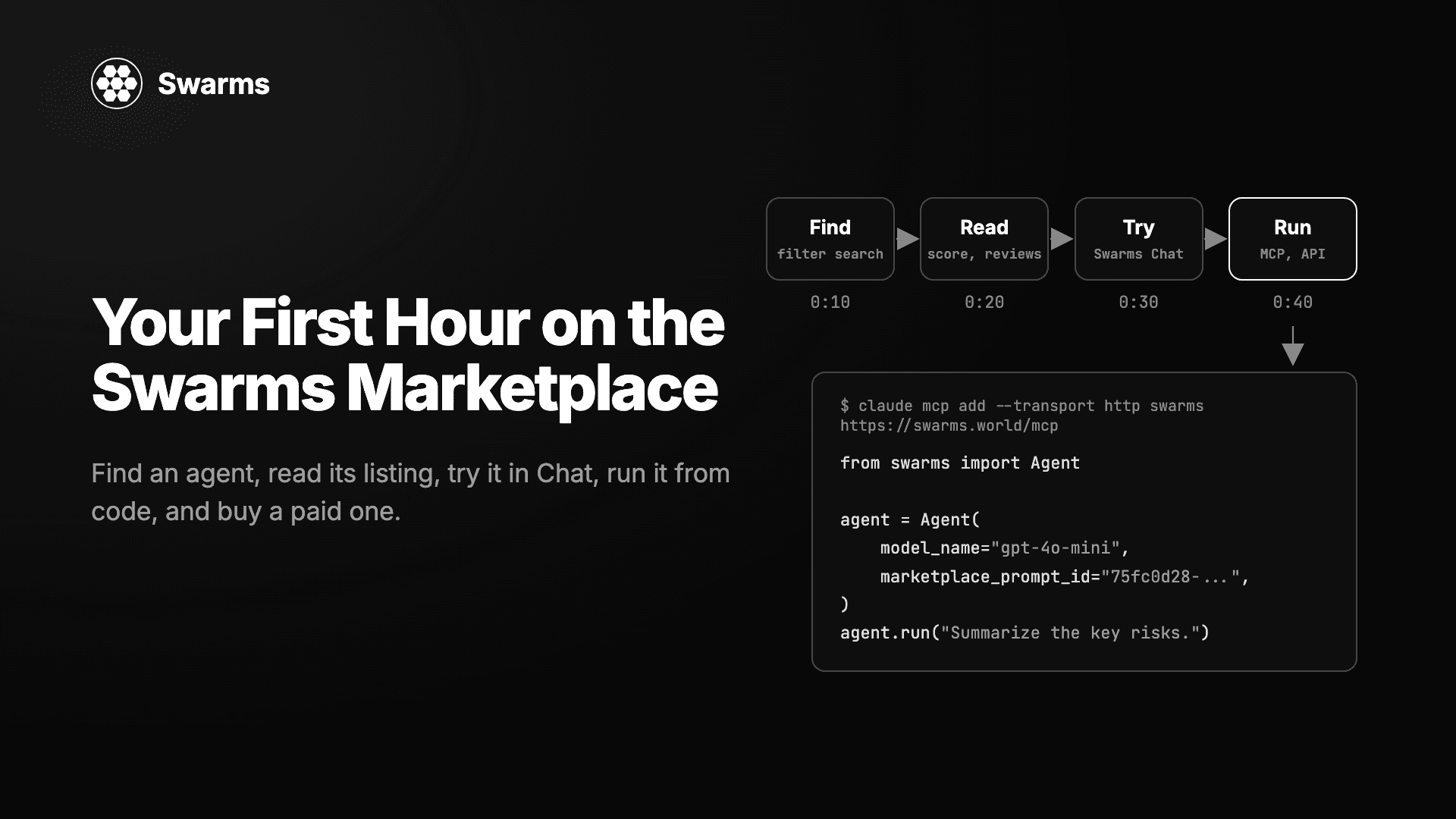
You have a browser and an hour. By the end of it you will have found an agent that does a job you care about, read its listing closely enough to trust it, talked to it, run it from your own code, and learned how to buy a paid one. Each segment links to the post that covers its feature in depth. The clock is a guide, so skip ahead wherever you already know the ground.
Minutes 0 to 10: Get Oriented
The Swarms Marketplace is a catalog of reusable AI components that you can browse, buy, publish, and run. Each listing is a building block you load into your own workflow. Creators earn from every sale, and buyers skip rebuilding what other teams already built. The longer version is in What Is an Agent Marketplace?.
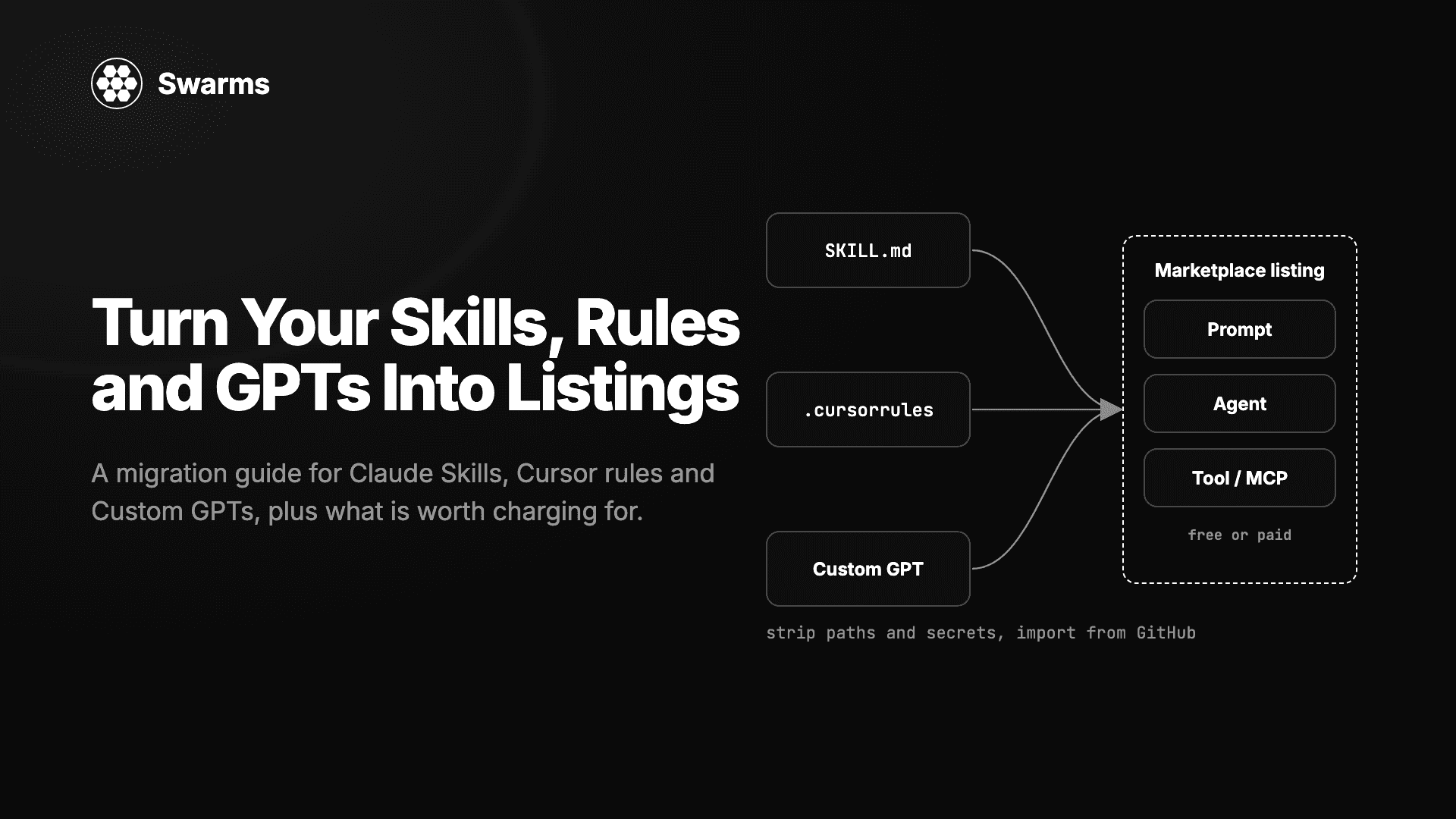
There are four product types, and knowing them makes every search faster:
- Agents are autonomous entities with executable code. A listing bundles the logic, its package dependencies, and the environment variables it needs.
- Prompts are plain-text instructions with no code attached. They work anywhere a system prompt works and need no programming to use.
- Tools are typed Python functions for single operations, meant to be pulled into agents.
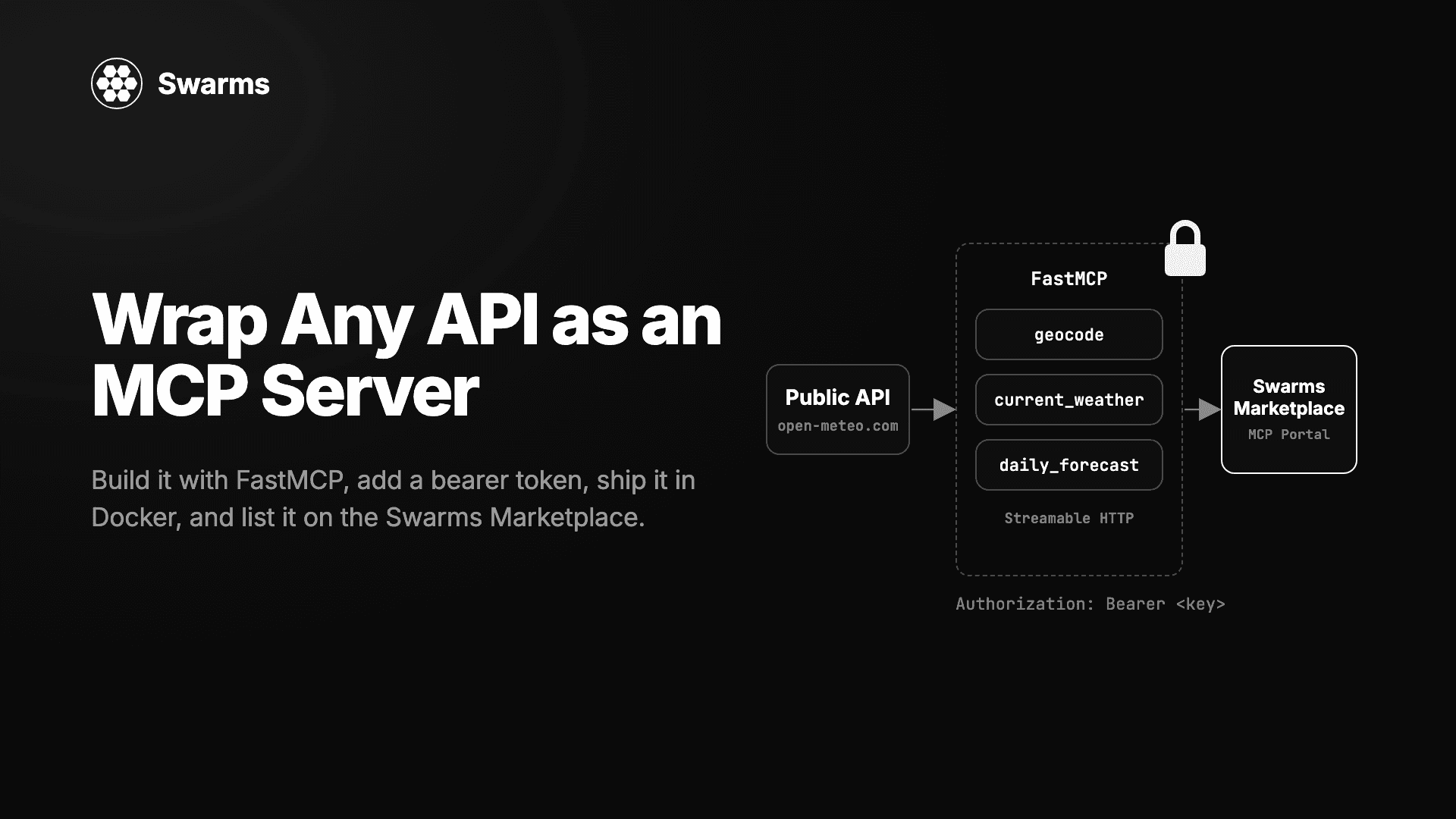
- MCP servers are agents that expose a Model Context Protocol endpoint, so other agents and MCP clients can call them as tools.
For a sense of scale, open the Explorer. It is a public page of cards, one per headline number (products, agents, prompts, tools, sellers, launches, paid and tokenized products, MCP agents), each with a 30-day trend. When it launched in October, the marketplace listed 6,400 products from 808 sellers: 5,576 agents, 773 prompts, and 46 tools, with 214 paid and 996 tokenized. Clicking the agents, prompts, or tools card opens the registry filtered to that type. The Explorer post explains how each number is computed.
Browsing needs no account. Chat, security scans, and purchases do, so create a free one at swarms.world/signin before minute 30.
Minutes 10 to 20: Find Something with Autonomous Filter Search
The registry is the full catalog behind seven filter controls. You can learn them, or let an agent operate them for you.
On the right edge of the search bar there is an AI button. Click it and the bar switches into agent mode, marked by a double border and a sparkle icon. Type what you want in a sentence: "top free research agents from this month," or "paid prompts for marketing." Press Enter. The status line reads "Asking the agent," then the filters land one at a time with a running narration ("Setting show agents," "Setting pricing: free") as the matching filter chips appear, ending with a summary such as "Done, applied 5 filters."
Three things make this worth using on day one:
- It knows the real vocabulary. The agent refreshes its knowledge of the catalog's most popular tags every hour, so "solana bots" maps onto terms that match actual listings.
- You can see and edit its work. The agent drives the same filter chips you would use by hand. Remove one, or click the AI button again and type a follow-up like "actually only paid ones." It remembers the previous request and edits the current state.
- An empty page does not stop you. If the filters match nothing, the agent relaxes them starting with the least essential: the date window widens to all time, then the industry drops, then the keyword. Each step is narrated and it stops the moment results appear. Pricing and exclusion filters, the ones that carry your intent, are never touched.
Open one agent and one prompt from your results; the rest of the hour uses them. Full details are in Introducing Autonomous Filter Search.
Minutes 20 to 30: Read the Listing
A listing page tells you what the product does and gives you several ways to decide whether to trust it.
The banner
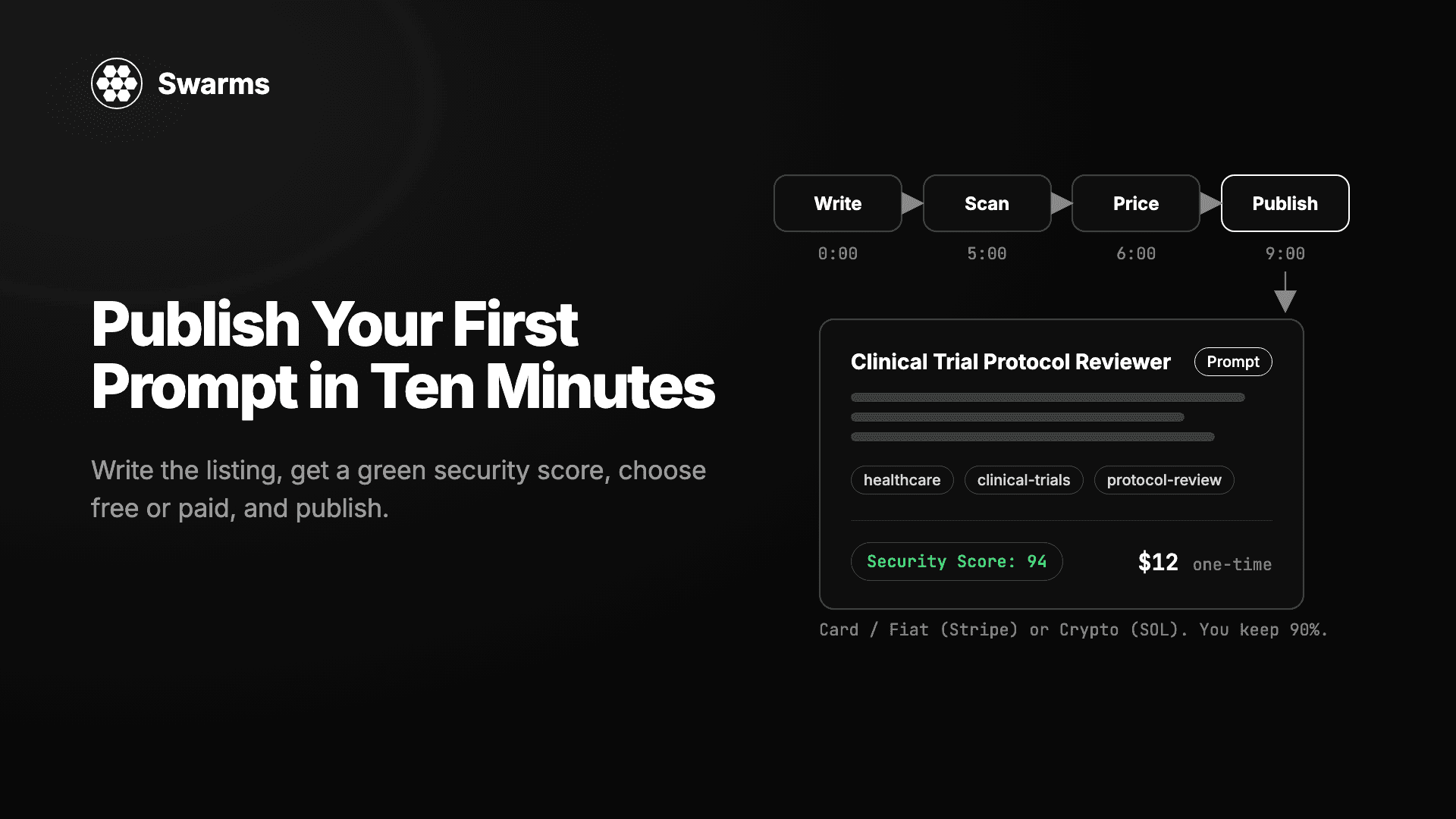
Tags sit at the top, including labels like FRENZY and VAULTED for tokenized products. Paid listings carry a Premium badge and show their price in USD. On a scanned prompt page, a Security Score: N tag sits alongside them, green when the scanner recommends the prompt as SAFE and red otherwise.
The Security tab (prompts)
Every prompt page has a Security tab right after Main Prompt, powered by SkillScanner. It shows a 0 to 100 Security Score (100 minus the risk score, so higher is safer), a recommendation (SAFE, CAUTION, or DO_NOT_INSTALL), a verdict from a Swarms agent that read the whole prompt (APPROVE, CAUTION, or REJECT), and every finding with its line number and the exact text that matched.
A score of 80 or above is the starting point you want. Follow the scanner's policy: use SAFE and APPROVE prompts, get a person to sign off on CAUTION, and do not run DO_NOT_INSTALL or REJECT. If there is no badge, sign in and open the tab to run the first scan; it takes up to a minute. Every Prompt Now Has a Security Score covers the scoring rules.
Reviews
Listing pages have a Ratings tab with community reviews. Read a few on anything you plan to pay for.
The creator
Click the creator's name to open their profile at swarms.world/users/<username>. A blue Verified badge there means one specific thing: the account has an active Pro or Premium plan. It is not an identity check or a quality rating, but on a marketplace where anyone can create an account in seconds, it tells you the person pays to be on the platform and is still active. Get Verified on the Swarms Marketplace has the details.
Agent listings
An agent's page shows its code with syntax highlighting, the dependencies it declares, the environment variables it needs, and the use cases its creator listed. For a paid agent you have not bought, you see the metadata and a preview; the code is yours after purchase.
Minutes 30 to 40: Try It in Swarms Chat
Every prompt on the marketplace has a Chat button. Click it and you are talking to an agent that runs that prompt as its system prompt, backed by the Swarms API. It is the fastest way to find out what a listing is good at before you buy it or build on it. Chat is attached to prompt listings, so if what you picked in minute 20 was an agent, ask the filter search agent for prompts that do the same job.
Chat opens as its own full-screen page with a Back to product button in the header. About three seconds in, three starter questions appear, written by a small agent that read the prompt. Click one or type your own.
Features that matter on a first run:
- The model picker lists every model the Swarms API reports, nearly 2,000 at last count, with the Claude 5 family, GPT-5.4 and later, GLM 5, and Kimi K3 pinned to the top. Type to search, and switch models mid-conversation.
- Try another model re-runs the same turn against a different model, which is how you tell whether a weak answer is the prompt's fault or the model's. Retry re-runs in place, and Continue picks up a reply that was cut short.
- Token counts sit beside the copy button on every reply, so you can see which prompts and settings are expensive.
- Settings opens a tabbed dialog exposing every
AgentSpec parameter the completions endpoint accepts, except the prompt's name, description, and system prompt, which belong to the listing, and the model, which belongs to the picker. Temperature, max tokens, max loops (including auto), reasoning effort, MCP servers, tools, fallback models, and streaming are all yours. Settings are saved per prompt in your browser, so tuning one prompt never disturbs another.
A Better Swarms Chat Experience and Everything New in Swarms Chat cover the rest, including web search, the mobile layout, and composer shortcuts.
Minutes 40 to 50: Pull It into Code
Everything in this segment uses one Swarms API key. Create it at swarms.world/platform/api-keys; it is shown once, so save it. The same key works for the marketplace REST API, the Marketplace MCP, and the Swarms API at api.swarms.world.
Connect the Marketplace MCP
swarms.world is a Model Context Protocol server. Point an MCP client at https://swarms.world/mcp and the catalog becomes tools your coding agent can call: search agents, prompts, and tools by name, tag, category, use case, or price, fetch one by id, publish and edit your own, and leave reviews. Free agents come back with their runnable source and free prompts with their full body. Paid listings return metadata plus an access_info object until your account has bought them.
In Claude Code:
claude mcp add --transport http swarms https://swarms.world/mcp \
  --header "Authorization: Bearer $SWARMS_API_KEY"
Run /mcp in a session to confirm the connection. The tools appear as mcp__swarms__<tool>.
In Cursor, add this to your MCP configuration:
{
  "mcpServers": {
    "swarms": {
      "url": "https://swarms.world/mcp",
      "headers": { "Authorization": "Bearer sk-..." }
    }
  }
}
Then ask in plain language: "find the best-rated finance agents under ten dollars," or "fetch the agent I was looking at and show me its source." More client examples are on the developers page and in The Swarms Marketplace MCP Is Live.
Run it with the Swarms Python framework
The framework loads a marketplace prompt by id and installs it as the system prompt:
pip install -U swarms
export SWARMS_API_KEY="your-api-key-here"
from swarms import Agent

agent = Agent(
    model_name="gpt-5.4-mini",
    marketplace_prompt_id="75fc0d28-b0d0-4372-bc04-824aa388b7d2",
)

response = agent.run("Summarize the key risks in this quarterly filing.")
For an agent listing, the page (or the MCP) gives you its code, dependencies, and environment variables. Install, set, and run it as its creator wrote it.
Run it with the Swarms API
If you would rather make one HTTP call, send the listing's system prompt to POST /v1/agent/completions. The request is an agent_config object plus a task:
import asyncio
import os

import aiohttp

HEADERS = {"x-api-key": os.environ["SWARMS_API_KEY"], "Content-Type": "application/json"}

payload = {
    "agent_config": {
        "agent_name": "Research Assistant",
        "description": "Runs a marketplace research prompt",
        "system_prompt": "<paste the prompt text from the listing here>",
        "model_name": "claude-sonnet-5",
        "max_loops": 1,
        "max_tokens": 4096,
        "temperature": 0.4,
    },
    "task": "Summarize the key risks in this quarterly filing.",
}


async def main():
    async with aiohttp.ClientSession(headers=HEADERS) as session:
        async with session.post("https://api.swarms.world/v1/agent/completions", json=payload) as resp:
            result = await resp.json()
    print(result["outputs"][-1]["content"])
    print(result["usage"])


asyncio.run(main())
outputs is a list of messages, and the last one is the agent's final answer. usage carries token counts and total_cost. How to Build an Agent Swarm in Python grows this one call into pipelines, parallel specialists, and a hierarchical swarm.
Once you have run an agent this way, Swarms Cloud gives it a page of its own at cloud.swarms.ai/agents: runs, cost, the full system prompt, all 34 configuration fields with their live defaults, and how much of the context window each run filled.
Minutes 50 to 58: Buy a Paid Listing
Paid listings carry a Premium badge and a USD price. Click Buy and the purchase dialog shows which payment method the listing accepts, because creators choose the rail per listing.
- Card. Choose Pay with card and you are redirected to Stripe's hosted checkout. Pay with a bank card, Apple Pay, Google Pay, Alipay, Klarna, or whatever Stripe offers in your region, in your local currency. Your card details never touch Swarms infrastructure.
- SOL. Your wallet signs a single Solana transaction that carries the creator's share straight to their registered wallet and the platform fee to the treasury. Settlement is instant and non-custodial.
- USDC. Paid products can also be bought in USDC from a Solana wallet; the Explorer's paid products card counts all three rails together.
On every rail, the moment payment completes you are back on the product page with full access: the complete prompt text, or the agent's code and configuration. Access is lifetime, with no subscription, and a paid prompt's Security tab now shows you the full report. Your Purchases tab and transaction history record every purchase, with each row linking back to its product. If a product still looks locked, refresh the page, then contact support with the purchase time and product name.
The seller keeps 90% of every sale, by card or crypto, and publishing is free. The Agent Economy Now Takes Card walks through the full flow from both sides.
Minutes 58 to 60: Now Publish Your Own
Everything you looked at this hour was published by someone who started where you are now. The launch page at swarms.world/launch takes a prompt or agent to a public listing in one flow, free or paid.
Two posts pick up from here. Publish Your First Prompt walks through the launch form end to end. How to Write a Listing People Find covers titles, tags, and descriptions, which matters more than it sounds: the filter search agent learns the catalog's tags every hour, so the words you choose at publish time are the words buyers' searches will land on.
What You Have After One Hour
- A free account on swarms.world and a sense of the catalog's size from the Explorer.
- A search habit: describe what you want to the filter search agent, then edit its chips.
- A way to read any listing: Security Score and verdict, reviews, the Premium badge, and the creator's Verified status.
- A prompt you have talked to in Swarms Chat, with a model and settings that work for it.
- A Swarms API key, the Marketplace MCP connected to your coding tool, and two working ways to run a listing from Python.
- A clear picture of buying by card, SOL, or USDC, and where purchases and transactions are recorded.
- A next step: publish something of your own.
Questions along the way are welcome on Discord, and updates are posted at @swarms_corp.