Most MCP servers worth having are thin. Behind the protocol sits an ordinary HTTP API, and the server's job is to describe a few of its endpoints as tools with typed arguments and clear docstrings, so a model can pick the right one and call it correctly. If you can write a Python function that calls an API, you can write an MCP server for it.
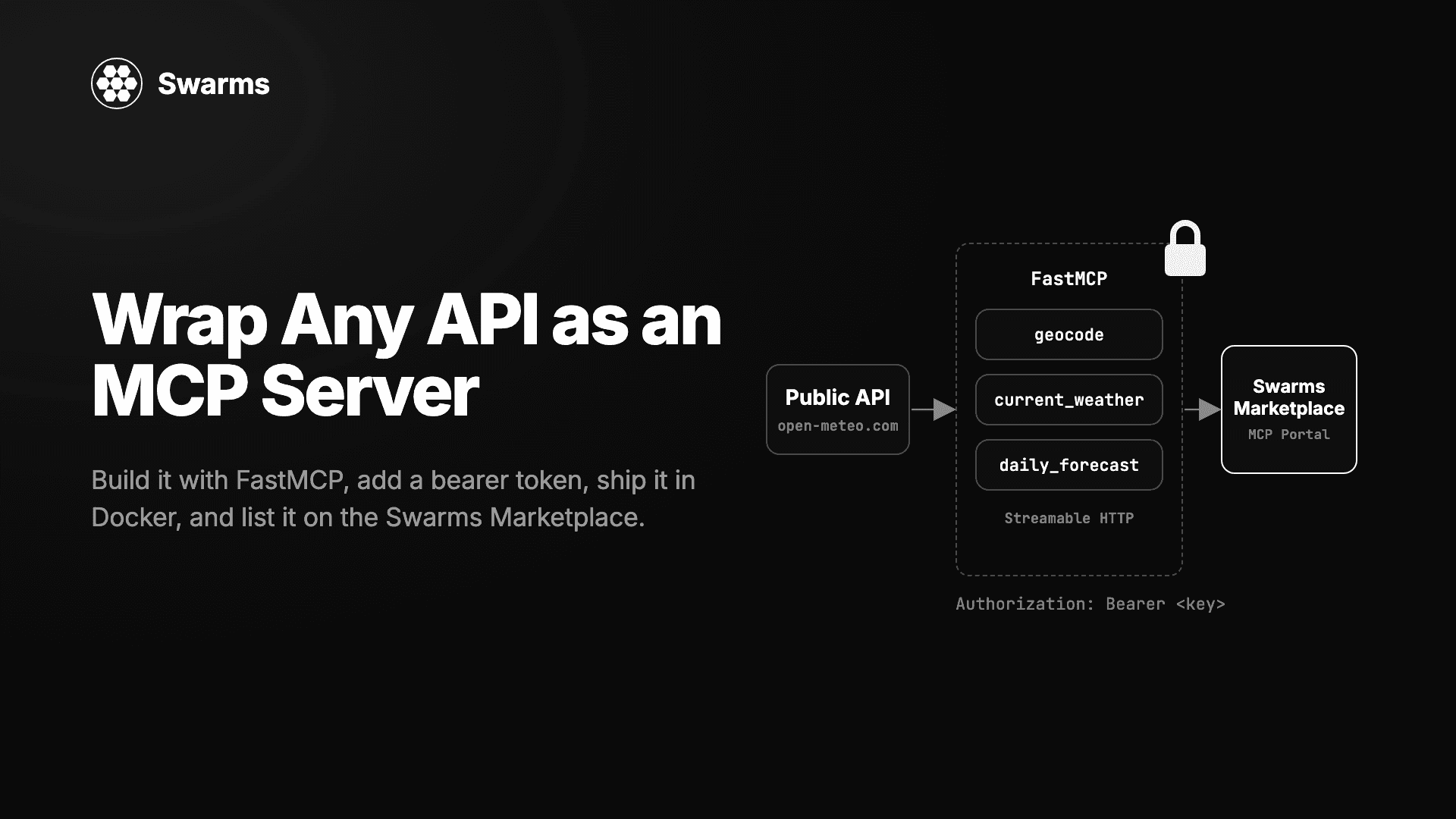
This guide builds one from scratch and takes it to a marketplace listing. The API is Open-Meteo, a public weather service that needs no API key, which keeps the example runnable for anyone. The server has three tools, runs on the Python MCP SDK's FastMCP class over Streamable HTTP, gets a bearer-token check and a Dockerfile, and ends up published on the MCP Portal of the Swarms Marketplace, where the marketplace reads its tools and generates connect instructions for every client.
Our earlier guide, How to Turn an AI Agent into an MCP Server in Python, covered the case where a Swarms agent sits behind the tool and MCPDeployer does the serving. This one covers a plain API with no model behind it, served with the mcp package directly. Every code block below is complete, and the whole project is under 120 lines.
Step 1: Project setup
Create a folder and a virtual environment, then install the MCP SDK, an HTTP client and an ASGI server:
mkdir open-meteo-mcp && cd open-meteo-mcp
python -m venv .venv && source .venv/bin/activate
pip install "mcp[cli]>=1.10,<2" httpx uvicorn
A note on versions. The mcp package has a 1.x line and a 2.x line, and some import paths differ between them (the Swarms Marketplace MCP post shows the 2.x client import, streamable_http_client; the Swarms Cloud MCP post shows the 1.x one, streamablehttp_client). This guide pins 1.x in its own environment so the imports below match what you run. If you also use swarms 16, keep it in a separate environment, since MCPDeployer wants mcp>=2.
Step 2: Define the tools
The server lives in server.py. Each tool is a plain function with type hints and a docstring. FastMCP turns the signature into the tool's JSON input schema and the docstring into its description, which is the text a model reads when deciding whether to call it.
import httpx
from mcp.server.fastmcp import FastMCP
from mcp.types import ToolAnnotations

GEO = "https://geocoding-api.open-meteo.com/v1/search"
FORECAST = "https://api.open-meteo.com/v1/forecast"
READ_ONLY = ToolAnnotations(readOnlyHint=True)

mcp = FastMCP("open-meteo", host="0.0.0.0", port=8000, stateless_http=True)


def get(url: str, **params) -> dict:
    r = httpx.get(url, params=params, timeout=10)
    r.raise_for_status()
    return r.json()


@mcp.tool(annotations=READ_ONLY)
def geocode(city: str, count: int = 3) -> list[dict]:
    """Find a city's coordinates. Returns name, country, latitude and longitude for up to `count` matches."""
    data = get(GEO, name=city, count=count, language="en", format="json")
    keys = ("name", "country", "latitude", "longitude")
    return [{k: r.get(k) for k in keys} for r in data.get("results", [])]


@mcp.tool(annotations=READ_ONLY)
def current_weather(latitude: float, longitude: float) -> dict:
    """Current temperature (C), wind speed (km/h) and WMO weather code at a coordinate."""
    data = get(FORECAST, latitude=latitude, longitude=longitude,
               current="temperature_2m,wind_speed_10m,weather_code")
    return data["current"]


@mcp.tool(annotations=READ_ONLY)
def daily_forecast(latitude: float, longitude: float, days: int = 3) -> dict:
    """Daily max and min temperature (C) and precipitation (mm) for the next 1 to 16 days."""
    data = get(FORECAST, latitude=latitude, longitude=longitude,
               daily="temperature_2m_max,temperature_2m_min,precipitation_sum",
               forecast_days=min(max(days, 1), 16))
    return data["daily"]


if __name__ == "__main__":
    mcp.run(transport="streamable-http")
Four decisions in that file carry the design.
Three small tools. Open-Meteo takes coordinates and people think in city names, so geocode is a separate step the model can chain: look up "Berlin", take the first result's coordinates, pass them to current_weather. One endpoint per tool keeps each schema short. A single weather(query) tool would push the parsing problem onto the model.
Typed arguments with defaults. count: int = 3 becomes an optional parameter in the schema and latitude: float a required one. Clients validate against that schema before a call reaches your code, and the listing marks required parameters. Clamp what the upstream will reject: Open-Meteo allows up to 16 forecast days, so days is clamped.
Docstrings that name units and shapes. The first line of each docstring is the tool description. Celsius, km/h and millimeters are spelled out because a model will otherwise guess. Results are trimmed for the same reason: geocode returns four fields per match, because every byte of a tool result lands in the model's context.
Read-only hints and stateless HTTP. ToolAnnotations(readOnlyHint=True) tells clients these tools only read data. The Swarms Marketplace shows these as Read-only and destructive badges on a listing's tool list, so mark tools that write with destructiveHint=True. stateless_http=True lets every request stand alone, so several replicas can sit behind a load balancer, and host="0.0.0.0" makes the server reachable from outside a container.
Step 3: Run it locally and test it
Start the server with python server.py. It serves Streamable HTTP at http://127.0.0.1:8000/mcp.
The quickest check is the MCP Inspector, the official browser UI for poking at a server: run npx @modelcontextprotocol/inspector, choose the Streamable HTTP transport, enter the URL and connect. You will see the three tools with their schemas and can call them from a form. The second check is a script, which is what you want in CI. Create client.py:
import asyncio
from mcp import ClientSession
from mcp.client.streamable_http import streamablehttp_client

URL = "http://127.0.0.1:8000/mcp"


async def main():
    async with streamablehttp_client(URL) as (read, write, _):
        async with ClientSession(read, write) as session:
            await session.initialize()
            tools = await session.list_tools()
            print([t.name for t in tools.tools])
            res = await session.call_tool("geocode", {"city": "Berlin", "count": 1})
            print(res.content[0].text)
            res = await session.call_tool("current_weather", {"latitude": 52.52, "longitude": 13.41})
            print(res.content[0].text)


asyncio.run(main())
Run python client.py in a second terminal. You should get the three tool names, one geocoding match for Berlin, and a current-conditions object with temperature, wind speed and weather code. Tool results arrive as JSON-encoded text in res.content[0].text. Try a bad call too, such as geocode without city: the SDK rejects it against the schema before your function runs.
Step 4: Add a bearer-token check
The server so far is open. That is fine on a laptop and wrong on the internet, where anyone who finds the URL can use your server, and where a paid listing needs a way to tell buyers from everyone else.
The simplest check is a shared bearer token. The MCPDeployer guide read its keys from a comma-separated environment variable and refused to start without one; a missing secret should fail at startup rather than serve an open endpoint. It also answered refused requests with a 401 and a WWW-Authenticate: Bearer header, which matters later, because the marketplace inspector reads a 401 as "this server wants an API key". FastMCP exposes the server as an ASGI app through streamable_http_app(), so the check is a small wrapper. Create app.py:
import hmac
import os

import uvicorn
from starlette.responses import JSONResponse

from server import mcp

KEYS = [k for k in os.environ.get("MCP_SERVER_KEYS", "").split(",") if k]
if not KEYS:
    raise SystemExit("Set MCP_SERVER_KEYS to one or more comma-separated keys")


@mcp.custom_route("/health", methods=["GET"])
async def health(request):
    return JSONResponse({"status": "ok"})


inner = mcp.streamable_http_app()


async def app(scope, receive, send):
    if scope["type"] == "http" and scope["path"] != "/health":
        header = dict(scope["headers"]).get(b"authorization", b"").decode()
        token = header.removeprefix("Bearer ").strip()
        if not any(hmac.compare_digest(token, k) for k in KEYS):
            reply = JSONResponse({"error": "unauthorized"}, status_code=401,
                                 headers={"WWW-Authenticate": "Bearer"})
            return await reply(scope, receive, send)
    await inner(scope, receive, send)


if __name__ == "__main__":
    uvicorn.run(app, host="0.0.0.0", port=int(os.environ.get("PORT", "8000")))
Start it with a key and check both paths:
MCP_SERVER_KEYS="sk-local-dev" python app.py
curl -s http://127.0.0.1:8000/health
curl -s -o /dev/null -w "%{http_code}\n" -X POST http://127.0.0.1:8000/mcp
The health route answers {"status":"ok"} and the bare POST to /mcp gets 401. hmac.compare_digest compares in constant time. To use the authenticated server from client.py, pass the header: streamablehttp_client(URL, headers={"Authorization": "Bearer sk-local-dev"}).
Keep /health open: hosting platforms probe it, and a probe that gets a 401 looks like a dead server. Everything else, including tools/list, requires the token. For OAuth or per-tenant rules, the auth section of the MCPDeployer guide covers a custom auth function and a token verifier with scopes, and the same ideas apply here.
Step 5: Deploy it behind https
The marketplace only inspects a server at a public https URL. Private, loopback and link-local addresses are refused, so localhost and a LAN IP are out, and so is plain http. Deploy first, inspect second; an https tunnel to your laptop works for a trial run. The portable way to deploy is a container. Create a Dockerfile:
FROM python:3.13-slim
WORKDIR /app
RUN pip install --no-cache-dir "mcp>=1.10,<2" httpx uvicorn
COPY server.py app.py ./
CMD ["python", "app.py"]
Build and run it with the key passed at start, never baked into the image:
docker build -t open-meteo-mcp .
docker run --rm -p 8000:8000 -e MCP_SERVER_KEYS="sk-local-dev" open-meteo-mcp
Anyone who can pull an image can read everything inside it, so secrets belong in the runtime environment, the same way the Swarms Docker guide passes provider keys, and a .dockerignore should keep .env files out of the build context.
From here, any container host works: a VM with Docker and a reverse proxy, a managed container platform, or a Kubernetes cluster. The inspector's limits double as a checklist:
- A public https URL. Terminate TLS at the platform or a reverse proxy; the server itself speaks plain HTTP on
PORT.
- Wake up inside 20 seconds. That is the inspector's budget for the whole check, long enough for a free tier to wake from a cold start.
- Keep responses under 1 MB. The inspector's limit, and a sensible ceiling for tool results too.
- Answer
/health with 200 and /mcp with 401 when the token is missing. The first keeps health checks green; the second is how the marketplace detects your auth type.
Note the URL your platform gives you, with /mcp on the end, for example https://open-meteo-mcp.example.com/mcp. That string is the listing.
Step 6: Publish it on the Swarms Marketplace
Publishing takes a URL and a few form fields. The marketplace does the rest by connecting to your server and reading what it exposes, as described in Expanded MCP Support on the Swarms Marketplace.
- Sign in and open swarms.world/launch.
- Under What would you like to publish?, choose Agent.
- In Agent Implementation, open the MCP URL tab and paste your server URL.
- Click Inspect. The marketplace opens a real MCP session with your server, trying Streamable HTTP first and falling back to SSE. With the Step 4 server it gets a
401, finds no OAuth metadata, and reports that the server needs an API key.
- Set Authentication. The picker preselects API key. Leave the header name as
Authorization and the "Bearer" option on, which is what app.py expects. Fill in Where users get a key with the page where you hand out tokens; it appears on your listing as Get an API key. Then add a test key and inspect again. The marketplace uses it once to read your three tools, their schemas and their read-only hints, and never stores it.
- Finish the details. Inspection fills an empty name and description from the server and adds the MCP category. Rewrite the description in your own words, since it is what buyers search for: current conditions and daily forecasts for any coordinate, with city lookup, no upstream key needed. Add an image and any other categories that fit.
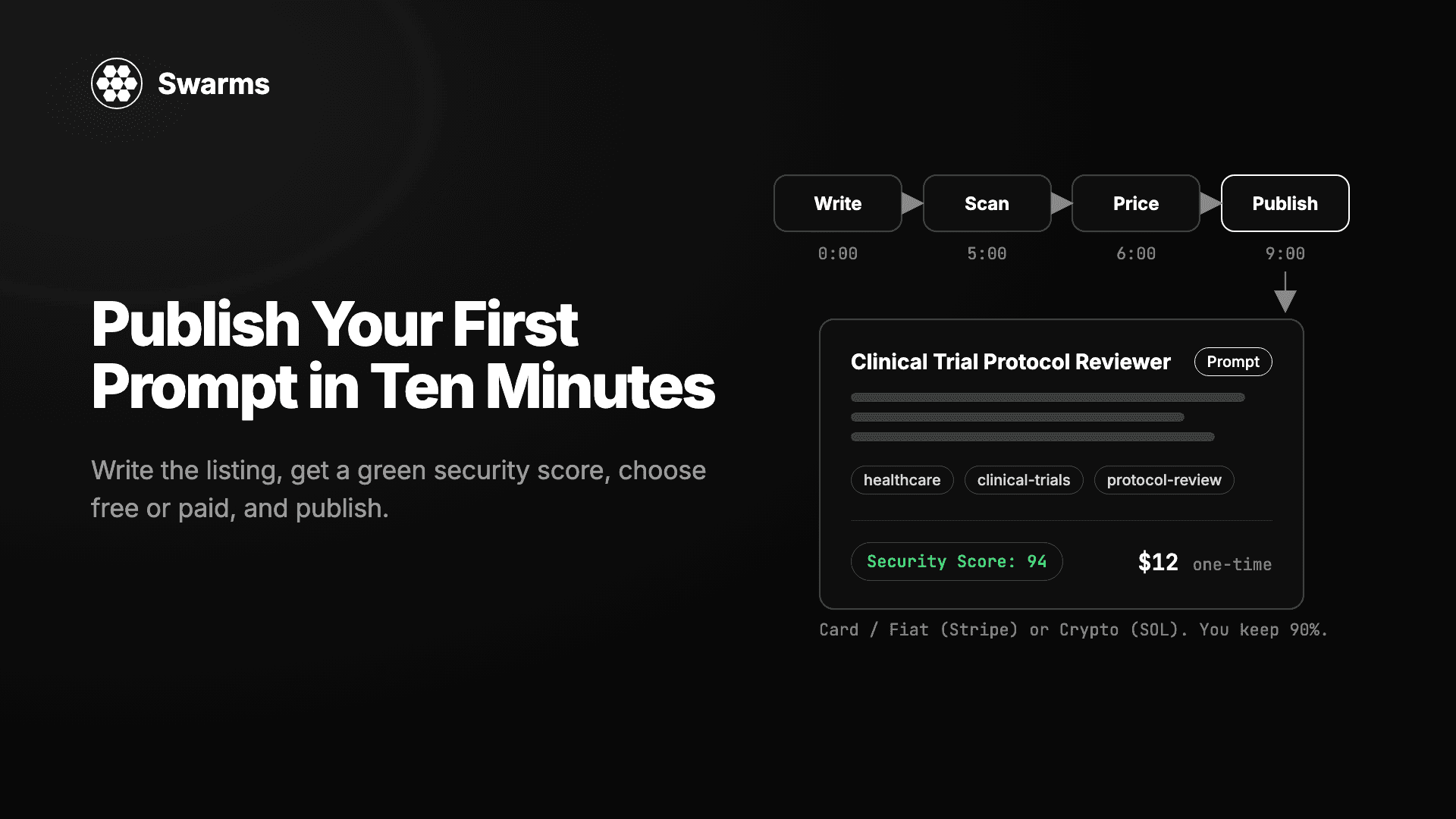
- Choose pricing. Pick Free or Paid. Paid listings pay out in Crypto (SOL) or by Card / Fiat (Stripe), from $0.01 up. Publishing is free; Swarms takes a 10% fee only when a sale happens, so you keep 90%.
- Publish. The marketplace reads your tools once more with the test key and saves them with the listing. This happens after the listing is created, so a server that is briefly down still publishes and fills in on a later view.
Your listing appears on the MCP servers page and in the registry, tagged MCP automatically because it has an MCP server URL.
What the listing shows
Every MCP listing gets a Connect to this MCP server section in its Overview tab, built from what the inspector read:
- The server URL with a copy button.
- Badges for auth (API key required here), transport (Streamable HTTP) and tool count, plus your Get an API key link.
- Client tabs for Claude, Cursor, VS Code and Other apps, each with a config carrying the
Authorization: Bearer YOUR_API_KEY header.
- The tools list:
geocode, current_weather and daily_forecast, each with its parameters, required ones marked, and a Read-only badge from the annotations in Step 2.
One-click Add to Cursor and Add to VS Code buttons appear only on servers that need no key, because a saved config without the key would fail until edited. Publish the open Step 2 server as a free listing and you get those buttons.
Listings stay current. When someone opens yours and the last check is more than a day old, the marketplace re-inspects the server, so a fourth tool shows up without republishing. Those refreshes carry no key, so an API-key listing keeps the tools from your last keyed inspection; re-inspect with a test key when you change the tool set.
There is no automated security score for MCP listings. A buyer sees what your server says about itself through the protocol (the read-only and destructive hints, the parameters) and what you write in the description, so set the hints truthfully. The Verified badge on your profile adds one more signal: the account behind the listing has an active Pro or Premium plan.
Pricing a wrapper
A free listing for a free upstream API is the natural default. Paid makes sense when you add something: a key for an upstream API that costs money, caching, higher rate limits, or tools that fold several calls into one answer. A buyer of a paid listing sees the connect section once they have access, and your Get an API key link is where they obtain a token for your server, since the marketplace does not issue keys for servers it lists. Sales and payouts show up in the Seller Portal, and the fee is the same 10% on card and crypto, as the fiat payments post describes.
Step 7: How buyers connect
The listing's client tabs cover desktop and IDE clients. For Claude Code the config is one line:
claude mcp add --transport http open-meteo https://open-meteo-mcp.example.com/mcp --header "Authorization: Bearer YOUR_API_KEY"
Cursor takes the same URL and header in mcp.json, and Claude Desktop connects through the mcp-remote bridge. The listing generates each of these for you.
From a Swarms agent. Swarms agents call MCP servers through mcp_url. MCPConnection sends api_key as Authorization: Bearer <key> by default, which is what app.py checks:
from swarms import Agent, MCPConnection

agent = Agent(
    agent_name="Weather-Agent",
    model_name="gpt-5.4-mini",
    max_loops=1,
    output_type="final",
    mcp_url=MCPConnection(url="https://open-meteo-mcp.example.com/mcp", api_key="YOUR_API_KEY"),
)
print(agent.run("What is the weather in Berlin right now, and will it rain tomorrow?"))
The agent fetches the tool list on startup, and the model chains geocode, current_weather and daily_forecast on its own. The same works over the hosted Swarms API, where an agent spec takes mcp_url or a list of mcp_urls with an authorization_token per server.
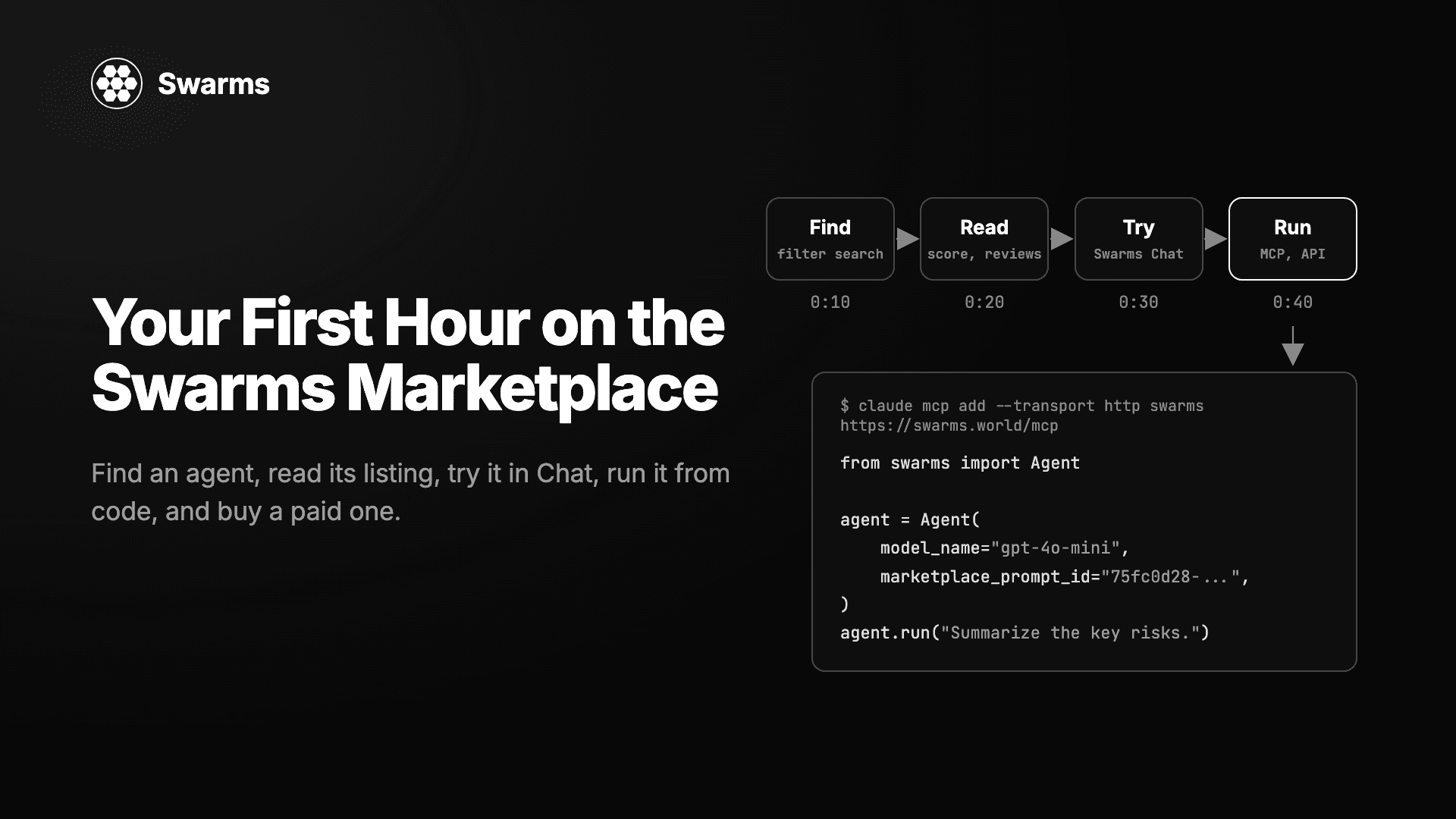
Through the Swarms Marketplace MCP. The marketplace itself is an MCP server at https://swarms.world/mcp, with one tool per marketplace REST operation. An agent connected to it with a Swarms API key can search the catalog by category, which includes MCP servers, and fetch a listing by id. A free listing comes back in full; a paid one returns its metadata plus an access_info object until the account behind the key has bought it. So an agent can discover your server mid-task, read its tools, and connect to it without a human opening a browser. The marketplace MCP post has the connection details.
Taking it further
The pattern generalizes to any HTTP API. Replace the two Open-Meteo URLs with the endpoints you care about, write one function per operation, and keep the habits that make a wrapper usable from a model: short typed signatures, docstrings that name units and result shapes, trimmed results.
- Upstream keys. If the API you wrap needs its own key, read it from the container's environment and never accept it as a tool argument. Your bearer token protects your server; the upstream key stays on your side.
- Timeouts and errors.
httpx.get(..., timeout=10) bounds each upstream call. Return a clear error message when the upstream is down, so the model can tell the user instead of retrying blindly.
- Write operations. Mark them
destructiveHint=True, name them with a verb such as create_booking, and consider a confirm: bool argument so a half-formed call cannot trigger them.
Once the server speaks the protocol, every client on the listing's tabs, every Swarms agent, and every agent browsing through the marketplace MCP can use it the same way. Publish it at swarms.world/launch.