指南教程
Swarms API MCP 服务器入门:把整个 Swarms API 作为工具交给任何 AI 客户端
托管在 api.swarms.world/mcp 的 Swarms MCP 服务器完整教程。用两行配置连接 Claude Code、Claude Desktop、Cursor 或你自己的 Python 和 TypeScript 智能体,了解 23 个工具,从一句聊天提示运行你的第一个智能体和集群,读取结果和费用,并解决第一天会遇到的错误。
Kye Gomez13 分钟阅读

托管在 api.swarms.world/mcp 的 Swarms MCP 服务器完整教程。用两行配置连接 Claude Code、Claude Desktop、Cursor 或你自己的 Python 和 TypeScript 智能体,了解 23 个工具,从一句聊天提示运行你的第一个智能体和集群,读取结果和费用,并解决第一天会遇到的错误。
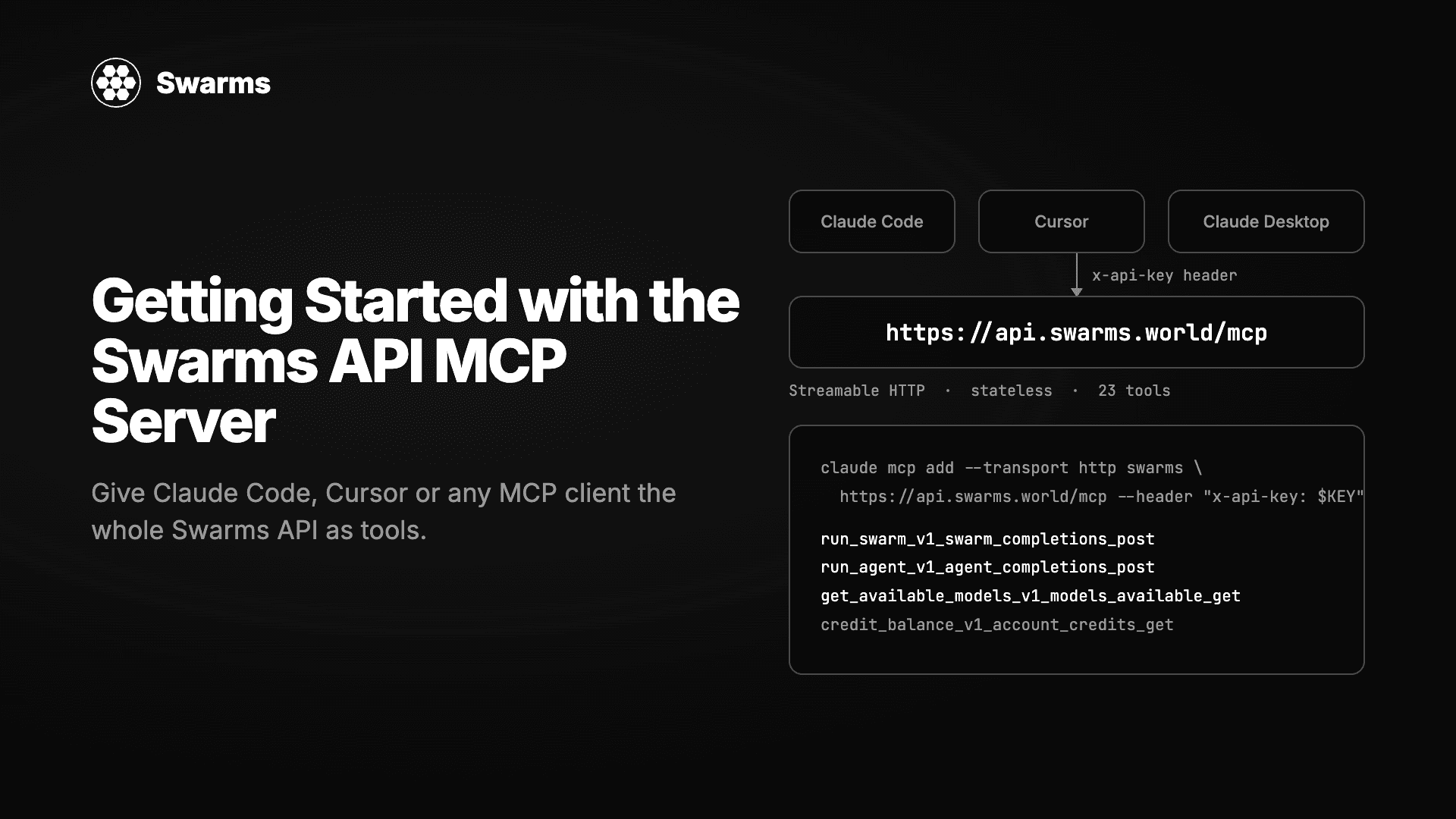
Model Context Protocol(MCP)是 AI 客户端发现和调用工具的方式。Claude Code、Claude Desktop、Cursor、Windsurf 和大多数智能体框架都支持它。Swarms API 也支持:托管在 https://api.swarms.world/mcp 的 MCP 服务器把 Swarms API 的每个端点都暴露为一个工具,所以你已经在用的助手可以运行单个智能体、编排十四种架构的多智能体集群、查看你的积分余额或拉取请求日志,既可以通过聊天提示,也可以通过代码。
不需要安装,也不需要运行任何东西。你给客户端两个值,URL 和你的 API 密钥,它就拥有了 Swarms API。本教程涵盖各客户端的配置、23 个工具的作用、你的第一个智能体和集群、如何读取结果和费用、如何在 Python 和 TypeScript 中使用服务器,以及你最可能遇到的错误。
| 属性 | 值 |
|---|---|
| URL | https://api.swarms.world/mcp |
| 传输 | Streamable HTTP |
| 协议版本 | 2025-06-18 |
| 会话 | 无状态,不需要跟踪 Mcp-Session-Id |
| 鉴权 | 每个请求在 x-api-key 请求头中携带你的 Swarms API 密钥 |
| 工具 | 23 个,每个 API 操作一个 |
| 上游 | https://api.swarms.world |
服务器自身不持有任何密钥。每个调用方把自己的密钥作为传输层请求头发送,服务器再转发给上游。因为密钥在请求头中传输,从不作为工具参数出现,所以驱动工具的模型永远看不到它。在 API 密钥页面获取密钥。计费工具需要购买的积分余额高于 1 美元。
一条命令把服务器加进 Claude Code。之后 Claude Code 可以在任何会话中调用 Swarms 工具。
claude mcp add --transport http swarms https://api.swarms.world/mcp \
    --header "x-api-key: your_api_key_here"
用 claude mcp list 检查,然后在会话中问:“Using the swarms MCP server, list the available swarm types.”你应该会看到十四种架构返回。
在 macOS 上把服务器加进 ~/Library/Application Support/Claude/claude_desktop_config.json,在 Windows 上是 %APPDATA%\Claude\claude_desktop_config.json,然后重启应用。
{
  "mcpServers": {
    "swarms": {
      "url": "https://api.swarms.world/mcp",
      "headers": {
        "x-api-key": "your_api_key_here"
      }
    }
  }
}打开 Cursor Settings,进入 MCP,添加同样的配置块;或者把它放进项目级的 .cursor/mcp.json,让整个团队随仓库获得它。用 Cursor 的环境变量插值或仅本地的文件,避免密钥进入版本控制。
{
  "mcpServers": {
    "swarms": {
      "url": "https://api.swarms.world/mcp",
      "headers": {
        "x-api-key": "your_api_key_here"
      }
    }
  }
}任何支持通过 Streamable HTTP 连接远程 MCP 服务器的客户端,都使用同样的两个值:URL 和 x-api-key 请求头。上面的 JSON 是它们大多数接受的形态。
服务器通过普通 HTTP POST 讲 JSON-RPC,所以用 cURL 就足以证明密钥可用。这个调用运行模型列表工具,并以单个 Server-Sent Events data: 帧返回响应。
curl -sS -X POST https://api.swarms.world/mcp \
  -H "Content-Type: application/json" \
  -H "Accept: application/json, text/event-stream" \
  -H "x-api-key: $SWARMS_API_KEY" \
  -d '{
        "jsonrpc": "2.0",
        "id": 1,
        "method": "tools/call",
        "params": {
          "name": "get_available_models_v1_models_available_get",
          "arguments": {}
        }
      }'
因为服务器是无状态的,不需要先做 initialize 握手。如果缺少密钥,你会得到 HTTP 401 和一个指明应设置哪个请求头的 JSON 错误;在我们的测试中,tools/list 和 tools/call 都是如此,所以每个请求都要带上密钥。
工具名称与 API 的操作 ID 一致,所以每个工具都对应 API 参考中的一个端点。你最常用的几个排在最前面。
| 工具 | 端点 | 作用 |
|---|---|---|
run_agent_v1_agent_completions_post | POST /v1/agent/completions | 运行一个智能体,可选联网搜索和抓取工具 |
run_swarm_v1_swarm_completions_post | POST /v1/swarm/completions | 以 14 种架构之一运行多智能体集群 |
check_swarm_types_v1_swarms_available_get | GET /v1/swarms/available | 列出架构 |
get_available_models_v1_models_available_get | GET /v1/models/available | 列出模型及价格 |
run_agent_batch_v1_agent_batch_completions_post | POST /v1/agent/batch/completions | 一次调用运行多个智能体(付费层级) |
run_batch_completions_v1_swarm_batch_completions_post | POST /v1/swarm/batch/completions | 一次调用运行多个集群(付费层级) |
run_graph_workflow_v1_graph_workflow_completions_post | POST /v1/graph-workflow/completions | 图定义的工作流(付费层级) |
run_batched_grid_workflow_v1_batched_grid_workflow_comple_0dda3b | POST /v1/batched-grid-workflow/completions | 每个智能体对每个任务(付费层级) |
run_auto_agent_builder_v1_auto_agent_builder_completions_post | POST /v1/auto-agent-builder/completions | 根据任务描述生成智能体配置 |
run_reasoning_agent_completions_v1_reasoning_agent_comple_a8b363 | POST /v1/reasoning-agent/completions | 自洽、反思和评判智能体(付费层级) |
get_reasoning_agent_types_v1_reasoning_agent_types_get | GET /v1/reasoning-agent/types | 列出推理智能体类型 |
list_agents_v1_agents_list_get | GET /v1/agents/list | 列出智能体配置 |
list_models_v1_models_get | GET /v1/models | OpenAI 兼容形态的模型列表 |
chat_completions_v1_chat_completions_post | POST /v1/chat/completions | OpenAI 兼容的聊天补全 |
get_available_tools_v1_tools_available_get | GET /v1/tools/available | 内置工具(auto_search、web_scraper) |
get_rate_limits_v1_rate_limits_get | GET /v1/rate/limits | 你的限额和当前用量 |
credit_balance_v1_account_credits_get | GET /v1/account/credits | 积分余额 |
usage_costs_v1_usage_costs_get | GET /v1/usage/costs | 完整费率表 |
get_metrics_summary_v1_account_metrics_summary_get | GET /v1/account/metrics/summary | 用量指标 |
get_logs_v1_account_logs_get | GET /v1/account/logs | 请求日志 |
premium_endpoints_v1_account_premium_endpoints_get | GET /v1/account/premium-endpoints | 哪些端点需要付费层级 |
health_health_get | GET /health | 健康检查 |
root_get | GET / | API 根路径 |
有两个名称以哈希后缀结尾,因为 MCP 限制了工具名长度;请原样复制。每个工具的 inputSchema 都可以从 tools/list 获取,参数就是 REST API 接受的同一套 JSON 请求体,所以 Swarms API 文档中的一切都原样适用。
客户端连接之后,你不需要写 JSON。你描述想要什么,客户端会填好工具调用。在 Claude Code 或 Claude Desktop 中试试:
Use the swarms server to run a single agent on
claude-haiku-5-5with the system prompt "Answer in one sentence" and the task "Name one reason to split a workflow across several agents." Show me the answer and the cost.
客户端会带着 agent_config 和 task 调用 run_agent_v1_agent_completions_post,并从工具结果中读回类似这样的内容:
{
  "job_id": "agent-4fc7226da44d00a0bb3667251f560a78",
  "success": true,
  "outputs": [
    {
      "role": "Haiku Probe",
      "content": "A team might split a workflow into several agents so that each agent can specialize in one sub-task, which improves quality and makes the system easier to build, test, and maintain."
    }
  ],
  "usage": {
    "input_tokens": 37,
    "output_tokens": 52,
    "total_tokens": 89,
    "total_cost": 0.000034
  }
}
这次运行花费千分之三美分。接下来是一个集群:
Use the swarms server to run a SequentialWorkflow with three agents on the task "Write a competitive brief on the shared e-scooter market in Berlin for an operator entering in 2027": a Researcher on gpt-5.4-mini who lists facts as bullets, an Analyst on claude-haiku-5-5 who structures them, and a Writer on claude-sonnet-5-5 who writes the brief under 500 words. Give me the Writer's output and the total cost.
客户端会调用 run_swarm_v1_swarm_completions_post。我们通过 API 运行这个集群时,22 秒完成,usage 块显示三个智能体、8,488 个 token,total_cost: 0.058763,其中 billing_info.cost_breakdown 显示 $0.03 的智能体费和 $0.0288 的 token 费。然后助手就可以做它擅长的事:把这份简报与 ConcurrentWorkflow 的运行结果比较,用 check_swarm_types 工具看看还有哪些架构,或者在批量运行前检查 credit_balance。
因为工具就是 API,每种架构都可以这样使用:带主管的 HierarchicalSwarm、用于分类的 MajorityVoting、GroupChat、DebateWithJudge、MixtureOfAgents 等等。集群架构指南解释了每种架构的适用场景。
每次工具调用都会把上游响应返回两次:
structuredContent 是解析后的 JSON 对象。在代码中用这个。content[0].text 是给人看的渲染:一行 HTTP 状态,后面是格式化的响应体。客户端把这个展示给模型。失败会以 isError: true 的工具结果返回,消息在 content[0].text 中。它们不是传输层异常,所以你的客户端不会抛出;读取 structuredContent 之前先检查这个标志。
{
  "content": [
    {
      "type": "text",
      "text": "HTTP 200 OK - POST /v1/agent/completions\n{\n  \"job_id\": \"agent-b0abf28…\",\n  …\n}"
    }
  ],
  "structuredContent": {
    "job_id": "agent-b0abf28…",
    "success": true,
    "outputs": [{ "role": "research-agent", "content": "…" }],
    "usage": { "total_tokens": 69, "total_cost": 0.001192 }
  },
  "isError": false
}同一个服务器也可以作为你自己构建的智能体的工具层。官方 MCP SDK 用几行代码就能连上它。
pip install mcp httpx# mcp_quickstart.py
# Connects to the hosted Swarms MCP server, lists its tools, and runs one agent.
# Requires: pip install mcp httpx
import asyncio
import os
import httpx
from mcp import ClientSession
from mcp.client.streamable_http import streamable_http_client
SERVER = "https://api.swarms.world/mcp"
async def main() -> None:
api_key = os.environ["SWARMS_API_KEY"]
# The key travels as a transport header. No tool ever receives it as an
# argument, so the model driving the tools never sees it.
async with (
httpx.AsyncClient(headers={"x-api-key": api_key}, timeout=180) as http_client,
streamable_http_client(SERVER, http_client=http_client) as (read, write),
ClientSession(read, write) as session,
):
await session.initialize()
tools = await session.list_tools()
print(f"{len(tools.tools)} tools available")
for tool in tools.tools:
print(" ", tool.name)
result = await session.call_tool(
"run_agent_v1_agent_completions_post",
{
"agent_config": {
"agent_name": "Probe",
"system_prompt": "Answer in one sentence.",
"model_name": "claude-haiku-5-5",
"max_loops": 1,
"max_tokens": 200,
},
"task": "Name one reason to split a workflow across several agents.",
},
)
if result.isError:
raise RuntimeError(result.content[0].text)
payload = result.structuredContent
print(payload["outputs"][0]["content"])
print(f"cost: ${payload['usage']['total_cost']}")
if __name__ == "__main__":
asyncio.run(main())export SWARMS_API_KEY=your_key
python mcp_quickstart.py这段代码基于 mcp 2.0 编写。HTTP 客户端上 180 秒的超时很重要:多智能体集群可能比默认超时跑得更久,否则 MCP SDK 会在集群完成前放弃。密钥无效时,脚本会在 initialize() 处以 MCPError 失败,这是确认问题出在密钥而不是代码上的最快方式。
npm install @modelcontextprotocol/sdkimport { Client } from "@modelcontextprotocol/sdk/client/index.js";
import { StreamableHTTPClientTransport } from "@modelcontextprotocol/sdk/client/streamableHttp.js";
const apiKey = process.env.SWARMS_API_KEY;
if (!apiKey) throw new Error("set SWARMS_API_KEY");
// The credential is a transport header. No tool takes it as an argument.
const transport = new StreamableHTTPClientTransport(
new URL("https://api.swarms.world/mcp"),
{ requestInit: { headers: { "x-api-key": apiKey } } },
);
const client = new Client({ name: "swarms-client", version: "1.0.0" });
await client.connect(transport);
const result = await client.callTool({
name: "run_swarm_v1_swarm_completions_post",
arguments: {
name: "market-analysis",
swarm_type: "SequentialWorkflow",
task: "Analyze the market for autonomous delivery robots.",
max_loops: 1,
agents: [
{ agent_name: "researcher", system_prompt: "Gather and summarize market facts.", model_name: "gpt-5.4-mini", max_loops: 1, max_tokens: 2000 },
{ agent_name: "critic", system_prompt: "Challenge weak claims in the research above.", model_name: "claude-haiku-5-5", max_loops: 1, max_tokens: 2000 },
],
},
});
if (result.isError) {
throw new Error((result.content as { text: string }[])[0].text);
}
const payload = result.structuredContent as {
output: { role: string; content: string }[];
number_of_agents: number;
execution_time: number;
usage: { total_cost: number };
};
for (const message of payload.output) {
console.log(`--- ${message.role} ---\n${message.content}`);
}
console.log(`agents: ${payload.number_of_agents}, elapsed: ${payload.execution_time}s, cost: $${payload.usage.total_cost}`);
await client.close();还有一个官方 Rust SDK(rmcp),模式相同,记录在 Swarms API MCP 页面。
MCP 服务器不额外加价。一次工具调用的计费与其背后的 REST 调用完全相同:集群请求中每个智能体 $0.01 加上每个模型的 token 及 15% 服务费,单智能体运行没有智能体费,每次启用 auto_search 的请求 $0.04,每张图片 $0.25。每个结果都带有 usage.total_cost,credit_balance_v1_account_credits_get 返回实时余额。
速率限制就是账户的限制:免费账户每分钟 100 次、每天 1,200 次请求,付费层级每分钟 2,000 次。五个高级工具(两个批处理工具、图工作流、批量网格工作流和推理智能体)在免费账户上返回 403;premium_endpoints_v1_account_premium_endpoints_get 会列出它们并附升级链接。
.cursor/mcp.json 或 claude_desktop_config.json 提交到版本控制。使用客户端的环境变量支持或仅本地的文件。get_logs_v1_account_logs_get。用这个密钥发出的每次调用都会出现在那里。| 你看到的 | 原因 | 解决办法 |
|---|---|---|
| HTTP 401,“Missing API key” | 请求上没有 x-api-key 请求头 | 把请求头加进客户端配置,而不是工具参数 |
isError: true,消息提到 x-api-key | 密钥存在但无效或已撤销 | 创建新密钥并更新客户端 |
isError: true,带 402 响应体 | 购买的积分余额不足 1 美元 | 充值;免费和推荐积分不计入 |
isError: true,带 403 响应体 | 在免费账户上使用高级工具 | 升级,或使用非批处理的等价工具 |
isError: true,带 422 响应体 | 参数不符合 schema,通常是 swarm_type 拼写错误 | 对照 tools/list 中该工具的 inputSchema |
isError: true,带 429 响应体 | 速率限制 | 退避;检查 get_rate_limits_v1_rate_limits_get |
| 集群运行时客户端超时 | 默认 HTTP 超时短于运行时间 | 调高客户端超时;集群可能运行数分钟 |
| 工具名与本指南不同 | 你在运行本地的 swarms-ts-mcp 包 | 使用托管服务器,或查阅该包自己的工具名 |
最后一行值得说明。有一个本地 stdio 桥接 npx -y swarms-ts-mcp@latest,面向网络隔离的环境。它暴露的工具集更小、名称不同(run_agent、run_swarms 等),所以为其中一个写的代码不能不加修改地在另一个上运行。api.swarms.world/mcp 的托管服务器是推荐路径。
一个托管在 https://api.swarms.world/mcp 的 Model Context Protocol 服务器,把 Swarms API 的每个端点暴露为 MCP 工具。任何 MCP 客户端,包括 Claude Code、Claude Desktop 和 Cursor,都可以通过它运行智能体和多智能体集群,无需本地安装。
运行 claude mcp add --transport http swarms https://api.swarms.world/mcp --header "x-api-key: your_key"。用 claude mcp list 确认,然后让 Claude Code 列出可用的集群类型。
不收。工具调用的计费与其背后的 REST 端点完全相同:集群中每个智能体 $0.01,加上模型 token 及 15% 服务费。每个结果都包含 usage.total_cost。
不能。密钥作为 HTTP 请求头随 MCP 请求发送,并由服务器转发给上游。没有任何工具把它当作参数接受,所以它永远不会出现在模型的上下文中。
可以。官方的 mcp Python 包和 TypeScript 的 @modelcontextprotocol/sdk 都通过 Streamable HTTP 和 x-api-key 请求头连接,如上所示。从每个结果中读取 structuredContent,并先检查 isError。
claude mcp add --transport http swarms https://api.swarms.world/mcp \
    --header "x-api-key: $SWARMS_API_KEY"
在 swarms.world 获取密钥,把服务器加进你的客户端,然后让它列出集群类型。Swarms API MCP 文档有完整的工具参考和 Rust 客户端,Swarms API 文档涵盖工具接受的每个参数。市场这一侧,Swarms Marketplace MCP 服务器让同样的客户端访问数千个已发布的智能体和提示词。
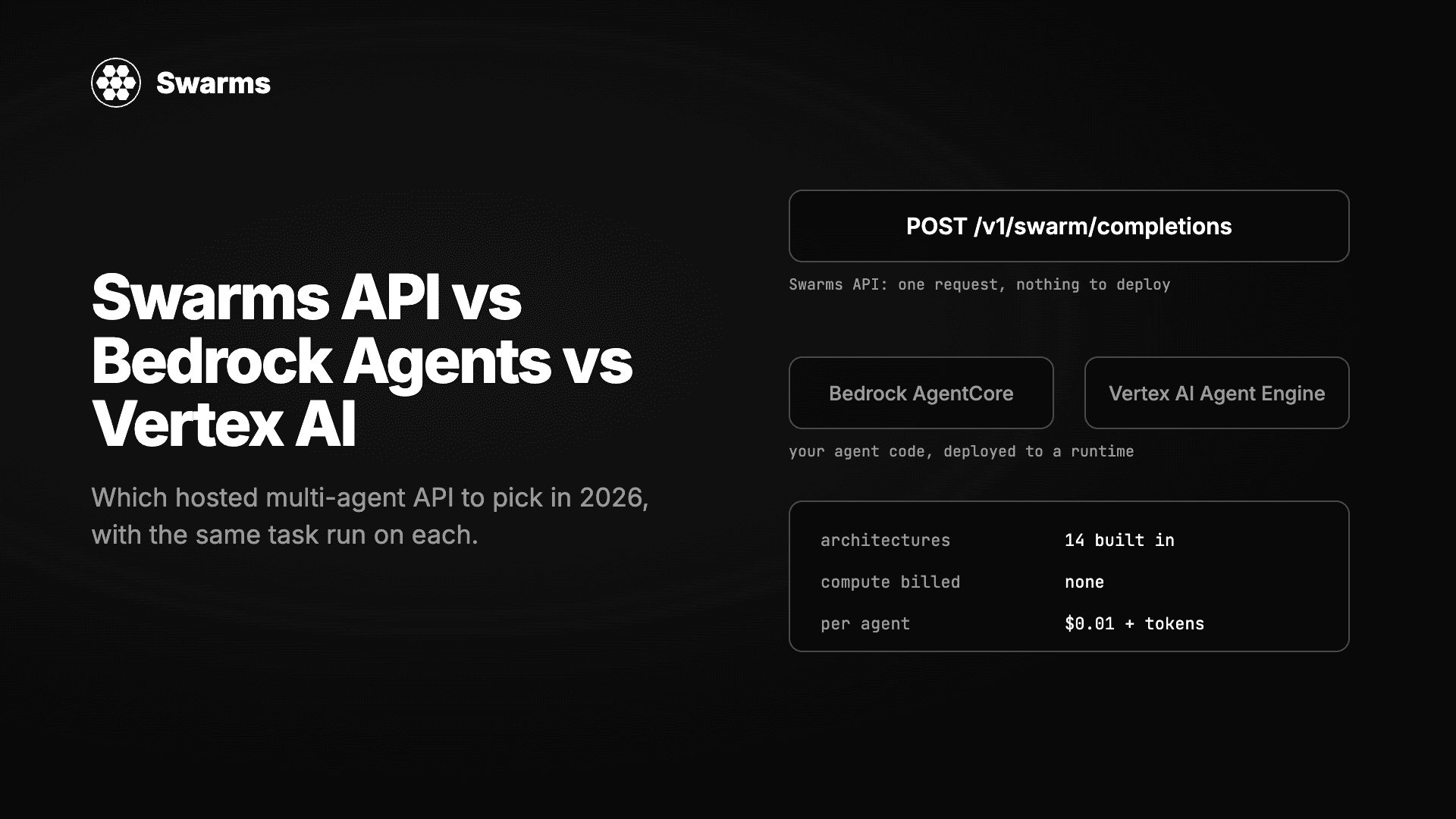
三种无需自建服务器即可运行多智能体系统的方式实测对比:Swarms API、Amazon Bedrock Agents 与 AgentCore、Google 的 Vertex AI Agent Builder 与 ADK。同一任务分别实现,逐项比较架构、模型选择、流式输出、批处理、定价以及拿到第一个结果所需的时间。
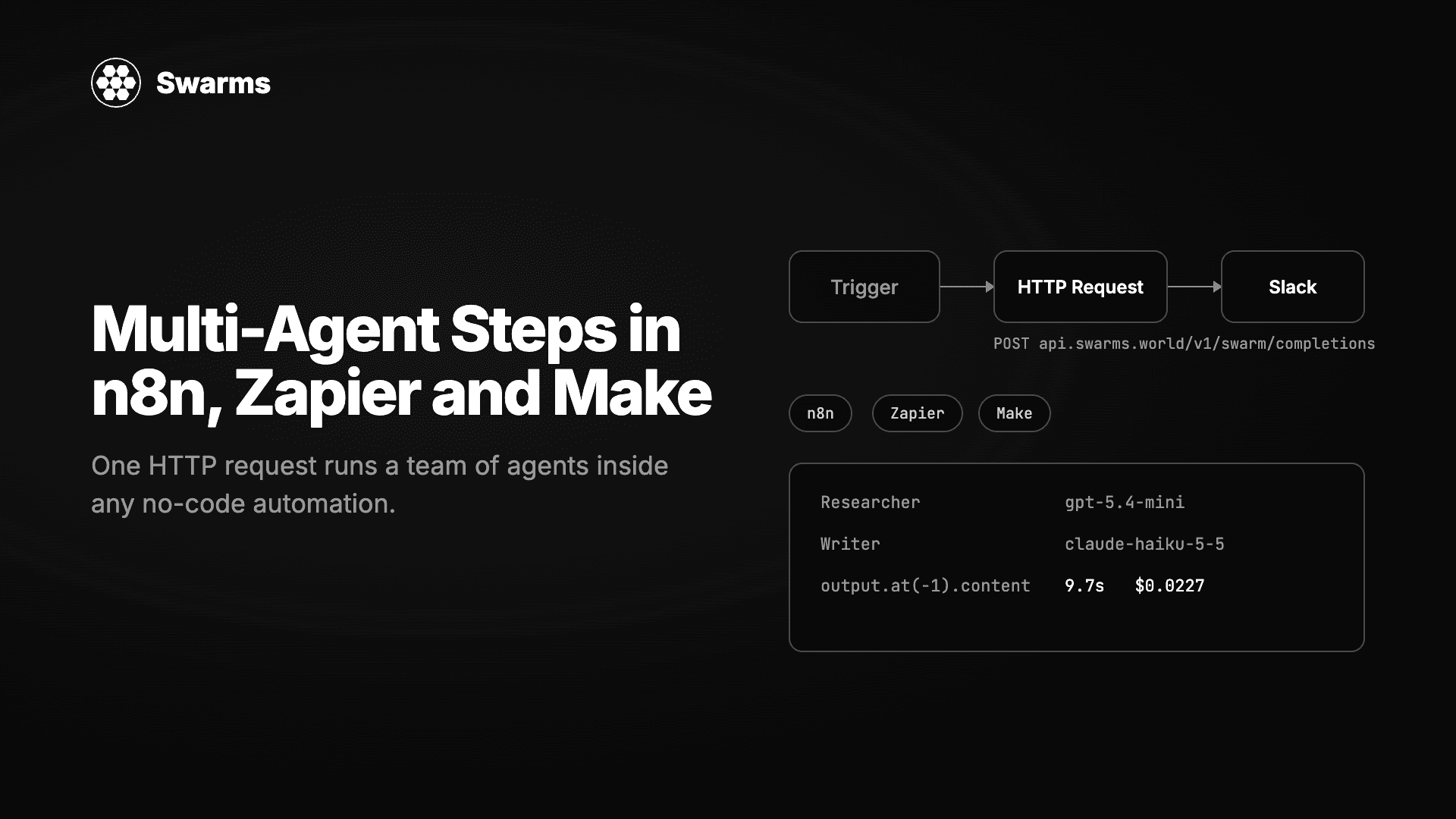
在任何无代码自动化工具中运行一支 AI 智能体团队。一个 HTTP Request 节点、一个 JSON 请求体,Swarms API 就会返回完成的工作。n8n、Zapier 和 Make 的逐步配置,外加三个可直接粘贴的配方:线索补全、工单分诊和每周报告。
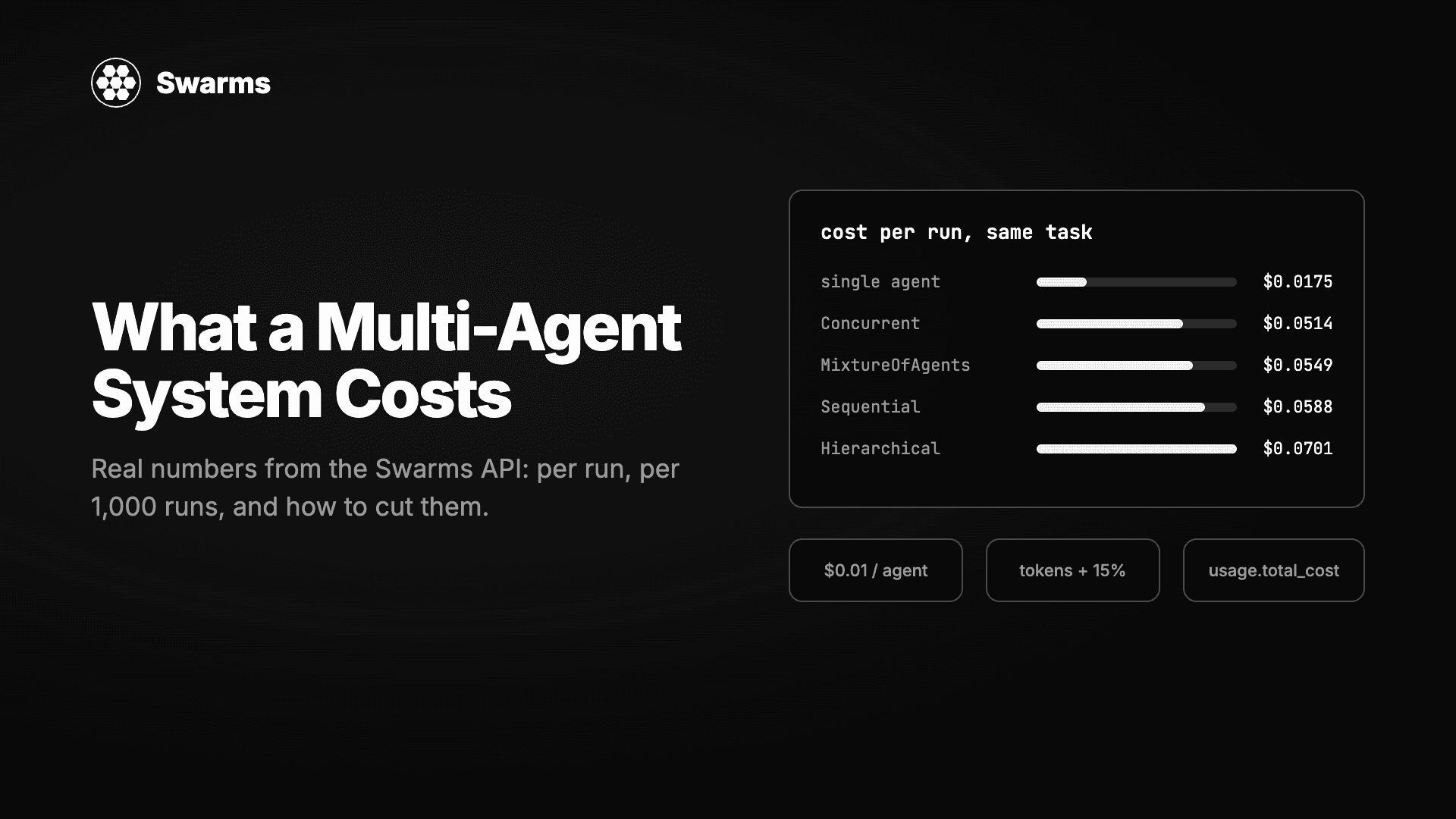
我们把同一个任务分别交给单个智能体和四种多智能体架构在 Swarms API 上运行,并从每个响应里读出账单。每次运行的费用、每 1,000 次运行的费用、钱花在哪里,以及降低费用的三个杠杆:模型搭配、max_loops 和夜间折扣。附基准测试脚本。