指南工程
如何让多台机器上的 AI 智能体共享同一段对话
用 Python 构建分布式多智能体系统:Swarms HttpChannel 让不同服务器上的智能体通过 HTTP 读写同一段共享对话,附带可运行的服务器和生产部署建议。
Kye Gomez12 分钟阅读

用 Python 构建分布式多智能体系统:Swarms HttpChannel 让不同服务器上的智能体通过 HTTP 读写同一段共享对话,附带可运行的服务器和生产部署建议。
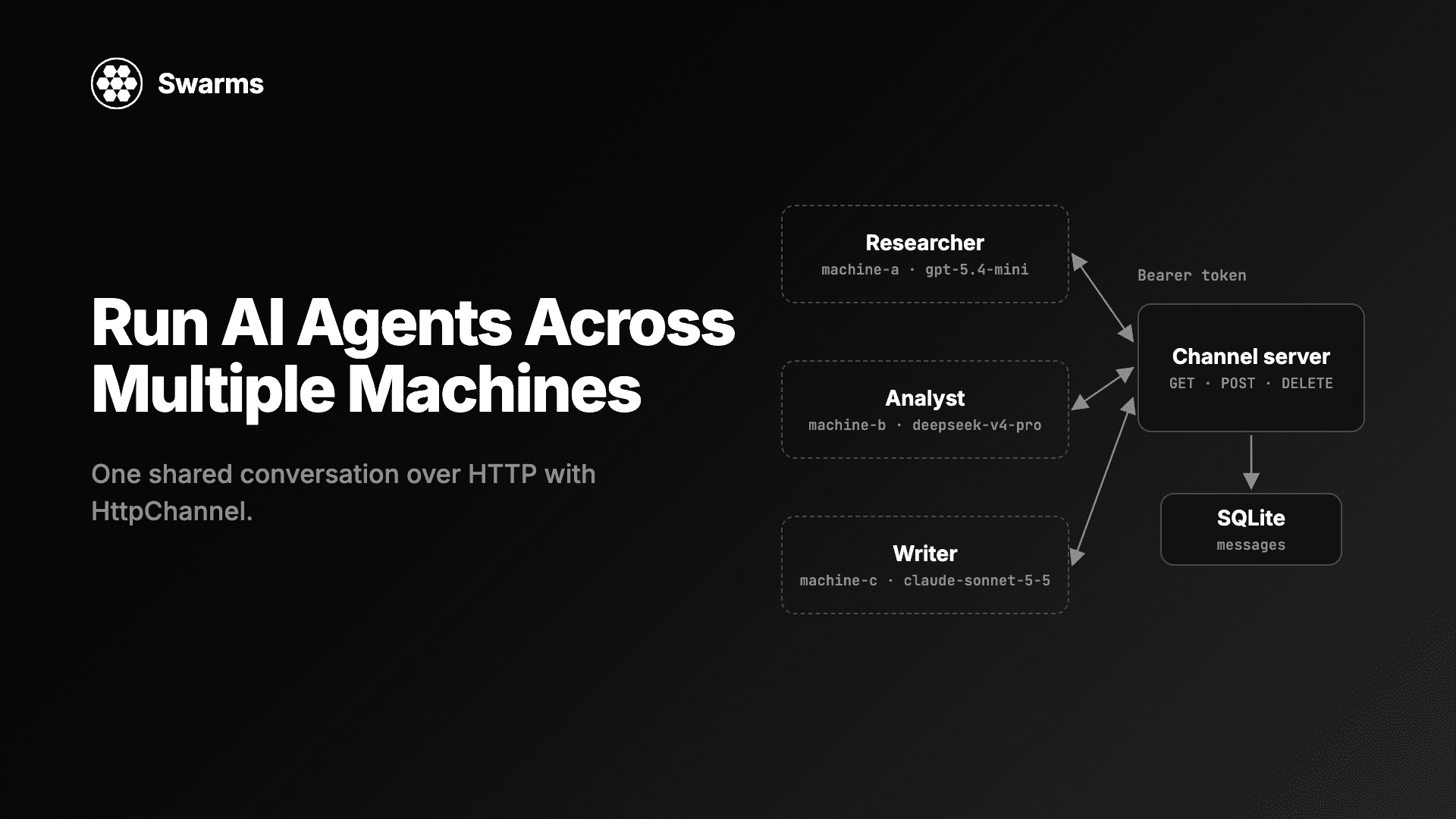
用 Python 搭建分布式多智能体系统,起点通常都一样:一个脚本,几个智能体,一个进程。后来研究智能体需要一台 GPU 机器,读取客户数据的智能体必须跑在内网里,或者你只是想让每个智能体各占一个容器,这样一个崩溃不会拖垮其他的。到了这一步,智能体之间不再共享内存,难点就变成了:怎样维护一段所有智能体都能读写的对话。
Swarms v17 "InterLink" 为此加入了 HttpChannel。你让每个智能体指向同一个 URL,由你自己运行的一个小服务器保存对话。本文会讲清楚 HttpChannel 期望的 HTTP 约定,给出一个带 bearer token 认证和 SQLite 存储的完整频道服务器(只用标准库),在三个独立进程里用三家不同的模型服务商运行三个智能体,最后给出关于 TLS、持久化和并发的生产建议。
当智能体跑在不同机器上时,有三样东西必须放在它们都能访问的地方:
消息队列、共享数据库或自定义 RPC 层都能做到这一点,但每一种都要在每个智能体里加代码。Swarms v17 把它变成了一个构造参数。任何 Agent(以及九种结构,包括 SequentialWorkflow、ConcurrentWorkflow、GroupChat 和 HierarchicalSwarm)都接受 channel=。运行之前,智能体把频道内容读作先前的轮次。它只发布一次任务,所以共享频道的智能体只看到一份任务。运行成功后,它以自己的 agent_name 发布最终答案。运行失败则什么都不发布。
v17 一共提供六种频道,详见完整更新日志。当智能体共享同一块磁盘时,用 FileChannel 和 SqliteChannel 就够了。HttpChannel 是给不同机器上的智能体用的。
HttpChannel 接受三个参数:
| 参数 | 默认值 | 作用 |
|---|---|---|
url | 必填 | 一段对话的端点,例如 https://host/channels/research |
headers | None | 每次调用都会发送,例如 {"Authorization": "Bearer ..."} |
timeout | 30.0 | 每次调用的等待秒数 |
一个 URL 对应一段对话,服务器在这个 URL 上响应三种调用:
| 调用 | 服务器做什么 | 消息体 |
|---|---|---|
GET url | 按从旧到新返回所有消息 | 响应:[{"agent_name": ..., "content": ...}, ...] |
POST url | 追加一条消息 | 请求:{"agent_name": ..., "content": ...} |
DELETE url | 删除所有消息 | 无 |
协议就这么多。HttpChannel 使用 httpx,而 Swarms 本来就依赖它,所以智能体这边不需要额外安装任何东西。任何非 2xx 响应都会抛出 httpx.HTTPStatusError,因此 token 错误或服务器宕机会直接报错,智能体不会在缺少上下文的情况下作答。messages() 只保留每行的 agent_name 和 content(转成字符串),所以服务器可以返回 id、时间戳等额外字段而不会出问题。close() 关闭连接池,服务器上的消息全部保留。
因为约定只是基于 HTTP 的普通 JSON,服务器可以用任何语言来写。下一节给出一个 Python 版本。
把下面的代码保存为 channel_server.py。它只用标准库:http.server 处理 HTTP,sqlite3 让对话在重启后依然存在,hmac.compare_digest 以恒定时间比较 token。对话位于 /channels/<name> 下,所以一台服务器可以容纳任意多段对话。
"""A channel server for Swarms HttpChannel: bearer-token auth, SQLite storage, standard library only."""

import hmac
import json
import os
import re
import sqlite3
import threading
from http.server import BaseHTTPRequestHandler, ThreadingHTTPServer

TOKEN = os.environ["CHANNEL_TOKEN"]
DB_PATH = os.environ.get("CHANNEL_DB", "channels.db")
HOST = os.environ.get("CHANNEL_HOST", "127.0.0.1")
PORT = int(os.environ.get("CHANNEL_PORT", "8765"))
MAX_BODY = 1_000_000  # bytes per message
ROUTE = re.compile(r"^/channels/([A-Za-z0-9_.-]{1,100})$")

db = sqlite3.connect(DB_PATH, check_same_thread=False)
db.execute("PRAGMA journal_mode=WAL")
db.execute(
    "CREATE TABLE IF NOT EXISTS messages ("
    " id INTEGER PRIMARY KEY AUTOINCREMENT,"
    " channel TEXT NOT NULL,"
    " agent_name TEXT NOT NULL,"
    " content TEXT NOT NULL,"
    " created_at TEXT NOT NULL DEFAULT CURRENT_TIMESTAMP)"
)
db.execute("CREATE INDEX IF NOT EXISTS by_channel ON messages (channel, id)")
db.commit()
lock = threading.Lock()  # one writer at a time on the shared connection


class Handler(BaseHTTPRequestHandler):
    def _reply(self, status, body=None):
        data = json.dumps(body).encode() if body is not None else b""
        self.send_response(status)
        self.send_header("Content-Type", "application/json")
        self.send_header("Content-Length", str(len(data)))
        self.end_headers()
        self.wfile.write(data)

    def _channel(self):
        """Check the token and the path. Returns the channel name, or None after replying."""
        sent = self.headers.get("Authorization", "")
        if not hmac.compare_digest(sent.encode(), f"Bearer {TOKEN}".encode()):
            self._reply(401, {"error": "missing or wrong bearer token"})
            return None
        match = ROUTE.match(self.path)
        if match is None:
            self._reply(404, {"error": "use /channels/<name>"})
            return None
        return match.group(1)

    def do_GET(self):
        name = self._channel()
        if name is None:
            return
        with lock:
            rows = db.execute(
                "SELECT agent_name, content FROM messages WHERE channel = ? ORDER BY id",
                (name,),
            ).fetchall()
        self._reply(200, [{"agent_name": a, "content": c} for a, c in rows])

    def do_POST(self):
        name = self._channel()
        if name is None:
            return
        length = int(self.headers.get("Content-Length") or 0)
        if length > MAX_BODY:
            self._reply(413, {"error": "message too large"})
            return
        try:
            row = json.loads(self.rfile.read(length))
            agent_name, content = row["agent_name"], row["content"]
            if not (isinstance(agent_name, str) and isinstance(content, str)):
                raise TypeError
        except (ValueError, KeyError, TypeError):
            self._reply(400, {"error": 'send {"agent_name": str, "content": str}'})
            return
        with lock:
            db.execute(
                "INSERT INTO messages (channel, agent_name, content) VALUES (?, ?, ?)",
                (name, agent_name, content),
            )
            db.commit()
        self._reply(201, {"agent_name": agent_name, "content": content})

    def do_DELETE(self):
        name = self._channel()
        if name is None:
            return
        with lock:
            db.execute("DELETE FROM messages WHERE channel = ?", (name,))
            db.commit()
        self._reply(204)


if __name__ == "__main__":
    print(f"Serving channels on http://{HOST}:{PORT}/channels/<name>")
    ThreadingHTTPServer((HOST, PORT), Handler).serve_forever()
生成一个 token 并启动服务器:
export CHANNEL_TOKEN="$(python -c 'import secrets; print(secrets.token_urlsafe(32))')"
python channel_server.py
id INTEGER PRIMARY KEY AUTOINCREMENT 这一列让每个读取方看到相同的顺序:GET 按它排序,所以"从旧到新"就是"先提交的在前"。ThreadingHTTPServer 在独立线程上处理每个请求,锁保证这一个 SQLite 连接同一时间只执行一条语句。
在另一个终端用 curl 检查。下面是我们从上面的服务器拿到的响应:
URL=http://127.0.0.1:8765/channels/battery-brief

curl -i $URL                       # HTTP/1.0 401 Unauthorized
curl -X POST $URL -H "Authorization: Bearer $CHANNEL_TOKEN" \
     -d '{"agent_name": "Ops", "content": "hello"}'
# {"agent_name": "Ops", "content": "hello"}
curl $URL -H "Authorization: Bearer $CHANNEL_TOKEN"
# [{"agent_name": "Ops", "content": "hello"}]
curl -i -X DELETE $URL -H "Authorization: Bearer $CHANNEL_TOKEN"   # HTTP/1.0 204 No Content
缺少字符串类型 agent_name 和 content 的请求体会得到 400,/channels/<name> 以外的路径会得到 404。
接下来是智能体。这个脚本可以运行三种角色中的任意一种,你可以把它复制到三台机器上,每台启动一个不同的角色。每个角色使用不同的服务商,按任务挑选:gpt-5.4-mini 便宜又快,适合收集事实;deepseek/deepseek-v4-pro 负责对成本和取舍做推理;anthropic/claude-sonnet-5-5 写最终简报。每台机器需要设置自己服务商的 API key(OPENAI_API_KEY、DEEPSEEK_API_KEY 或 ANTHROPIC_API_KEY)。
保存为 agent_node.py:
"""Run one agent of the team against a shared HttpChannel.

Usage: python agent_node.py researcher|analyst|writer
"""

import os
import sys
import time

from swarms import Agent, HttpChannel

TASK = "Write a one-page brief on home battery storage for a utility's product team."

ROLES = {
    "researcher": {
        "agent_name": "Researcher",
        "model_name": "gpt-5.4-mini",
        "system_prompt": "You gather facts, figures and open questions. Answer in a short bullet list.",
        "waits_for": None,
    },
    "analyst": {
        "agent_name": "Analyst",
        "model_name": "deepseek/deepseek-v4-pro",
        "system_prompt": "You read the research in the conversation and list the risks, costs and trade-offs.",
        "waits_for": "Researcher",
    },
    "writer": {
        "agent_name": "Writer",
        "model_name": "anthropic/claude-sonnet-5-5",
        "system_prompt": "You turn the research and analysis in the conversation into a one-page brief.",
        "waits_for": "Analyst",
    },
}


def wait_for(channel, agent_name, poll_seconds=2.0, timeout_seconds=900):
    """Block until `agent_name` has posted to the channel."""
    deadline = time.monotonic() + timeout_seconds
    while not any(m["agent_name"] == agent_name for m in channel.messages()):
        if time.monotonic() > deadline:
            raise TimeoutError(f"{agent_name} did not post within {timeout_seconds}s")
        time.sleep(poll_seconds)


role = ROLES[sys.argv[1]]
channel = HttpChannel(
    os.environ["CHANNEL_URL"],
    headers={"Authorization": f"Bearer {os.environ['CHANNEL_TOKEN']}"},
    timeout=30.0,
)

if role["waits_for"]:
    print(f"Waiting for {role['waits_for']} ...", flush=True)
    wait_for(channel, role["waits_for"])

agent = Agent(
    agent_name=role["agent_name"],
    system_prompt=role["system_prompt"],
    model_name=role["model_name"],
    max_loops=1,
    output_type="final",
    print_on=False,
    channel=channel,
)
print(agent.run(TASK))
channel.close()
在三台机器(或三个终端)上以任意顺序启动三个角色:
export CHANNEL_URL=http://127.0.0.1:8765/channels/battery-brief
export CHANNEL_TOKEN=...   # the same token the server uses

python agent_node.py writer       # machine C: prints "Waiting for Analyst ..."
python agent_node.py analyst      # machine B: prints "Waiting for Researcher ..."
python agent_node.py researcher   # machine A: runs at once
在我们的测试中,先启动 writer,然后 analyst,最后 researcher。writer 和 analyst 一直轮询到轮到自己,三个进程按 Researcher、Analyst、Writer 的顺序完成。
几个让它能正常工作的细节:
wait_for 负责协调。 HttpChannel 只存储消息,运行顺序由你决定。轮询 messages(),看上一个智能体的名字是否出现,是串联多个进程最简单的方法,这样你也可以同时启动所有机器。TASK。researcher 发布它;analyst 和 writer 发现它已经在频道上,就不会再发一次。模型仍然会把任务作为当前请求收到。output_type="final" 让 run 返回答案。 Agent 默认返回整段对话。无论哪种设置,频道收到的都只是最终答案。任何持有 token 的机器都能读取这段对话。仪表盘、测试或某个人也可以用这种方式观察智能体:
import os

from swarms import HttpChannel

channel = HttpChannel(
    os.environ["CHANNEL_URL"],
    headers={"Authorization": f"Bearer {os.environ['CHANNEL_TOKEN']}"},
)
for message in channel.messages():
    print(f"\n## {message['agent_name']}\n{message['content']}")
channel.close()
输出中每条消息一节,顺序与服务器提交的顺序相同:
## Human
Write a one-page brief on home battery storage for a utility's product team.

## Researcher
- ...

## Analyst
- ...

## Writer
...
Human 是智能体默认的 user_name,任务就是以这个名字发布的。给 Agent 传 user_name="Scheduler"(或任意名字)可以修改它。因为服务器把行存进 SQLite,重启后记录依然存在;我们在上面停掉并重启了服务器,读回了同样的四条消息。
整个结构也可以共享一个频道。每个接受 channel= 的结构都会把它的记录写进去,所以一台机器上的整条流水线可以把工作交给另一处的智能体。这里机器 A 运行一个两步的 SequentialWorkflow,用 groq/openai/gpt-oss-120b 做快速研究,用 gemini/gemini-2.5-pro 做分析:
import os

from swarms import Agent, HttpChannel, SequentialWorkflow

channel = HttpChannel(
    os.environ["CHANNEL_URL"],
    headers={"Authorization": f"Bearer {os.environ['CHANNEL_TOKEN']}"},
)

researcher = Agent(
    agent_name="Researcher",
    system_prompt="You gather facts, figures and open questions. Answer in a short bullet list.",
    model_name="groq/openai/gpt-oss-120b",
    max_loops=1,
    print_on=False,
)
analyst = Agent(
    agent_name="Analyst",
    system_prompt="You read the research in the conversation and list the risks, costs and trade-offs.",
    model_name="gemini/gemini-2.5-pro",
    max_loops=1,
    print_on=False,
)

workflow = SequentialWorkflow(agents=[researcher, analyst], max_loops=1, channel=channel)
workflow.run("Assess home battery storage for a utility's product team.")
print(f"{len(channel.messages())} messages on the channel")
它会打印 3 messages on the channel:任务(由工作流以 User 名义发布)、researcher 和 analyst。频道归工作流所有,所以成员智能体不会单独发布,每条消息只写一次。
机器 B 运行一个使用 anthropic/claude-opus-5-5 的审阅者。这是这组模型里最强的一个,因为它只运行一次,任务是找出其他智能体遗漏的问题:
import os

from swarms import Agent, HttpChannel

channel = HttpChannel(
    os.environ["CHANNEL_URL"],
    headers={"Authorization": f"Bearer {os.environ['CHANNEL_TOKEN']}"},
)

reviewer = Agent(
    agent_name="Reviewer",
    system_prompt="You check the analysis in the conversation for gaps and unsupported claims.",
    model_name="anthropic/claude-opus-5-5",
    max_loops=1,
    output_type="final",
    print_on=False,
    channel=channel,
)
print(reviewer.run("Review the analysis above. List anything that needs a source."))
审阅者把之前的三条消息读作上下文,发布自己的任务,并把答案作为第五条消息追加进去。非空的频道会延续对话,所以之后你可以继续往同一个 URL 添加智能体或工作流。
如果你的技术栈本来就在用 FastAPI,同样的约定只需要几个装饰器。需要先 pip install fastapi uvicorn:
"""The same channel server in FastAPI. Run: uvicorn channel_server_fastapi:app --port 8765"""

import hmac
import os
import sqlite3
import threading

from fastapi import Depends, FastAPI, Header, HTTPException, Path, Response
from pydantic import BaseModel

TOKEN = os.environ["CHANNEL_TOKEN"]
db = sqlite3.connect(os.environ.get("CHANNEL_DB", "channels.db"), check_same_thread=False)
db.execute("PRAGMA journal_mode=WAL")
db.execute(
    "CREATE TABLE IF NOT EXISTS messages (id INTEGER PRIMARY KEY AUTOINCREMENT,"
    " channel TEXT NOT NULL, agent_name TEXT NOT NULL, content TEXT NOT NULL,"
    " created_at TEXT NOT NULL DEFAULT CURRENT_TIMESTAMP)"
)
db.commit()
lock = threading.Lock()
app = FastAPI()
Name = Path(pattern=r"^[A-Za-z0-9_.-]{1,100}$")


class Message(BaseModel):
    agent_name: str
    content: str


def check_token(authorization: str = Header(default="")):
    if not hmac.compare_digest(authorization.encode(), f"Bearer {TOKEN}".encode()):
        raise HTTPException(status_code=401, detail="missing or wrong bearer token")


@app.get("/channels/{name}", dependencies=[Depends(check_token)])
def read(name: str = Name) -> list[Message]:
    with lock:
        rows = db.execute(
            "SELECT agent_name, content FROM messages WHERE channel = ? ORDER BY id", (name,)
        ).fetchall()
    return [Message(agent_name=a, content=c) for a, c in rows]


@app.post("/channels/{name}", status_code=201, dependencies=[Depends(check_token)])
def append(message: Message, name: str = Name) -> Message:
    with lock:
        db.execute(
            "INSERT INTO messages (channel, agent_name, content) VALUES (?, ?, ?)",
            (name, message.agent_name, message.content),
        )
        db.commit()
    return message


@app.delete("/channels/{name}", status_code=204, dependencies=[Depends(check_token)])
def clear(name: str = Name) -> Response:
    with lock:
        db.execute("DELETE FROM messages WHERE channel = ?", (name,))
        db.commit()
    return Response(status_code=204)
它使用同一张表,所以两个服务器可以在同一个数据库上互相切换。智能体脚本不需要改动。FastAPI 对不合法的频道名返回 422 而不是 404;两种情况 HttpChannel 都会抛出异常。
认证头。 headers 会随每个 GET、POST 和 DELETE 发送,所以网关能识别的任何方式都可以:bearer token、API key 头,或服务网格签发的签名头。如果想知道每一行是哪台机器写的,就给每台机器发不同的 token;服务器可以把 token 映射到允许的 agent_name,拒绝冒充他人的发布。没有认证的频道会让任何拿到 URL 的人读取整段对话,并替智能体"说话",所以不要在没有校验的情况下暴露它。
TLS。 流量一旦离开单台主机,就使用 https:// URL。httpx 默认校验证书,所以自签名证书在你信任它之前会失败。最简单的部署方式是让服务器只监听 127.0.0.1,在前面放 Caddy 或 nginx 终止 TLS。FastAPI 版本也可以直接用 uvicorn 的 --ssl-keyfile 和 --ssl-certfile 提供 TLS。只有在前面有组件负责 TLS 和访问控制时,才设置 CHANNEL_HOST=0.0.0.0。
持久化。 WAL 模式的 SQLite 对单个服务器进程足够用,并且能挺过重启。如果你在负载均衡后面运行多个服务器副本,它们需要在同样的三个路由背后共享一个数据库(Postgres 或类似的),因为智能体只能看到 GET 返回的内容。如果所有智能体都在一台机器上或共享磁盘,你可能根本不需要服务器:SqliteChannel(path, name) 直接从文件提供同样的共享对话。
并发。 服务器按提交顺序排列消息,所以两个智能体同时发布时,两条消息都会落库,一前一后。不过 Agent.run 里的"任务只发一次"检查是先读后写:两个智能体在同一瞬间开始同一个任务时,可能都看到空频道,于是都发布了任务。wait_for 只让第一个智能体先开始,从而避免这种情况。如果有很多并行的工作者,给每个分配独立的对话 URL,或者让它们在一个拥有该频道的 ConcurrentWorkflow 里运行,它会按智能体顺序发布答案。
超时和错误。 timeout 作用于每次调用(默认 30 秒)。运行前 GET 失败会在任何模型调用之前抛出异常,所以你不会为一个缺少上下文的答案付费。运行后 POST 失败也会抛出异常,此时模型调用已经发生,所以如果网络不稳定,请给 run 加上重试。
对话大小。 messages() 每次读取都会拉取整段对话,每个智能体也会把它全部作为先前轮次发给模型。每个任务用一个 URL(/channels/report-2026-11-04),不要用一个无限增长的频道,并在对话结束时调用 channel.clear()(即 DELETE)。
它是一组运行在不同进程或不同机器上、协作完成同一任务的 AI 智能体。每个智能体可以使用自己的模型、硬件和网络访问权限,它们通过共享状态来协调,例如一段对话、一个队列或一个数据库。
在 Swarms 中,给每个智能体传入指向同一 URL 的 channel=HttpChannel(url, headers=...)。运行前,每个智能体把该 URL 上的消息读作先前轮次;运行成功后,把答案发布到那里。服务器只需要在这个 URL 上响应 GET、POST 和 DELETE。
不需要。只要服务器在 GET 时以 JSON 列表返回消息、在 POST 时追加 {"agent_name", "content"}、在 DELETE 时清空,用任何语言写都可以。Swarms 在 examples/channel_examples/http_channel_server.py 中提供了一个最小的内存版参考服务器,本文的服务器在此基础上加了认证和 SQLite。
在每个请求上校验 bearer token(或其他请求头),通过 HTTPS 提供服务,并让数据库只对服务器可见。通过 HttpChannel(..., headers={"Authorization": "Bearer ..."}) 传入 token;token 错误时,智能体会在调用模型之前抛出 httpx.HTTPStatusError。
当所有智能体都能打开同一个文件时,用 FileChannel 或 SqliteChannel。当它们做不到时,用 HttpChannel:不同的机器、没有共享卷的容器,或者处在不同网络、只能通过 HTTP 互通的智能体。
pip install -U swarms启动 channel_server.py,在每台机器上设置 CHANNEL_URL 和 CHANNEL_TOKEN,然后在每台机器上用不同的角色运行 agent_node.py。如果想把人也拉进同样的循环,请看通过电子邮件实现人机协同的 AI 智能体,它使用 SmtpChannel 和 AgentMailChannel,让人可以在收件箱里回复智能体。其他频道以及这次发布的全部内容,请阅读 Swarms v17 InterLink 更新日志。可以跨机器运行的协作模式,请看多智能体协作模式和智能体通信协议。
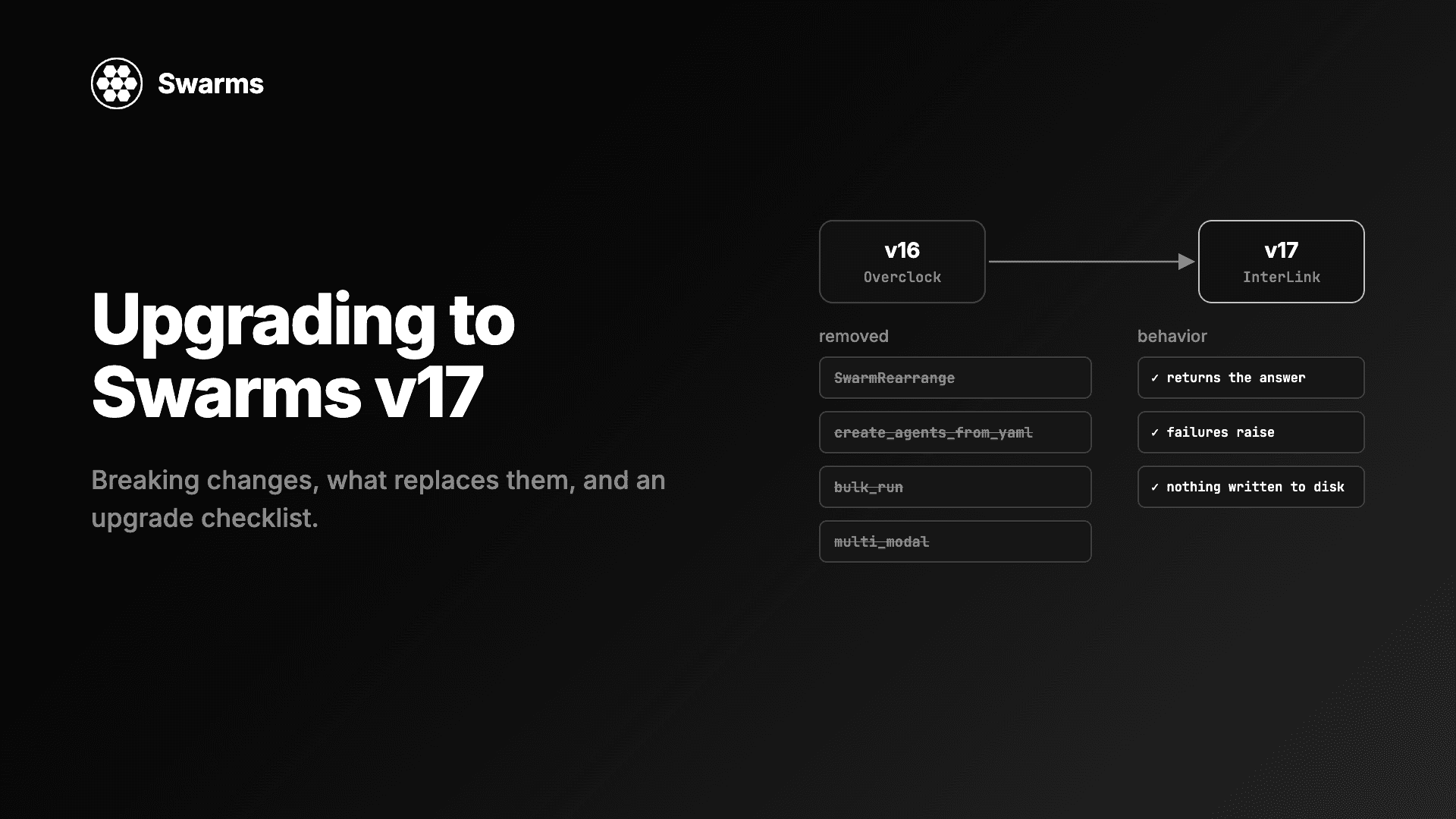
Swarms v17 升级与迁移指南:InterLink 中移除的每个类和参数、应该改用什么、变更的默认行为,以及一份升级检查清单。
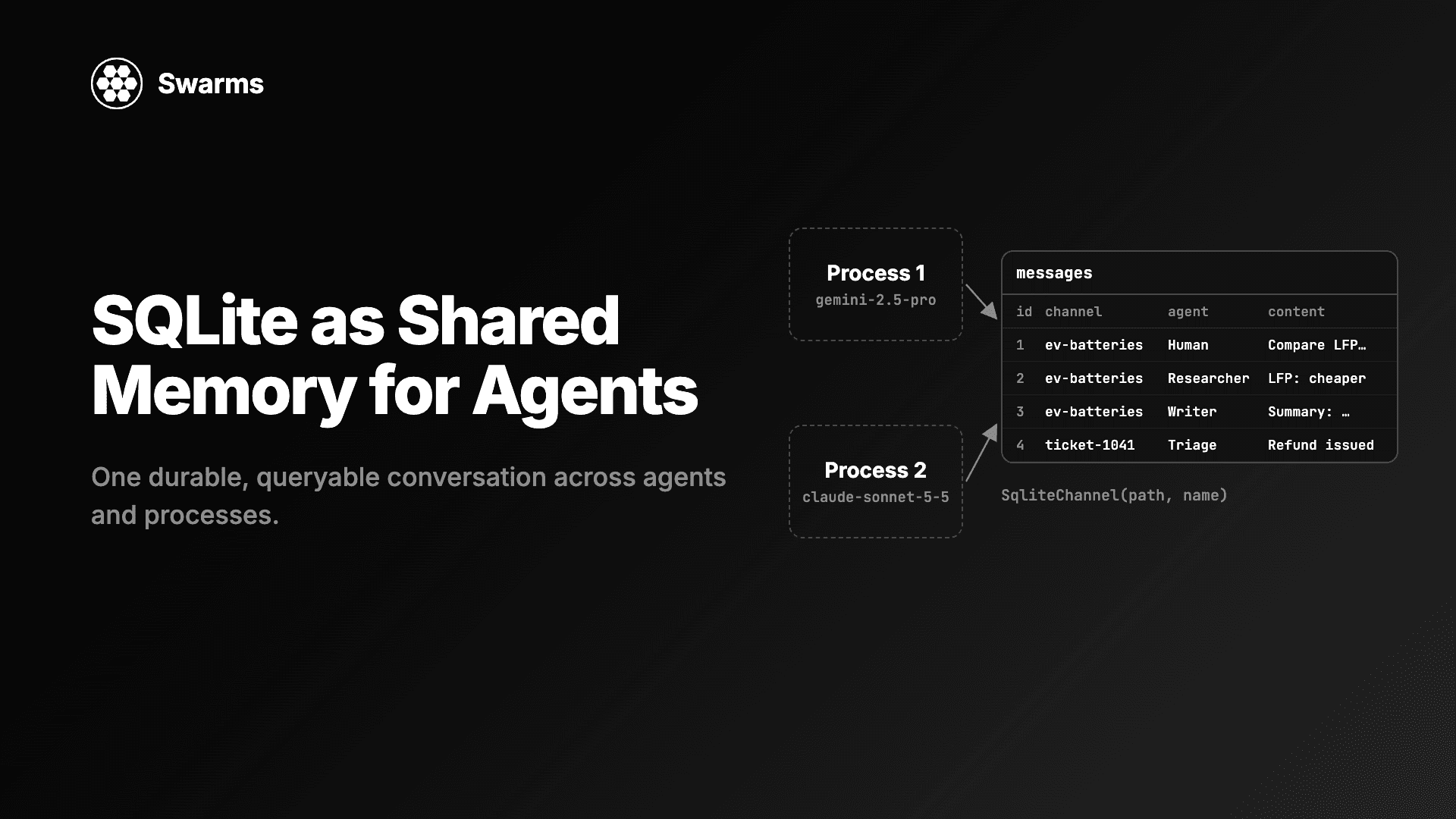
用 SQLite 实现 AI 智能体的共享记忆:SqliteChannel 让多个智能体和进程共用一份持久、可查询的对话历史。用 Swarms 存储、共享这份记忆,并对它运行 SQL。
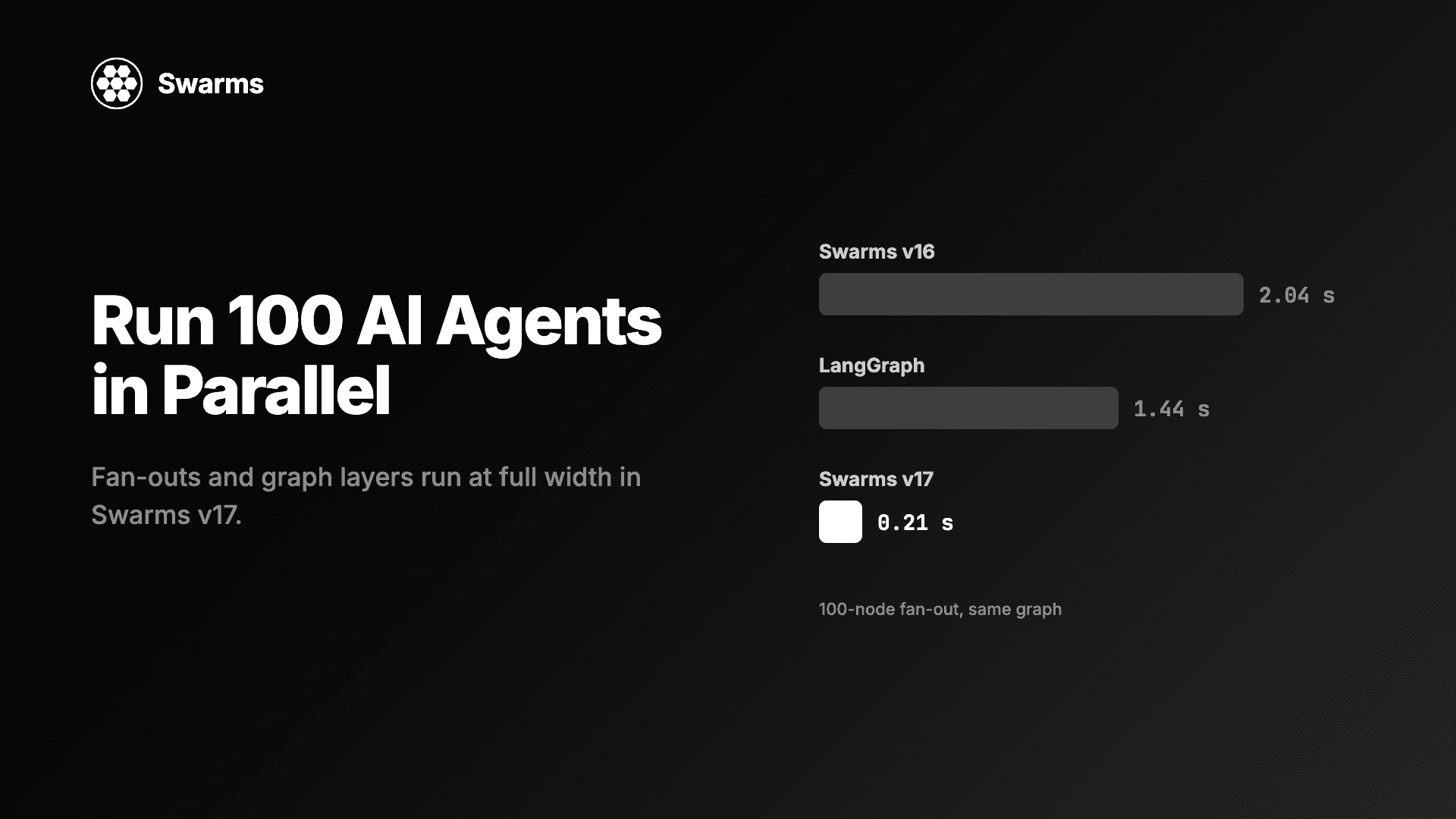
在 Python 中并行运行 AI 智能体:Swarms v17 中 100 个智能体的扇出只需 0.21 秒,此前为 2.04 秒(LangGraph:1.44 秒)。附满宽并发与异步上限的代码。