指南工程
如何在 Python 中并行运行 100 个 AI 智能体
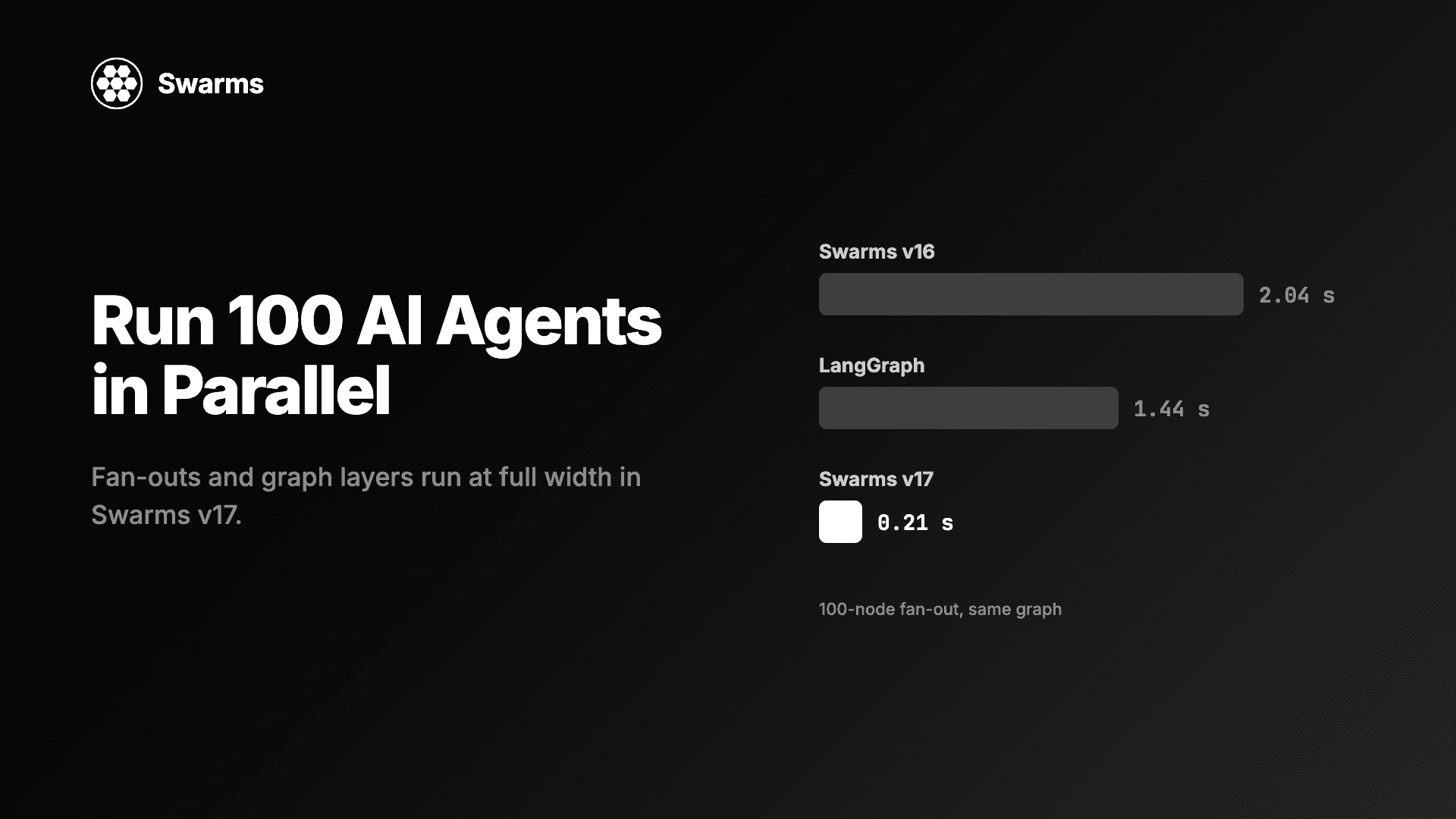
在 Python 中并行运行 AI 智能体:Swarms v17 中 100 个智能体的扇出只需 0.21 秒,此前为 2.04 秒(LangGraph:1.44 秒)。附满宽并发与异步上限的代码。
Kye Gomez11 分钟阅读

在 Python 中并行运行 AI 智能体:Swarms v17 中 100 个智能体的扇出只需 0.21 秒,此前为 2.04 秒(LangGraph:1.44 秒)。附满宽并发与异步上限的代码。
想在 Python 中并行运行 AI 智能体,启动它们的代码很短。真正决定有多少个同时运行的,是一个你可能不知道自己有的上限:按 CPU 大小设定的线程池、默认 32 的上限、一个你从没配置过的事件循环执行器。本指南演示如何用 Swarms v17 “InterLink” 的 ConcurrentWorkflow、GraphWorkflow 和异步扇出辅助函数满宽运行 100 个智能体,再演示当速率限制开始反压时,如何有意地按提供商限制并发。下面的每个代码块在发布前都针对 Swarms 17.0.0 源码用 100 个智能体实际运行过。
一次智能体调用几乎所有时间都在等模型 API。等待期间 CPU 是空闲的,Python 也会释放 GIL,所以线程能很好地重叠。因此正确的池大小是你希望同时在途的调用数,和 CPU 核数无关。
v17 之前,Swarms 有两处用错了上限。ConcurrentWorkflow 的默认池最多 32 个智能体,GraphWorkflow 把池大小设为 CPU 核数的 95%。在 12 核机器上,一个 100 节点的层要分成每波 11 个来运行。在 v17 中两者默认都会同时运行所有智能体(#2956、#2957):ConcurrentWorkflow 把池大小设为 len(agents),GraphWorkflow 设为图中最宽的那一层。
v17 更新日志测量了一个由相互独立节点组成的扇出,每个智能体替换为 200 毫秒的 sleep,取三次运行的中位数(#2957):
| 节点数 | v16 | v17 | LangGraph |
|---|---|---|---|
| 8 | 0.206 s | 0.204 s | 0.205 s |
| 32 | 0.614 s | 0.208 s | 0.413 s |
| 100 | 2.036 s | 0.211 s | 1.436 s |
| 256 | 4.877 s | 0.219 s | 3.280 s |
100 节点的扇出从 2.04 秒降到 0.21 秒,而 LangGraph 在同一张图上是 1.44 秒。sleep 代替了模型调用,所以这个基准测的是调度:100 个各 200 毫秒的节点用 0.21 秒跑完,说明 100 个是在一波里同时运行的。换成真实模型时,一个满宽层的耗时大致等于其中最慢那次调用的时间。两种图 API 的并排对比,见 Swarms GraphWorkflow 与 LangGraph 对比。
pip install -U swarms
# optional: RouteHub for model calls and rustworkx for graphs
pip install -U "swarms[fast]"
示例混用了多家提供商,所以为你用到的每一家设置 key:OPENAI_API_KEY、ANTHROPIC_API_KEY、GEMINI_API_KEY、DEEPSEEK_API_KEY、MISTRAL_API_KEY、GROQ_API_KEY。更新日志报告,swarms[fast] 把每次调用的开销降低了一半以上,峰值内存从约 220 MB 降到 100 MB,当 100 个调用同时在途时,这些节省会累积起来。
ConcurrentWorkflow 给每个智能体同一个任务,并同时运行它们。这里 100 个分析师分布在四家提供商上,使用小而快的模型,因为每个智能体只回答两句话。
import time

from swarms import Agent, ConcurrentWorkflow

# Cheap, fast models from four providers, 25 agents each.
models = [
    "gpt-5.4-mini",
    "anthropic/claude-haiku-5-5",
    "groq/openai/gpt-oss-120b",
    "mistral/mistral-large-latest",
]
sectors = ["energy", "banking", "retail", "logistics", "healthcare"]

agents = [
    Agent(
        agent_name=f"Analyst-{n:03d}",
        system_prompt=(
            f"You are an equity analyst covering {sectors[n % len(sectors)]}. "
            "Answer in two sentences."
        ),
        model_name=models[n % len(models)],
        max_loops=1,
        print_on=False,
    )
    for n in range(100)
]

workflow = ConcurrentWorkflow(agents=agents)  # max_workers defaults to len(agents)

start = time.perf_counter()
results = workflow.run("What is the biggest risk to your sector next quarter?")
print(f"{len(results)} answers in {time.perf_counter() - start:.2f} s")

for message in results[:3]:
    print(message["role"], "->", message["content"][:80])
在默认的 output_type="dict-all-except-first" 下,run() 返回 100 条消息的列表,每个智能体一条,按智能体顺序排列,role 是智能体名称,content 是它的回答。工作流会记录每个智能体的答案(通过 agent_answer),所以每个 content 只是该智能体的回复本身。print_on=False 让 100 个智能体不会打印 100 个面板。
如果某个智能体抛出异常,默认的 on_error="store" 会把它记录在角色 "<name> (failed)" 下,内容为 "Error: ...",并让其余 99 个继续完成。传入 on_error="raise" 则会在第一次失败时中止运行。
把智能体分散到四家提供商,作用不只是让回答更多样。速率限制是按提供商账号计算的,所以向四家各发 25 个请求,远比向一家发 100 个温和。
当并行层位于其他步骤之间时,使用 GraphWorkflow。这张图有一个简报撰写者、100 个并行的评审者,以及一个读完全部 100 条评审的编辑。
import time

from swarms import Agent, GraphWorkflow

def make_agent(name, model, prompt):
    return Agent(
        agent_name=name,
        system_prompt=prompt,
        model_name=model,
        max_loops=1,
        output_type="final",  # record each node's answer, not its transcript
        print_on=False,
    )

brief = make_agent(
    "Brief-Writer", "gpt-5.4",
    "Turn the task into a short brief that a reviewer can act on.",
)
reviewers = [
    make_agent(
        f"Reviewer-{n:03d}",
        ["gpt-5.4-mini", "anthropic/claude-haiku-5-5", "groq/openai/gpt-oss-120b"][n % 3],
        f"You review product feedback as customer persona #{n}. Give one concrete objection.",
    )
    for n in range(100)
]
editor = make_agent(
    "Editor", "anthropic/claude-sonnet-5-5",
    "Group the reviewers' objections into themes and rank them by how often they appear.",
)

graph = GraphWorkflow(name="persona-review")  # max_parallel_nodes=None: full layer width
for agent in [brief, *reviewers, editor]:
    graph.add_node(agent)
graph.add_edges_from_source("Brief-Writer", [r.agent_name for r in reviewers])
graph.add_edges_to_target([r.agent_name for r in reviewers], "Editor")

start = time.perf_counter()
outputs = graph.run("Launch plan: a $9/month tier with no API access.")
print(f"{len(outputs)} nodes in {time.perf_counter() - start:.2f} s")
print(outputs["Editor"][:200])
print(graph.usage)
这张图编译成三层(1、100 和 1 个节点),中间一层在一波内跑完,所以整次运行大约花三次模型调用的时间。run() 返回一个以节点 id(也就是智能体名称)为键的字典。GraphWorkflow 保存每个智能体 run 返回的任何内容,所以要在智能体上设置 output_type="final";在 Agent 的默认设置下,每个节点的输出会是它的整段对话。graph.usage 汇总图中每个智能体的提供商 token。
模型选择跟着工作走:一个中档模型写唯一的简报,三家提供商的三个便宜模型处理 100 条评审,Claude Sonnet 5.5 负责最后那一次长上下文的综合。
在异步应用中,使用 run_agents_concurrently_async。在 v17 中它会 await 每个智能体的 arun,并接受 max_concurrency(#3093)。结果按输入顺序返回,第一个异常会向上传播。None 表示不设上限;小于 1 的值会抛出 ValueError。
import asyncio
import time
from concurrent.futures import ThreadPoolExecutor

from swarms import Agent, run_agents_concurrently_async

agents = [
    Agent(
        agent_name=f"Summariser-{n:03d}",
        system_prompt="Summarise the task in one sentence.",
        model_name=["gpt-5.4-mini", "groq/openai/gpt-oss-120b"][n % 2],
        max_loops=1,
        output_type="final",
        print_on=False,
    )
    for n in range(100)
]

async def main():
    # Agent.arun runs Agent.run in a worker thread (asyncio.to_thread), and the
    # event loop's default pool has min(32, CPU cores + 4) threads. Size it to the fan-out.
    asyncio.get_running_loop().set_default_executor(ThreadPoolExecutor(max_workers=len(agents)))

    for cap in (None, 20):
        start = time.perf_counter()
        results = await run_agents_concurrently_async(
            agents, "Summarise today's market news.", max_concurrency=cap
        )
        print(f"max_concurrency={cap}: {len(results)} results in {time.perf_counter() - start:.2f} s")

    print(results[0])

asyncio.run(main())
set_default_executor 这一行很重要。在 17.0.0 中 Agent.arun 仍然是 asyncio.to_thread(self.run)(原生异步在 #2711 中跟踪),所以每个在途的智能体都会占用事件循环默认执行器中的一个线程。Python 把这个池的大小设为 min(32, os.cpu_count() + 4),在 12 核笔记本上是 16 个线程。没有这一行,max_concurrency=None 仍会把 100 个智能体分成每波 16 个运行。加上这一行,None 会同时运行全部 100 个,max_concurrency=20 则分五波、每波 20 个。等原生 arun 落地后,仅靠信号量就能决定宽度。
CouncilAsAJudge.arun 和 MajorityVoting.arun 接受同样的 max_concurrency 参数,所以同一个上限也适用于评审团和投票者。
当 100 个智能体跨越多家提供商时,单一的全局上限不合适,因为每家提供商都执行自己的限制。按模型给智能体分组,给每组单独的上限,然后让各组同时运行:
import asyncio
from collections import defaultdict
from concurrent.futures import ThreadPoolExecutor

from swarms import Agent, run_agents_concurrently_async

# How many requests each provider account can take at once. Set these from
# your own rate-limit tier; the numbers here are placeholders.
PROVIDER_CAPS = {
    "gpt-5.4-mini": 40,
    "anthropic/claude-haiku-5-5": 10,
    "groq/openai/gpt-oss-120b": 25,
    "deepseek/deepseek-v4-pro": 15,
}
# A backup model on a different provider for each primary.
FALLBACK = {
    "gpt-5.4-mini": "groq/openai/gpt-oss-120b",
    "anthropic/claude-haiku-5-5": "gpt-5.4-mini",
    "groq/openai/gpt-oss-120b": "gpt-5.4-mini",
    "deepseek/deepseek-v4-pro": "anthropic/claude-haiku-5-5",
}
models = list(PROVIDER_CAPS)

agents = [
    Agent(
        agent_name=f"Grader-{n:03d}",
        system_prompt="Grade the answer from 1 to 10 and give one reason.",
        model_name=models[n % len(models)],
        fallback_model_name=FALLBACK[models[n % len(models)]],
        retry_attempts=3,  # client-side retries per model, with backoff on rate limits
        max_loops=1,
        output_type="final",
        print_on=False,
    )
    for n in range(100)
]

async def main():
    asyncio.get_running_loop().set_default_executor(ThreadPoolExecutor(max_workers=len(agents)))

    by_model = defaultdict(list)
    for agent in agents:
        by_model[agent.model_name].append(agent)

    task = "Answer to grade: 'Water boils at 100 C at sea level.'"
    groups = list(by_model.items())
    results = await asyncio.gather(*(
        run_agents_concurrently_async(group, task, max_concurrency=PROVIDER_CAPS[model])
        for model, group in groups
    ))

    for (model, group), answers in zip(groups, results):
        print(f"{model}: {len(answers)} answers, at most {PROVIDER_CAPS[model]} in flight")

asyncio.run(main())
四组各有 25 个智能体和各自的信号量,所以 Anthropic 同时看到的请求永远不超过 10 个,而 OpenAI 最多可以接 40 个。
底下还有两层容错。retry_attempts 会作为客户端的 num_retries 随每个请求发送,遇到速率限制错误时按指数退避。如果模型仍然失败,智能体会切换到它的备用模型:fallback_model_name 会被并入 fallback_models,形式为 [model_name, fallback],只有 AgentLLMError 会让智能体沿这个列表往下走。每次运行都会重新从主模型开始。备用调用会发往备用提供商,不受该提供商所在组的信号量约束,所以上限要留一些余量。
如果你直接传 fallback_models,请把主模型放在第一位。在 17.0.0 中,第一项会成为智能体的 model_name,无论你给 model_name 传的是什么。
ConcurrentWorkflow 给每个智能体同一个任务。当每个智能体有自己的输入时,使用 batched_grid_agent_execution,它把 agents[i] 和 tasks[i] 配对:
from swarms import Agent, batched_grid_agent_execution

samples = [
    "The checkout page froze twice before my order went through.",
    "Arrived a day early and the packaging was perfect.",
    "Twelve dollars a month is too much for what it does.",
    "My parcel has been stuck in the depot for a week.",
]
reviews = [f"Review #{n}: {samples[n % len(samples)]}" for n in range(100)]

agents = [
    Agent(
        agent_name=f"Tagger-{n:03d}",
        system_prompt="Tag the review with one of: bug, praise, pricing, shipping. Reply with the tag only.",
        model_name="gpt-5.4-mini" if n % 2 else "anthropic/claude-haiku-5-5",
        max_loops=1,
        output_type="final",
        print_on=False,
    )
    for n in range(100)
]

# One task per agent. max_workers defaults to 95% of CPU cores here, so set it.
tags = batched_grid_agent_execution(agents, reviews, max_workers=len(agents))

failed = [t for t in tags if isinstance(t, Exception)]
print(len(tags), "tagged,", len(failed), "failed")
print(tags[0])
结果按输入顺序排列,失败智能体的槽位保存它的异常,所以一次失败的调用不会让你丢掉其余 99 个结果。
v17 的满宽改动覆盖的是这两个工作流。swarms.structs.multi_agent_exec 中的函数式辅助工具在你省略 max_workers 时,仍然按 CPU 核数设定池大小:run_agents_concurrently(agents, task, max_workers=...) 和 batched_grid_agent_execution 都默认使用 95% 的核数。run_agents_with_different_tasks(pairs, batch_size=10) 更进一步,会一批接一批地运行,默认每次 10 对。想要宽度时,请传入 max_workers(以及更大的 batch_size)。更新日志也列出 HierarchicalSwarm 和 MixtureOfAgents 的池仍然默认使用 95% 的 CPU 核数。
满宽是默认行为,节流只需一个参数。max_workers 限制 ConcurrentWorkflow,max_parallel_nodes 限制 GraphWorkflow 的每一层:
import time

from swarms import Agent, ConcurrentWorkflow, GraphWorkflow

agents = [
    Agent(
        agent_name=f"Worker-{n:03d}",
        model_name="anthropic/claude-haiku-5-5",
        max_loops=1,
        output_type="final",
        print_on=False,
    )
    for n in range(100)
]

# At most 10 requests in flight, for a provider tier that allows little concurrency.
throttled = ConcurrentWorkflow(agents=agents, max_workers=10)
start = time.perf_counter()
throttled.run("Name one prime number.")
print(f"max_workers=10: {time.perf_counter() - start:.2f} s")

graph = GraphWorkflow(max_parallel_nodes=10)  # the same cap for a graph's widest layer
for agent in agents:
    graph.add_node(agent)
start = time.perf_counter()
outputs = graph.run("Name one prime number.")
print(f"max_parallel_nodes=10: {len(outputs)} nodes in {time.perf_counter() - start:.2f} s")
两次运行都大约花十次模型调用的时间,因为 100 个智能体要通过 10 个槽位。旧的 32 个上限原本是为了防护提供商的速率限制,所以如果你在大规模智能体下看到 429 错误或连接池警告,这就是该调的设置。
agent_name。 GraphWorkflow 用它作为节点 id,重复时会抛出异常,两个工作流的输出也都用它来标注。output_type="final",例如 GraphWorkflow 的节点和各个辅助函数。ConcurrentWorkflow 已经会提取每个答案。print_on=False,省掉 100 个终端面板。max_workers 或 max_parallel_nodes。多家提供商:每家一个信号量,如分组异步示例所示。GraphWorkflow 的就绪队列调度(#3102)是不均匀图的下一个大幅提速。当智能体的数量要到运行时才知道,例如每个文件或每条发现一个智能体,就让主智能体来规划扇出,而不必自己连线。这就是使用 PhasedFanOutWorkflow 的编排者-工作者模式。
构建一个 Agent 对象列表,传给 ConcurrentWorkflow(agents=agents).run(task)。在 Swarms 17 中池默认是每个智能体一个线程,所以 100 个智能体会同时运行。当并行层位于其他步骤之间时用 GraphWorkflow,在异步代码中用 run_agents_concurrently_async。
在 v17 基准测试中,一个由 100 个独立节点组成的扇出(每个节点替换为 200 毫秒的 sleep)耗时 0.211 秒(三次运行的中位数),v16 为 2.036 秒。LangGraph 在同一张图上耗时 1.436 秒。
给 ConcurrentWorkflow 传 max_workers,给 GraphWorkflow 传 max_parallel_nodes,或给 run_agents_concurrently_async 传 max_concurrency。对于多家提供商,按模型给智能体分组,每组设置自己的 max_concurrency。
Agent.arun 在工作线程中运行智能体,而事件循环的默认执行器有 min(32, os.cpu_count() + 4) 个线程。在扇出之前调用 loop.set_default_executor(ThreadPoolExecutor(max_workers=len(agents)))。
可以。每个 Agent 都有自己的 model_name,所以一个工作流可以混用 OpenAI、Anthropic、Groq、Mistral、DeepSeek 和 Gemini 的模型。把智能体分散到多家提供商,也会把负载分散到各自独立的速率限制上。
pip install -U swarms扁平扇出从 ConcurrentWorkflow(agents=agents) 开始,当宽层位于流水线内部时改用 GraphWorkflow,只在提供商需要时才加上限。并发改动、基准测试以及背后的 PR,见 Swarms v17 “InterLink” 更新日志。参考文档在 docs.swarms.world,源码在 GitHub。
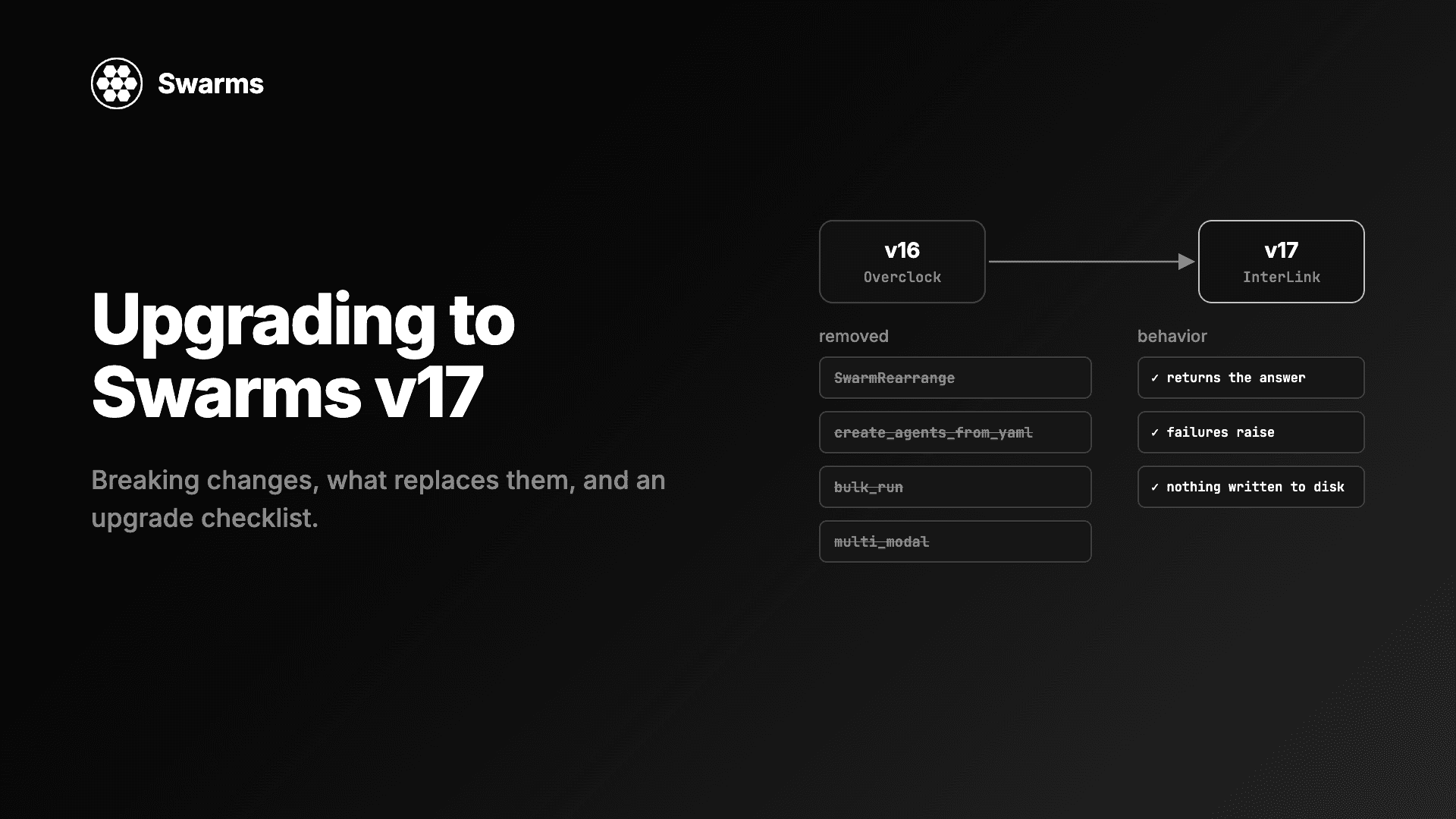
Swarms v17 升级与迁移指南:InterLink 中移除的每个类和参数、应该改用什么、变更的默认行为,以及一份升级检查清单。
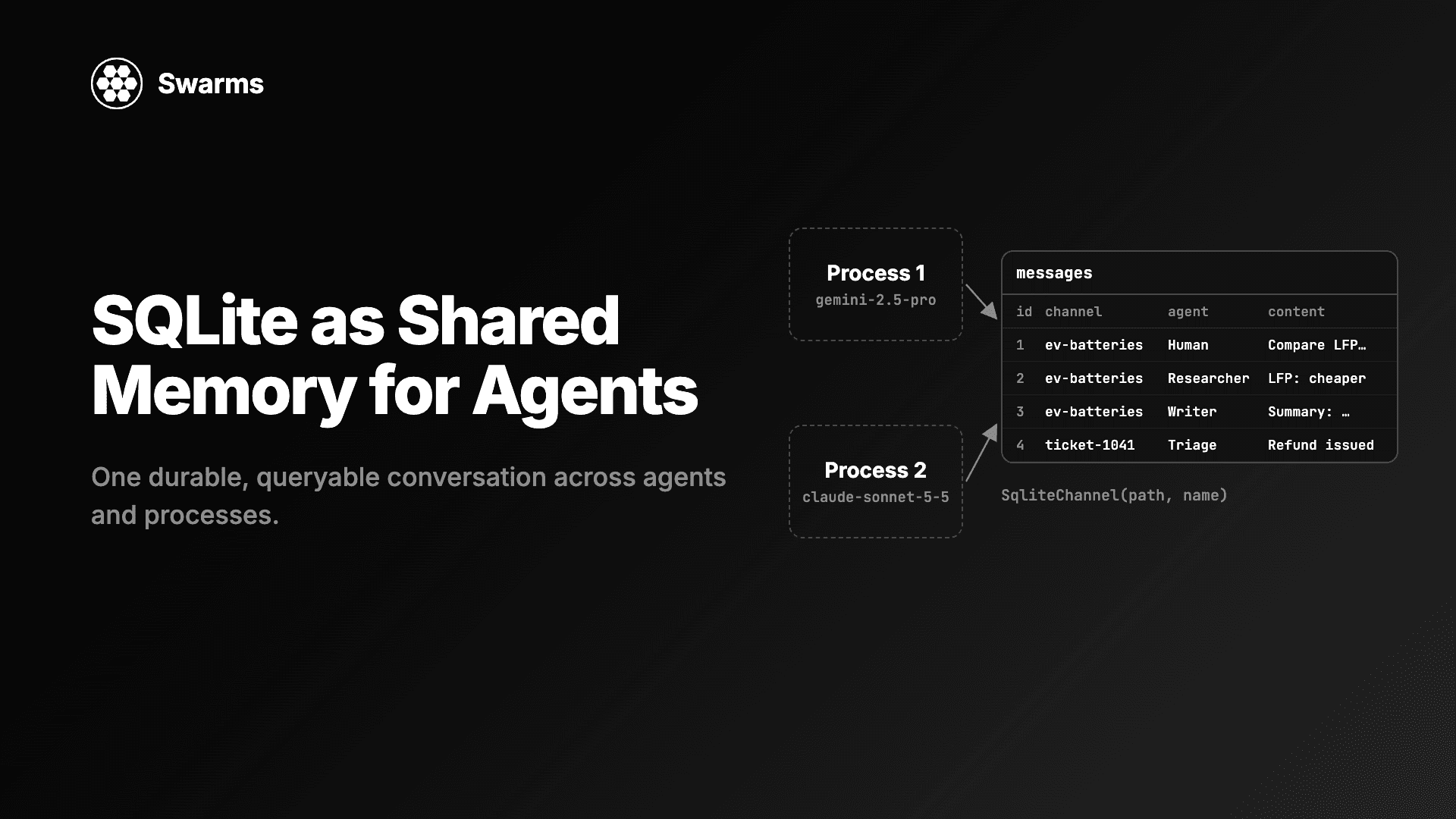
用 SQLite 实现 AI 智能体的共享记忆:SqliteChannel 让多个智能体和进程共用一份持久、可查询的对话历史。用 Swarms 存储、共享这份记忆,并对它运行 SQL。
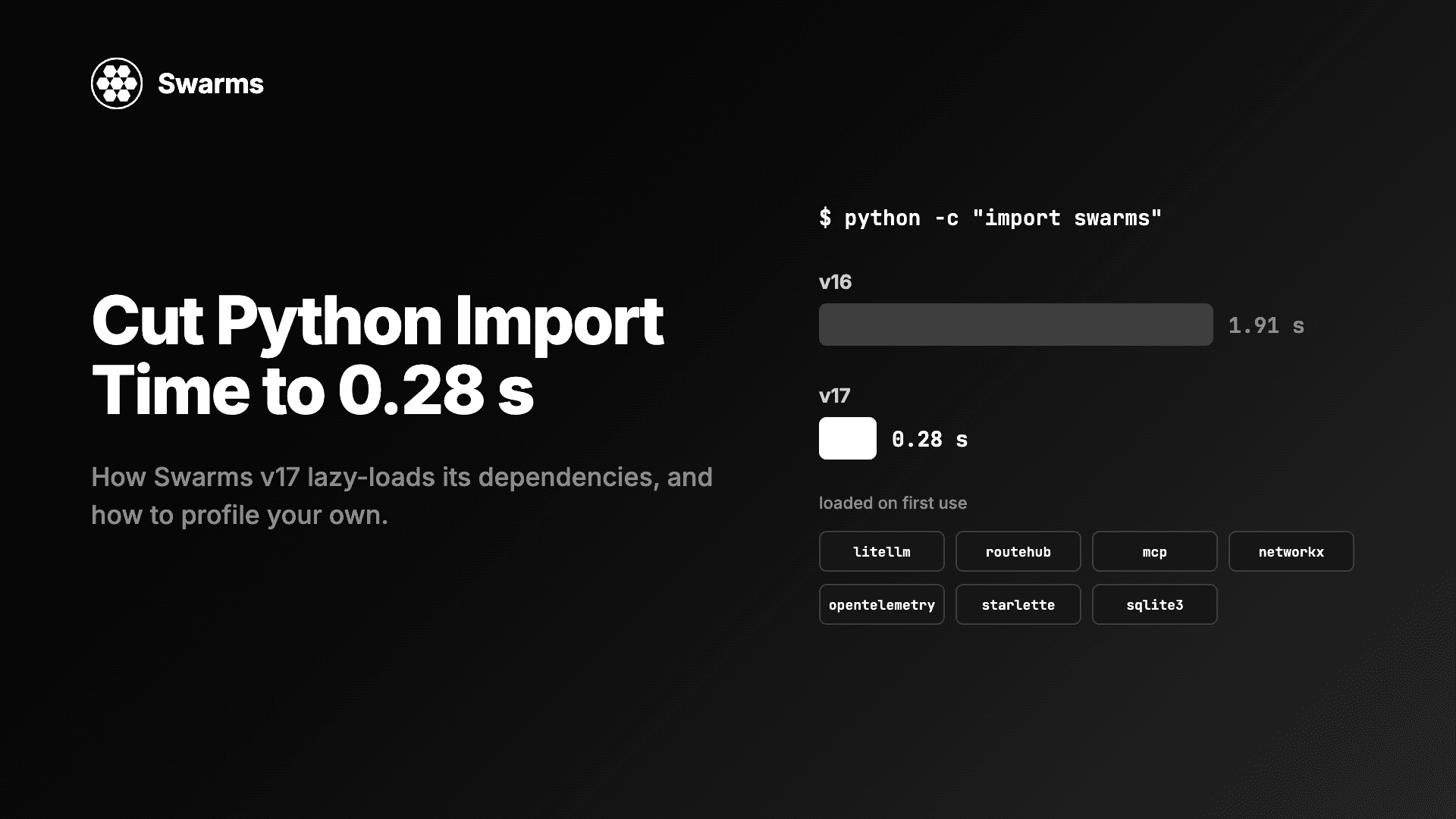
降低 Python 导入时间与智能体冷启动:借助懒加载、导入时不写磁盘,import swarms 从 1.91 秒降到 0.28 秒。附剖析自己代码导入耗时的方法。