指南工程
升级到 Swarms v17:破坏性变更与迁移指南
Swarms v17 升级与迁移指南:InterLink 中移除的每个类和参数、应该改用什么、变更的默认行为,以及一份升级检查清单。
Kye Gomez15 分钟阅读

Swarms v17 升级与迁移指南:InterLink 中移除的每个类和参数、应该改用什么、变更的默认行为,以及一份升级检查清单。
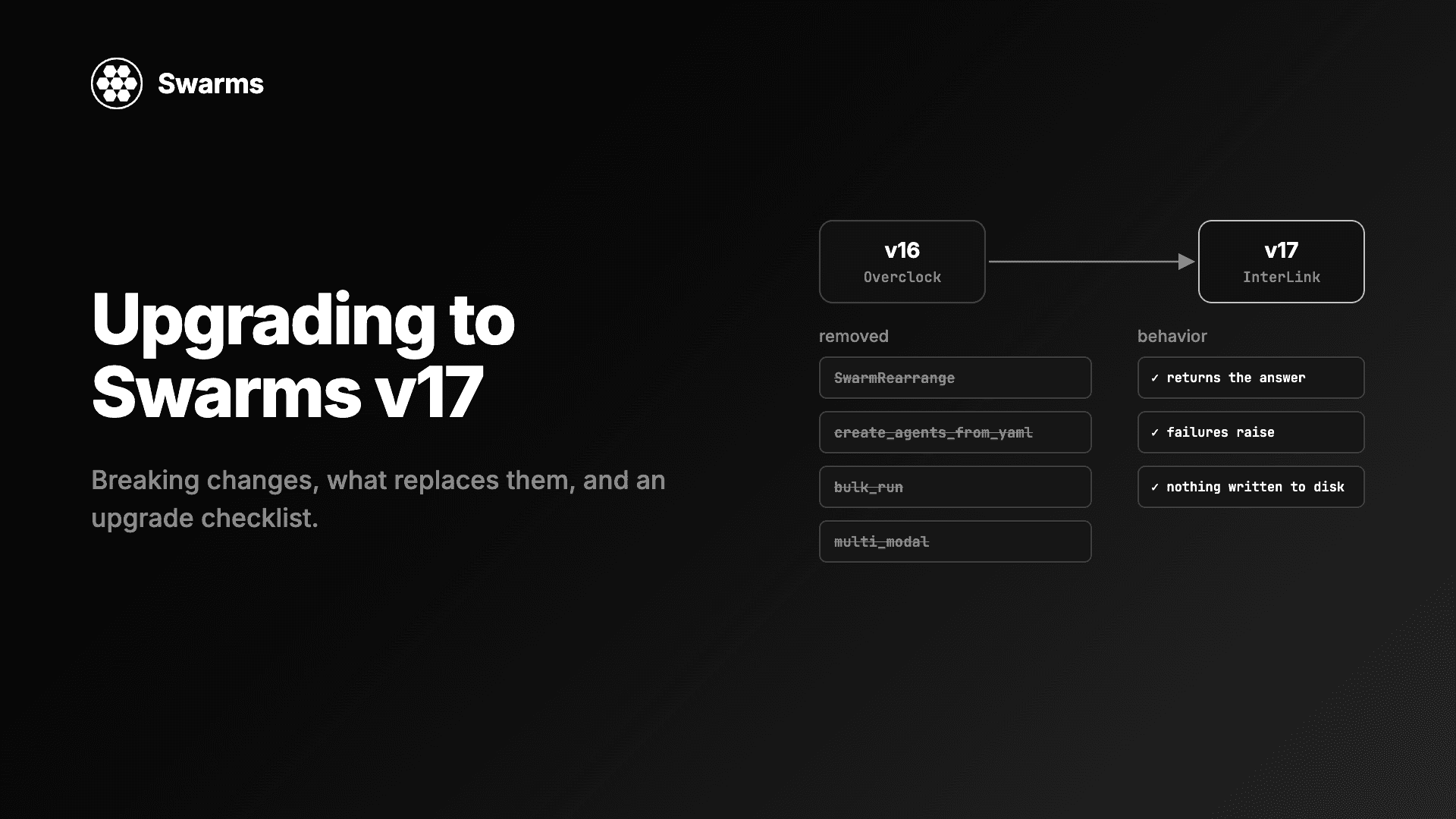
Swarms v17 "InterLink" 删掉的代码比新增的还多。四十多个什么都不做、或者做错了事的参数、方法、模块和类被移除,几项默认行为也变了:Agent() 在你不提供系统提示词时不再发送任何系统提示词,工作流不再自动保存,失败的 swarm 会抛出异常,而不再返回一个错误字符串。这篇指南就是 Swarms v17 的升级与迁移路径,按你实际会遇到的问题来组织,列出你手上可能有的 v16 代码,以及替换它的 v17 代码。
开始之前最重要的一点:很多被移除的关键字参数会被 **kwargs 吸收并被静默忽略。 升级之后你的代码往往还能继续运行,只是那个参数原本的作用悄悄消失了。请主动搜索本指南中列出的名称,而不是等着 TypeError 出现。
下面每个 v17 代码块都在 Swarms 17.0.0 上实际运行过。标注为 v16(旧) 的代码块展示的是你要迁移掉的代码,在 v17 上无法运行。
先固定你当前使用的版本,这样可以并排比较行为,必要时也能回滚:
# see what you have
python -c "import swarms; print(swarms.__version__)"

# stay on v16 while you migrate (16.0.4 was the last v16 point release)
pip install "swarms==16.0.4"

# then, on a branch, move to v17
pip install -U "swarms==17.0.0"
# or with RouteHub and rustworkx, the optional speedups
pip install -U "swarms[fast]==17.0.0"
在 requirements.txt 或 pyproject.toml 中固定主版本号,避免未来的版本在你不知情时改变行为:swarms>=17,<18。
然后在代码中搜索被移除的名称。这能找出本指南其余部分涉及的大多数问题:
grep -rnE "SwarmRearrange|swarm_arrange|create_agents_from_yaml|CSVAgentLoader|MarkdownAgentLoader|MarkdownAgentConfig|AgentConfigDict|AgentValidator|ModelName|image_batch_processor|ImageAgentBatchProcessor|hierarchical_structured_communication_framework|Transcript|log_agent_data|generate_conversation_id|MAX_CONCURRENT_AGENTS|bulk_run|check_available_tokens|get_available_models|get_current_model|switch_to_next_model|reset_model_index|is_fallback_available|multi_modal=|sop=|sop_list=|output_cleaner|agents_config=|memory_system=|shared_memory=|idle_timeout=|auto_generate_prompts=|metadata_output_path=|output_metadata=|correct_answer=|basemodel|mcp_url=" --include="*.py" .会有一些误报(Transcript 和 ModelName 是常见单词,而 mcp_url= 对 HTTP 服务器仍然有效)。agent.run(task, n=...) 这样的调用太普通,用 grep 很难可靠地找到,需要人工检查。
更新日志列出了十二个被移除的模块。下面这些是真正有调用方、并且有直接替代方案的。
SwarmRearrange 改为把 swarm 作为步骤放进 AgentRearrangeAgentRearrange 现在可以在 agents= 中接收完整的 swarm,与普通智能体并列。任何有 name 和 run(task) 方法的对象都可以出现在流程中,因此 SwarmRearrange 和 swarm_arrange() 被删除了。
v16(旧):
from swarms import SwarmRearrange

pipeline = SwarmRearrange(swarms=[research_team, review_team], flow="Research-Team -> Review-Team")
v17:
from swarms import Agent, AgentRearrange, ConcurrentWorkflow

def make(name, model, prompt):
    return Agent(agent_name=name, model_name=model, system_prompt=prompt, max_loops=1, print_on=False)

planner = make("Planner", "anthropic/claude-sonnet-5-5", "Break the question into two research angles.")
analyst_a = make("Supply-Analyst", "groq/openai/gpt-oss-120b", "Research the supply side.")
analyst_b = make("Demand-Analyst", "gpt-5.4-mini", "Research the demand side.")
editor = make("Editor", "anthropic/claude-sonnet-5-5", "Merge the research into a five-line brief.")

# A whole swarm can be one step. This output_type returns each analyst's answer, without the task.
research_team = ConcurrentWorkflow(
    name="Research-Team", agents=[analyst_a, analyst_b], output_type="str-all-except-first",
)

pipeline = AgentRearrange(
    agents=[planner, research_team, editor],
    flow="Planner -> Research-Team -> Editor",
    output_type="final",
)
print(pipeline.run("What is the HBM memory supply outlook for 2027?"))
规划者和编辑使用 Claude Sonnet 5.5,因为规划和整合更需要强模型;两个分析师则使用更便宜、更快的模型(Groq 上的 gpt-oss-120b 和 gpt-5.4-mini),因为这类角色数量更多。每个供应商读取自己的密钥:ANTHROPIC_API_KEY、GROQ_API_KEY、OPENAI_API_KEY,本指南其他示例还会用到 GEMINI_API_KEY、DEEPSEEK_API_KEY 和 MISTRAL_API_KEY。
嵌套的 swarm 会把到目前为止的整个共享对话作为任务接收,而它返回的任何内容都会被写进外层对话。所以要给内层 swarm 设置一个只返回它自己产出内容的输出类型。对 ConcurrentWorkflow 来说,"str-all-except-first" 会返回每个智能体的回答,而不会重复它收到的任务。("final" 只会保留最后完成的那个智能体,另一个分析师的结果就丢了。)对于内层的顺序团队,"final" 才是正确选择。原始对象仍然可以通过 pipeline.agents[i].swarm 访问。
create_agents_from_yaml、CSVAgentLoader 和 MarkdownAgentLoader 改为 AgentLoader过去加载智能体分散在四个入口中,各自的 schema 互相重叠。v17 只有一个类 AgentLoader,配一个字段名与 Agent 参数一致的 pydantic schema。被移除的有:swarms.create_agents_from_yaml(及其 return_type="tasks")、CSVAgentLoader、MarkdownAgentLoader、MarkdownAgentConfig、AgentConfigDict、AgentValidator、AgentValidationError 和 ModelName。校验错误现在是 pydantic.ValidationError。
v16(旧):
from swarms import create_agents_from_yaml
from swarms.structs.agent_loader import CSVAgentLoader

agents = create_agents_from_yaml("team.yaml", return_type="agents")
csv_agents = CSVAgentLoader("team.csv").load_agents()
v17:
from pathlib import Path

from swarms import AgentLoader, load_agent_from_markdown

Path("team.yaml").write_text("""
agents:
  - agent_name: Researcher
    model_name: gemini/gemini-2.5-pro
    system_prompt: You research the question and list the key facts.
    max_loops: 1
  - agent_name: Writer
    model_name: anthropic/claude-haiku-5-5
    system_prompt: You turn research notes into a short, plain answer.
    max_loops: 1
swarm_architecture:
  name: Research-Pipeline
  swarm_type: SequentialWorkflow
  output_type: final
  task: Why do bond prices fall when interest rates rise?
""")

Path("reviewer.md").write_text("""---
name: Reviewer
model_name: gpt-5.4
max_loops: 1
---
You review an answer for factual errors and reply with a corrected version.
""")

loader = AgentLoader()

agents = loader.load_agents_from_yaml("team.yaml", return_type="agents")
print([a.agent_name for a in agents])

answer = loader.load_agents_from_yaml("team.yaml", return_type="run_swarm")  # builds the SwarmRouter and runs its task
print(answer)

reviewer = load_agent_from_markdown("reviewer.md")
print(reviewer.agent_name, reviewer.model_name)
对于 CSV 和 JSON,使用 loader.load_agents_from_csv("team.csv");loader.auto(path) 会根据扩展名(.md、.yaml、.yml、.csv、.json)选择加载器。现有文件需要检查两处差异:未设置的字段现在回落到 Agent 的默认值(v16 的 CSV 加载器会打开 autosave,Markdown 加载器会设置 context_length=100000),并且任何模型名都会被接受。别名 name、description、model、dynamic_temperature 和 streaming 让旧文件依然可以加载。
| 被移除 | 改用 |
|---|---|
swarms/structs/transcript.py(Transcript) | Conversation.record_assistant、flush_tool_results、to_messages |
swarms/structs/hierarchical_structured_communication_framework.py | HierarchicalSwarm |
swarms.structs.image_batch_processor(ImageAgentBatchProcessor) | 已移到代码仓库的 examples/single_agent/capabilities/vision/ |
log_agent_data、swarms.state span | 运行 span 上的 swarms.conversation |
agent_id()、generate_conversation_id() | swarms.utils.generate_id.generate_id |
MAX_CONCURRENT_AGENTS | ConcurrentWorkflow(max_workers=...) |
output_type="basemodel" | output_type="json" |
swarms/prompts/debate.py、collaborative_utils.talk_to_agent、swarms/tools/function_util.py、MULTI_MODAL_AUTO_AGENT_SYSTEM_PROMPT* 以及几个辅助函数 | 没有任何地方调用它们 |
output_type="basemodel" 值得单独说明:它从来不是一个能用的输出类型,在 17.0.0 中它仍然会抛出 ValueError: Invalid type: basemodel,而且是在模型调用已经发出并已计费之后。请改用 "json"。
BaseTool 方法BaseTool 少了一半:26 个没有任何调用方的方法,其中 18 个是公开方法,包括 execute_tool、dynamic_run、execute_tool_from_text、execute_function_with_dict、dict_to_openai_schema_str、get_docs_from_callable、detect_api_response_format 和 convert_schema_between_providers。保留下来的方法覆盖了真实的用途:func_to_dict 根据函数构建 schema,execute_tool_by_name 运行单个工具,execute_function_calls_from_api_response 执行模型响应中的工具调用。
这是你搜索代码时要对照的表。"被忽略"表示该参数落入 **kwargs,不起任何作用,也没有任何警告。
| 被移除 | 在 17.0.0 上的表现 | 改用 |
|---|---|---|
Agent(multi_modal=...) | 被忽略 | 无需替代:视觉能力根据 model_name 自动检测 |
Agent(sop=..., sop_list=...) | 被忽略 | Skills:Agent(skills_dir=...) |
Agent(output_cleaner=...)、output_cleaner_op | 被忽略 | 对 run() 的返回值自行后处理 |
Agent.run(n=...) | 不再把任务运行 n 次;落入 **kwargs 并被传给模型请求 | 用循环运行任务 |
Agent.run(correct_answer=...) | 落入 **kwargs;它原本是第 4 个位置参数,所以 streaming_callback 及其后的参数要用关键字传递 | 删掉它 |
Agent.bulk_run | AttributeError | agent.run_batched(tasks) |
Agent.check_available_tokens | AttributeError | agent.input_tokens |
get_available_models、get_current_model、switch_to_next_model、reset_model_index、is_fallback_available、current_model_index | AttributeError | fallback_models |
LiteLLM(audio=...)、构造函数的 max_completion_tokens、modalities、audio_processing、reasoning_check、get_media_base64、check_internet_connection | 作为普通 kwargs 转发给供应商,或 AttributeError | max_tokens;音频用显式的 messages |
Conversation(output_metadata=...) | TypeError | 删掉它 |
GroupChat(idle_timeout=...) | TypeError | max_loops、threshold |
AgentRearrange(memory_system=...) | TypeError | 自己查询存储,把记录放进任务中传入 |
SequentialWorkflow(shared_memory_system=...)、MultiAgentRouter(shared_memory_system=...) | 被忽略 | 删掉它 |
ForestSwarm(shared_memory=...) | 被忽略;rules 和 verbose 的位置前移一位 | 删掉它,后面的参数用关键字传递 |
SwarmRouter(agents_config=...)、SwarmRouter.fetch_message_history_as_string | 被忽略,或 AttributeError | router.swarm.conversation |
ConcurrentWorkflow(auto_generate_prompts=...)、metadata_output_path | TypeError | 删掉它们 |
把 mcp_url="python server.py" 当作 stdio 服务器 | 抛出 AgentMCPConnectionError | mcp_config=MCPConnection(command=..., args=[...]) |
bulk_run、n 和 check_available_tokensv16(旧):
tags = agent.bulk_run([{"task": h} for h in headlines])
samples = agent.run("Fed holds rates steady", n=3)
agent.check_available_tokens()
v17:
from swarms import Agent

agent = Agent(
    agent_name="Tagger",
    model_name="gpt-5.4-mini",
    system_prompt="Reply with one topic tag for the headline.",
    max_loops=1,
    output_type="final",
    print_on=False,
)

headlines = ["Fed holds rates steady", "Chipmaker beats on datacenter revenue"]

# was agent.bulk_run(...)
tags = agent.run_batched(headlines)
print(tags)

# was agent.run(task, n=3): run it three times yourself, on a fresh conversation each time
samples = []
for _ in range(3):
    agent.reset()
    samples.append(agent.run("Fed holds rates steady"))
print(len(samples), "samples")

# was agent.check_available_tokens()
print("next request would carry about", agent.input_tokens, "input tokens")
run_batched 在同一个智能体上依次运行这些任务,所以后面的任务会在对话中看到前面的任务。如果这些运行必须彼此独立,就像采样循环那样,在每次运行之间调用 agent.reset()。reset() 会像构造函数那样重建对话(系统提示词、预置消息、工具 schema),并保留 agent.usage。input_tokens 统计的是下一次请求将携带的内容:系统提示词、对话和工具 schema。
fallback_modelsv16 会在三层叠加的重试中重试失败的调用,并提供了手动在模型之间切换的方法。v17 只有一个扁平的循环:retry_attempts 作为每个模型的重试次数传给客户端,Agent.run 按顺序遍历 fallback_models。只有 AgentLLMError 会让它切换到下一个模型;其他任何错误都会立即抛出。每次运行都会重新从第一个模型开始。
from swarms import Agent
from swarms.structs.agent import AgentLLMError

agent = Agent(
    agent_name="Analyst",
    model_name="anthropic/claude-sonnet-5-5",
    fallback_models=["anthropic/claude-sonnet-5-5", "gpt-5.4", "gemini/gemini-2.5-pro"],
    retry_attempts=2,   # client retries per model, then the next model in the list
    max_loops=1,
    output_type="final",
    print_on=False,
)

try:
    print(agent.run("Summarise the risks of buying an ETF on margin in two sentences."))
    print("answered by:", agent.model_name)
except AgentLLMError as error:
    # Every model failed. The provider's own exception is chained underneath.
print("every model failed:", type(error.__cause__).__name__, error.__cause__)有一个很容易忽略的细节:fallback_models 是整条链,主模型排在第一个。 设置了它之后,智能体的 model_name 会被替换成 fallback_models[0]。如果你只列出备用模型,第一个备用模型就会变成主模型,而你的 model_name 永远不会被调用。fallback_model_name="..." 仍然可用,它会被合并成列表 [model_name, fallback_model_name]。
供应商错误以 AgentLLMError 的形式到达,供应商自己的异常放在 __cause__ 中。如果你原来在 agent.run 外面捕获供应商的异常类型(RateLimitError、APIConnectionError 等),请改为捕获 AgentLLMError。
MCPConnection(command=...)过去,一个没有协议前缀的 mcp_url 会被按空格拆分,并带着你的完整环境变量作为命令启动,这意味着任何能控制智能体 mcp_url 的人都可以执行命令。v17 只会通过显式的 MCPConnection 启动 stdio 服务器,并且只给它 MCP SDK 的最小默认环境,加上你传入的 env。
v16(旧):
agent = Agent(model_name="gpt-5.4", mcp_url="python server.py")一个用于测试的小型 stdio 服务器(server.py,用 Swarms 会安装的 mcp 2.x SDK 编写):
import os

from mcp.server.mcpserver import MCPServer

mcp = MCPServer("rates")


@mcp.tool()
def policy_rate(central_bank: str) -> str:
    """Return the current policy rate for a central bank."""
    # A stdio server in v17 sees only the env you pass it, plus a minimal default.
    source = os.environ.get("RATES_API_KEY", "missing")
    return f"{central_bank}: 4.25% (key {'set' if source != 'missing' else 'missing'})"


if __name__ == "__main__":
mcp.run("stdio")v17,在同一目录下运行:
import sys

from swarms import Agent, MCPConnection

agent = Agent(
    agent_name="Rates-Desk",
    model_name="gpt-5.4",
    system_prompt="Use the policy_rate tool to answer questions about interest rates.",
    max_loops=1,
    output_type="final",
    print_on=False,
    mcp_config=MCPConnection(
        command=sys.executable,           # was mcp_url="python server.py"
        args=["server.py"],
        env={"RATES_API_KEY": "env:RATES_API_KEY"},  # pass what the server needs, explicitly
    ),
)
print(agent.run("What is the ECB's policy rate?"))
4.25% 只是这个示例服务器返回的占位值。env: 前缀会在连接启动时从你的环境变量中读取值。去掉 env 那一行,工具就会报告 key missing,这正是一个依赖继承 shell 环境变量的 v16 服务器在升级后会遇到的情况。
这些变化最有可能在没有任何报错的情况下改变结果。
Agent() 不再发送任何系统提示词在 v16 中,只要你没有传 system_prompt,就会发送一个内置的 1,111 字符人设提示词,里面还写入了当前的分钟时间。它改变了每个智能体的说话方式,而且由于每分钟都在变化,还破坏了供应商的提示词缓存。在 v17 中,一个没有 system_prompt 且 max_loops=1 的智能体完全不发送系统消息。
system_prompt | max_loops=1 | 整数 max_loops >= 2 | max_loops="auto" |
|---|---|---|---|
| 未传入 | 无系统消息 | 循环提示词 | 自主模式提示词 |
| 你的文本 | 你的文本 | 你的文本,然后是循环提示词 | 你的文本,然后是自主模式提示词 |
from swarms import Agent
from swarms.prompts.agent_system_prompts import build_agent_system_prompt

# v17: no system_prompt means no system message at all
plain = Agent(agent_name="Plain", model_name="gpt-5.4-mini", max_loops=1, output_type="final")

# Your own prompt is sent as written
analyst = Agent(
    agent_name="Analyst",
    model_name="anthropic/claude-sonnet-5-5",
    system_prompt="You are a credit analyst. Answer in three bullet points.",
    max_loops=1,
    output_type="final",
)

# The v16 built-in persona, if your agents depended on it
legacy = Agent(
    agent_name="Legacy",
    model_name="gemini/gemini-2.5-pro",
    system_prompt=build_agent_system_prompt(),
    max_loops=1,
    output_type="final",
)

for agent in (plain, analyst, legacy):
    print(agent.agent_name, "->", agent.run("What drives a company's interest coverage ratio?"))
如果升级后某个智能体回答的语气变了,这是首先要检查的地方。为每个智能体写一个真正的系统提示词,比恢复那个通用人设更好;但如果迁移期间你需要完全相同的行为,可以使用 build_agent_system_prompt()。
output_type:返回回复还是返回对话Agent.run 按照 output_type 决定返回什么,默认值 "str-all-except-first" 是第一个输入之后的对话。对一个全新的单轮智能体来说,它看起来就像回复。但在对同一个智能体的第二次调用中,或者在使用工具、多轮循环时,它会带上第一个任务以来的所有内容:
from swarms import Agent

default_agent = Agent(agent_name="Explainer", model_name="gpt-5.4-mini", max_loops=1, print_on=False)
final_agent = Agent(
    agent_name="Explainer", model_name="gpt-5.4-mini", max_loops=1, print_on=False,
    output_type="final",  # only the newest reply
)

for agent in (default_agent, final_agent):
    agent.run("In one sentence, what is a write-ahead log?")
    second = agent.run("And in one sentence, what is a checkpoint?")
    print(f"output_type={agent.output_type!r}:")
    print(second)
print("---")默认智能体的第二次结果包含第一个回答、第二个问题和第二个回答;"final" 智能体的结果只包含第二个回答。v16 中有七个结构和辅助函数把这个原始返回值记录为某个智能体的贡献,因此它们的输出每一步都在膨胀。在 v17 中,HeavySwarm、ReflexionAgent、IterativeReflectiveExpansion、handoff_task、ExpertPanelDiscussion、GKPAgent 以及 SequentialWorkflow 的漂移检测都改为记录回答本身。如果你之前从它们(尤其是 handoff_task)的返回值中解析对话记录,现在可以直接拿到被委派智能体的回答。
另有两处相关变化:"str"、"string" 和 "all" 现在返回完整的对话(过去返回的是裁剪到 8,192 token、并且在单词中间截断的视图);运行 RoundRobin 的 SwarmRouter 返回路由器的 output_type,默认是 "dict"。如需旧版 RoundRobin 的字符串,传入 output_type="final"。
fallback_swarms 因此生效HeavySwarm、MixtureOfAgents、MajorityVoting、AuctionSwarm 以及 AgentRearrange 中的并行步骤,过去会捕获失败的模型调用,然后返回一个看起来像答案的东西:一个错误字符串、一张出价表,或者一个被当作投票的异常。SwarmRouter(fallback_swarms=...) 只有在 swarm 抛出异常时才会回退,所以回退从来没有触发过。在 v17 中,它们会抛出异常。
from swarms import Agent, SwarmRouter

def make(name, model, prompt):
    return Agent(agent_name=name, model_name=model, system_prompt=prompt, max_loops=1, print_on=False)

agents = [
    make("Bull", "deepseek/deepseek-v4-pro", "Argue the bull case in two sentences."),
    make("Bear", "mistral/mistral-large-latest", "Argue the bear case in two sentences."),
    # MixtureOfAgents uses the last agent as its aggregator
    make("Judge", "anthropic/claude-opus-5-5", "Weigh both cases and give a one-line verdict."),
]

router = SwarmRouter(
    name="Equity-Debate",
    agents=agents,
    swarm_type="MixtureOfAgents",
    fallback_swarms=["SequentialWorkflow"],  # tried only if the primary swarm raises
    output_type="final",
)

result = router.run("Should a long-term investor buy Nvidia at 40x earnings?")
print("ran as:", router.active_swarm_type)
for attempt in router.fallback_attempts:
    print("failed first:", attempt["swarm_type"], "->", type(attempt["error"]).__name__)
print(result)
两个辩手分别使用 DeepSeek 和 Mistral,让正反两方来自不同的模型家族;裁判使用这里最强的 Claude Opus 5.5,因为它的这一次调用决定了最终输出。如果裁判在 MixtureOfAgents 中的调用失败,swarm 现在会抛出 AgentLLMError,路由器把它记录到 fallback_attempts 中,然后用同样的智能体以 SequentialWorkflow 的方式再运行一次。如果所有 swarm 类型都失败了,路由器会抛出 SwarmRouterRunError,并链接到最后一个错误。如果没有设置 fallback_swarms,你会得到原始异常。
需要修改的地方:凡是你检查 swarm 返回值里是否有 "Error" 或 "Failed" 的地方,都改为用 try/except 包住调用,或者把这个 swarm 放到一个设置了 fallback_swarms 的路由器下面。MixtureOfAgents 某一层中的 worker 失败仍然会被有意记录为 "Error: ..." 回答,这样一个 worker 出故障不会拖垮整个混合;只有聚合者会抛出异常。关于回退设计的更多内容,见 多智能体系统的回退机制。
一个导入了 Swarms 并运行了 SequentialWorkflow 的 v16 进程,会留下一个 agent_workspace/ 目录、一个 error.txt、若干日志文件和一个 conversation_history.json。v17 默认一个都不写:
| 内容 | v16 | v17 |
|---|---|---|
agent_workspace/ 和 error.txt | 由 import swarms 创建 | 第一次真正写入时创建 |
WORKSPACE_DIR/logs 下的日志文件 | 总是写入 | 只在设置 SWARMS_LOG_FILES=True 时写入 |
SequentialWorkflow、ConcurrentWorkflow、AgentRearrange 自动保存 | 开启 | 关闭 |
SpreadSheetSwarm 的 CSV 和 JSON | 开启 | 关闭 |
在导入之后设置 WORKSPACE_DIR | 被忽略 | 每次调用时读取 |
如果下游任务需要读取这些文件,请显式地重新打开:
import os
from pathlib import Path

os.environ["WORKSPACE_DIR"] = str(Path("runs").resolve())  # read on every write in v17

from swarms import Agent, SequentialWorkflow

def make(name, model, prompt):
    return Agent(agent_name=name, model_name=model, system_prompt=prompt, max_loops=1, print_on=False)

workflow = SequentialWorkflow(
    name="Release-Notes",
    agents=[
        make("Drafter", "deepseek/deepseek-v4-pro", "Draft release notes from the change list."),
        make("Copyeditor", "anthropic/claude-haiku-5-5", "Tighten the draft. Keep every fact."),
    ],
    autosave=True,  # v17 default is False: nothing is written unless you ask
    output_type="final",
)
workflow.run("Changes: faster import, channels, uncapped worker pools.")

for path in sorted(Path("runs").rglob("*.json")):
print(path)它会输出一条路径:runs/swarms/SequentialWorkflow/Release-Notes-<timestamp>/conversation_history.json。在 SwarmRouter 中,autosave=False 现在会真正传递到它构建的 swarm,而 AgentRearrange(autosave=True) 现在也会真正保存。
ConcurrentWorkflow 过去把线程池上限设为 32 个智能体,GraphWorkflow 则按 CPU 核数设定线程池大小,所以在一台 12 核机器上,一个 100 节点的层要分 11 个一批来跑。v17 会让所有智能体、以及一层中的所有节点同时运行。对于受网络限制的模型调用,这要快得多,但也可能撞上过去那个上限恰好替你挡住的供应商速率限制。如果你看到 429 错误或连接池警告,请设置一个上限:
from swarms import Agent, ConcurrentWorkflow

tickers = ["AAPL", "MSFT", "NVDA", "AMZN", "GOOGL", "META", "TSLA", "AVGO", "JPM", "V", "XOM", "LLY"]

screeners = [
    Agent(
        agent_name=f"Screener-{ticker}",
        model_name="groq/openai/gpt-oss-120b",  # a cheap, fast model for many parallel workers
        system_prompt=f"You screen {ticker}. Reply with one line: buy, hold or sell, and why.",
        max_loops=1,
        print_on=False,
    )
    for ticker in tickers
]

# v17 runs all 12 at once by default. Cap it if your provider rate-limits you.
workflow = ConcurrentWorkflow(name="Screen", agents=screeners, max_workers=4, output_type="dict")
results = workflow.run("Screen this stock for a 12-month horizon.")
print(len(results), "messages recorded")
它会输出 13 messages recorded:一条任务加上每个筛选智能体各一条回答。MAX_CONCURRENT_AGENTS 已被移除,由 max_workers 替代。对于图,对应的写法是 GraphWorkflow(max_parallel_nodes=16)。如何在 Python 中并行运行 100 个 AI 智能体 介绍了何时以及如何为它们设置上限。
遥测和 v16 一样默认开启,但记录的内容多了很多:每个被追踪调用的参数、发起调用的结构的完整对话、token 用量,以及每一次模型请求和响应。名称表明是凭据的字典键(以 key 或 token 结尾,或包含 secret、password、authorization、oauth,以及 headers 和 env)会被替换为 <redacted>。消息文本和参数值不会被清洗,所以粘贴进提示词的密钥会原样发送。
如需关闭:
export SWARMS_TELEMETRY_ON=False关闭遥测后,不会导入任何 OpenTelemetry 模块,被追踪的方法也会以未装饰的形式运行。这个开关在导入 Swarms 时读取,所以要在导入之前通过环境变量或 .env 文件设置。
tool_call_summary 默认为 False。 v16 在每次工具调用之后都会再发起一次模型调用来总结工具输出。传入 tool_call_summary=True 可以恢复。stopping_token 默认为 None,设置之后它现在会作为停止序列发送给供应商。max_tokens 超出上限、不支持函数调用)只在设置 SWARMS_STRICT_MODEL_CHECK=true 时出现。如果你依赖这些警告,请在开发环境中设置它。[tool call] 和 [thinking] 标头。返回值不变。可以按标头或 token_info["type"] 过滤。ModelRouter 用 gpt-5.4 做路由;AgentJudge、ReflexionAgent 和 GKPAgent 默认使用 gpt-5.4(过去默认是已下线的 openai/o1);ReasoningDuo 的推理智能体跟随 model_name;top_p 和所有内置的 temperature 都是 None,因为当前的 Claude 模型会拒绝它们。MixtureOfAgents 的 SwarmRouter 只把最后一个智能体当作聚合者(过去它还会作为 worker 运行,并评判自己的回答),GroupChat 的 max_loops 统计的是智能体的发言轮数。asyncio 和 setuptools。如果你自己的代码需要 pkg_resources,请自行安装 setuptools。swarms==17.0.0(或 swarms[fast]==17.0.0)。build_agent_system_prompt()。run() 的返回值当作智能体回答的地方,设置 output_type="final",并给嵌套的 swarm 设置一个只返回自身输出的输出类型。AgentLLMError,需要回退结构的地方使用 SwarmRouter(fallback_swarms=[...])。fallback_models:列表必须以主模型开头。autosave=True 和 SWARMS_LOG_FILES=True。max_workers 或 max_parallel_nodes。MCPConnection(command=..., args=[...], env={...})。SWARMS_TELEMETRY_ON=False。[tool call] 和 [thinking] 文本。swarms[fast]。RouteHub 和 rustworkx 可以直接替换使用,设置 SWARMS_LLM_BACKEND=litellm 即可把模型调用切回 litellm。升级还会让启动快得多:import swarms 从 1.91 秒降到了 0.28 秒。如果你在意冷启动,为什么你的 Python 智能体框架要花 2 秒导入 介绍了如何在你自己的部署中测量它。
有一部分会直接抛出异常(被移除的类、bulk_run、idle_timeout 和 auto_generate_prompts 等少数构造参数),这部分很容易发现。风险更大的是那些继续运行的部分:multi_modal、sop、agents_config 等被移除的关键字参数会被静默忽略,Agent() 不再发送默认系统提示词,而过去返回错误字符串的 swarm 现在会抛出异常。部署之前,运行本指南中的 grep 命令,并阅读行为变化一节。
SwarmRearrange?AgentRearrange。把 swarm 和普通智能体一起放进 agents=,并在 flow 中写出它们的名字,例如 flow="Planner -> Research-Team -> Editor"。给每个嵌套的 swarm 设置一个只返回自身输出的 output_type。
最可能的原因是系统提示词。v17 在你没有传 system_prompt 时什么都不发送,而 v16 会发送一个通用的内置人设。传入你自己的提示词,或者使用 swarms.prompts.agent_system_prompts 中的 build_agent_system_prompt() 恢复旧的提示词。
在导入 Swarms 之前,通过环境变量或 .env 文件设置 SWARMS_TELEMETRY_ON=False。关闭之后,不会加载任何 OpenTelemetry 模块。
pip install "swarms==16.0.4"。完成迁移后固定 swarms>=17,<18,让升级到下一个主版本成为一个明确的选择。
pip install -U swarms

# RouteHub for model calls and rustworkx for graphs
pip install -U "swarms[fast]"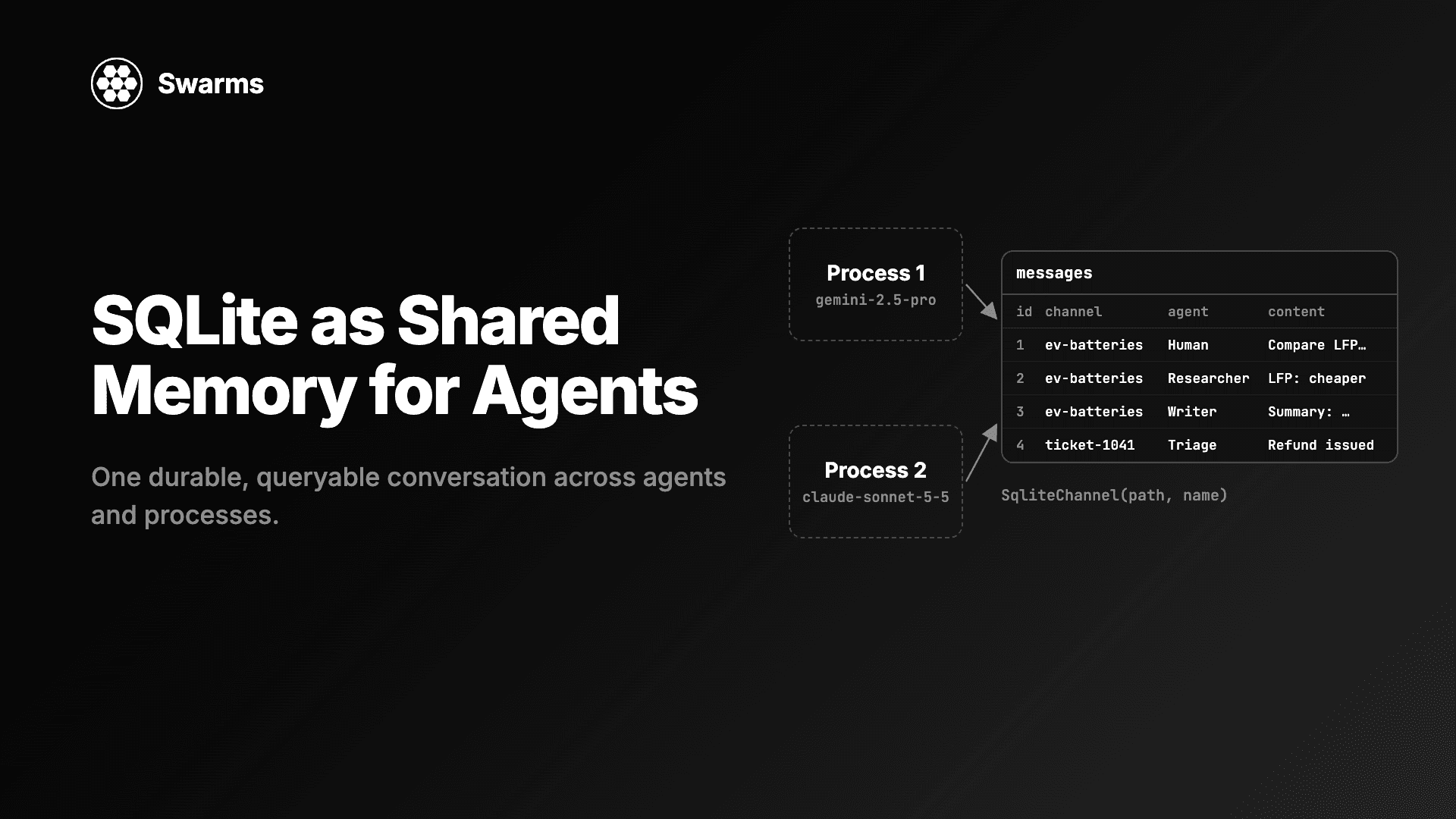
用 SQLite 实现 AI 智能体的共享记忆:SqliteChannel 让多个智能体和进程共用一份持久、可查询的对话历史。用 Swarms 存储、共享这份记忆,并对它运行 SQL。
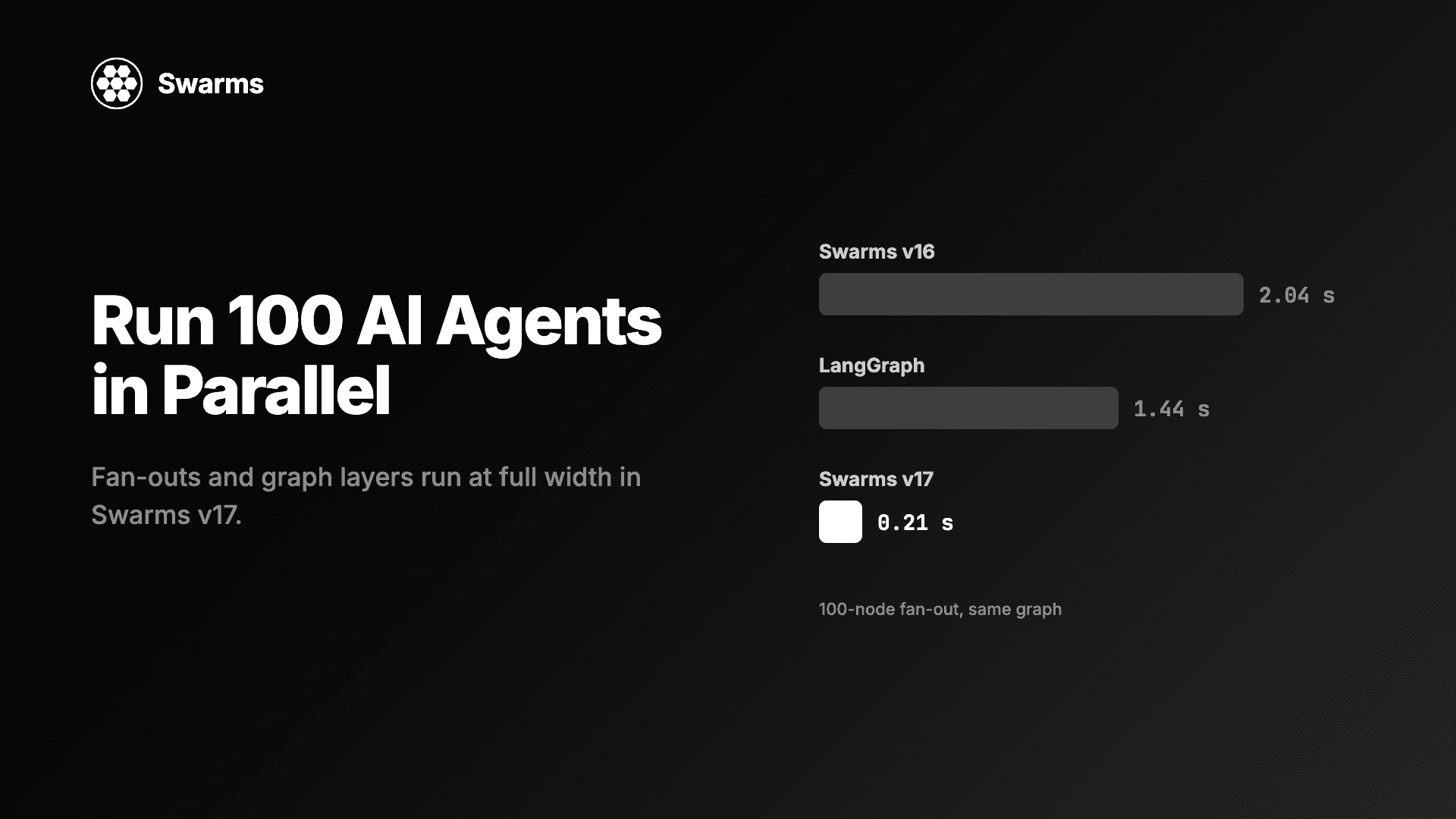
在 Python 中并行运行 AI 智能体:Swarms v17 中 100 个智能体的扇出只需 0.21 秒,此前为 2.04 秒(LangGraph:1.44 秒)。附满宽并发与异步上限的代码。
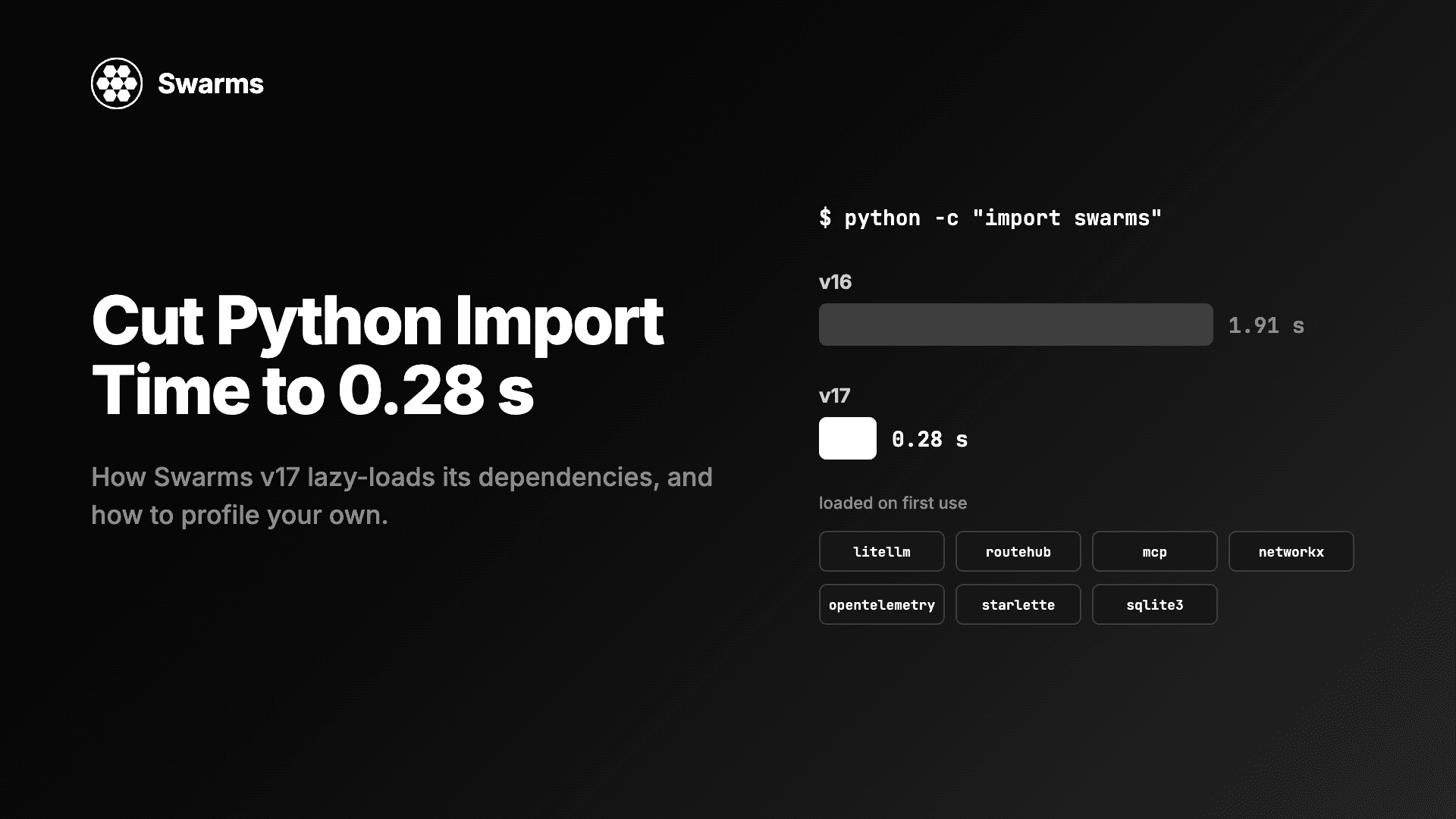
降低 Python 导入时间与智能体冷启动:借助懒加载、导入时不写磁盘,import swarms 从 1.91 秒降到 0.28 秒。附剖析自己代码导入耗时的方法。