A distributed multi-agent system in Python usually starts the same way: one script, a few agents, one process. Then the research agent needs a GPU box, the agent that reads customer data has to run inside a private network, or you simply want each agent in its own container so one crash does not take the others down. At that point the agents no longer share memory, and the hard part becomes keeping one conversation that all of them can read and write.
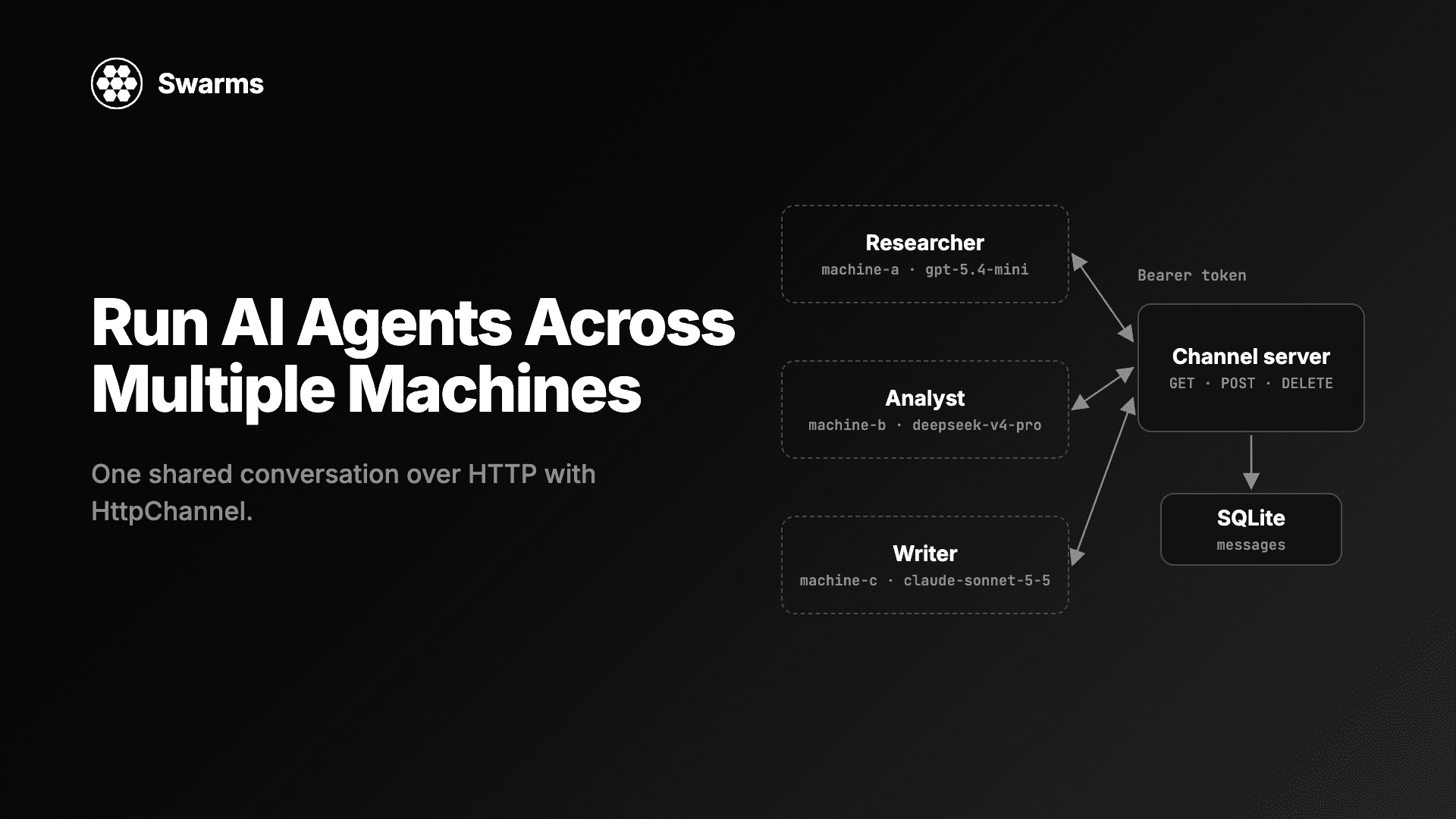
Swarms v17 "InterLink" adds HttpChannel for exactly this. You point every agent at the same URL, and a small server you run keeps the conversation. This guide explains the HTTP contract HttpChannel expects, gives you a complete channel server with bearer-token auth and SQLite storage (standard library only), runs three agents in separate processes on three different model providers, and ends with production notes on TLS, persistence and concurrency.
What a distributed multi-agent system needs
When agents run on different machines, three things have to live somewhere they can all reach:
- The conversation. Agent B has to see what agent A said before it answers.
- An order. Messages need one sequence everyone agrees on, oldest first.
- A gate. Only your agents (and the people you choose) should be able to read or write it.
A message queue, a shared database or a custom RPC layer can all do this, and each one adds code to every agent. Swarms v17 turns it into one constructor argument. Any Agent (and nine structures, including SequentialWorkflow, ConcurrentWorkflow, GroupChat and HierarchicalSwarm) accepts a channel=. Before a run, the agent reads the channel as prior turns. It posts the task once, so agents sharing a channel see one copy of it. After a successful run it posts its final answer under its agent_name. A failed run posts nothing.
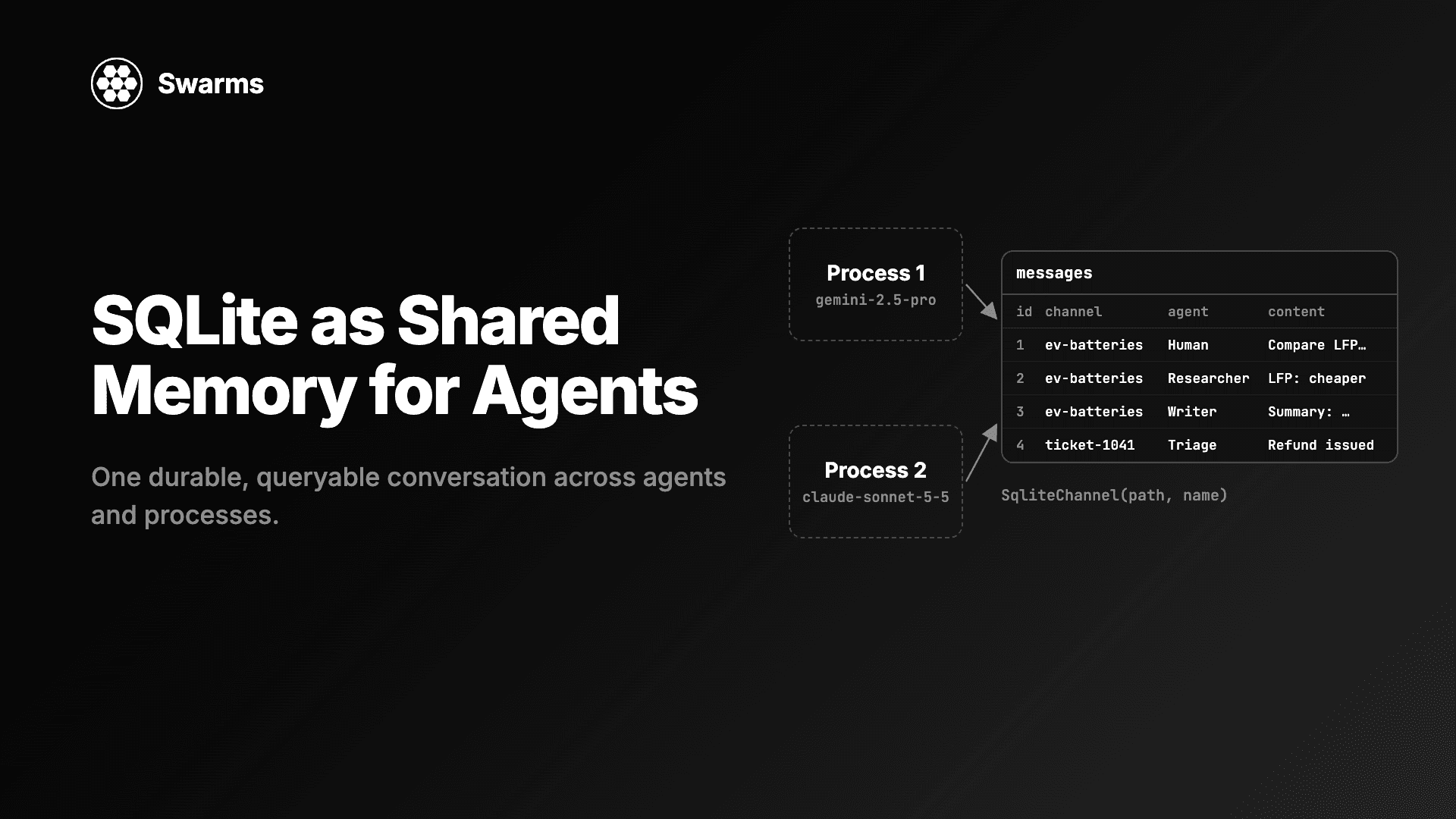
Six channels ship in v17, covered in the full changelog. FileChannel and SqliteChannel work when the agents share a disk. HttpChannel is the one for agents on different machines.
How HttpChannel works: the HTTP contract
HttpChannel takes three arguments:
| Argument | Default | What it does |
|---|
url | required | The endpoint for one conversation, such as https://host/channels/research |
headers | None | Sent with every call, for example {"Authorization": "Bearer ..."} |
timeout | 30.0 | Seconds to wait for each call |
The URL names one conversation, and the server answers three calls on it:
| Call | Server does | Body |
|---|
GET url | Return every message, oldest first | Response: [{"agent_name": ..., "content": ...}, ...] |
POST url | Append one message | Request: {"agent_name": ..., "content": ...} |
DELETE url | Remove every message | none |
That is the whole protocol. HttpChannel uses httpx, which Swarms already depends on, so there is nothing extra to install on the agent side. Any non-2xx reply raises httpx.HTTPStatusError, so a wrong token or a down server fails loudly instead of letting an agent answer without context. messages() keeps only the agent_name and content of each row (as strings), so your server can return extra fields such as ids or timestamps without breaking anything. close() closes the connection pool; the server keeps every message.
Because the contract is plain JSON over HTTP, the server can be written in any language. The next section gives you one in Python.
Step 1: Run a channel server with bearer-token auth
Save this as channel_server.py. It uses only the standard library: http.server for HTTP, sqlite3 so the conversation survives a restart, and hmac.compare_digest to check the token in constant time. Conversations live under /channels/<name>, so one server can hold as many as you like.
"""A channel server for Swarms HttpChannel: bearer-token auth, SQLite storage, standard library only."""

import hmac
import json
import os
import re
import sqlite3
import threading
from http.server import BaseHTTPRequestHandler, ThreadingHTTPServer

TOKEN = os.environ["CHANNEL_TOKEN"]
DB_PATH = os.environ.get("CHANNEL_DB", "channels.db")
HOST = os.environ.get("CHANNEL_HOST", "127.0.0.1")
PORT = int(os.environ.get("CHANNEL_PORT", "8765"))
MAX_BODY = 1_000_000  # bytes per message
ROUTE = re.compile(r"^/channels/([A-Za-z0-9_.-]{1,100})$")

db = sqlite3.connect(DB_PATH, check_same_thread=False)
db.execute("PRAGMA journal_mode=WAL")
db.execute(
    "CREATE TABLE IF NOT EXISTS messages ("
    " id INTEGER PRIMARY KEY AUTOINCREMENT,"
    " channel TEXT NOT NULL,"
    " agent_name TEXT NOT NULL,"
    " content TEXT NOT NULL,"
    " created_at TEXT NOT NULL DEFAULT CURRENT_TIMESTAMP)"
)
db.execute("CREATE INDEX IF NOT EXISTS by_channel ON messages (channel, id)")
db.commit()
lock = threading.Lock()  # one writer at a time on the shared connection


class Handler(BaseHTTPRequestHandler):
    def _reply(self, status, body=None):
        data = json.dumps(body).encode() if body is not None else b""
        self.send_response(status)
        self.send_header("Content-Type", "application/json")
        self.send_header("Content-Length", str(len(data)))
        self.end_headers()
        self.wfile.write(data)

    def _channel(self):
        """Check the token and the path. Returns the channel name, or None after replying."""
        sent = self.headers.get("Authorization", "")
        if not hmac.compare_digest(sent.encode(), f"Bearer {TOKEN}".encode()):
            self._reply(401, {"error": "missing or wrong bearer token"})
            return None
        match = ROUTE.match(self.path)
        if match is None:
            self._reply(404, {"error": "use /channels/<name>"})
            return None
        return match.group(1)

    def do_GET(self):
        name = self._channel()
        if name is None:
            return
        with lock:
            rows = db.execute(
                "SELECT agent_name, content FROM messages WHERE channel = ? ORDER BY id",
                (name,),
            ).fetchall()
        self._reply(200, [{"agent_name": a, "content": c} for a, c in rows])

    def do_POST(self):
        name = self._channel()
        if name is None:
            return
        length = int(self.headers.get("Content-Length") or 0)
        if length > MAX_BODY:
            self._reply(413, {"error": "message too large"})
            return
        try:
            row = json.loads(self.rfile.read(length))
            agent_name, content = row["agent_name"], row["content"]
            if not (isinstance(agent_name, str) and isinstance(content, str)):
                raise TypeError
        except (ValueError, KeyError, TypeError):
            self._reply(400, {"error": 'send {"agent_name": str, "content": str}'})
            return
        with lock:
            db.execute(
                "INSERT INTO messages (channel, agent_name, content) VALUES (?, ?, ?)",
                (name, agent_name, content),
            )
            db.commit()
        self._reply(201, {"agent_name": agent_name, "content": content})

    def do_DELETE(self):
        name = self._channel()
        if name is None:
            return
        with lock:
            db.execute("DELETE FROM messages WHERE channel = ?", (name,))
            db.commit()
        self._reply(204)


if __name__ == "__main__":
    print(f"Serving channels on http://{HOST}:{PORT}/channels/<name>")
    ThreadingHTTPServer((HOST, PORT), Handler).serve_forever()
Generate a token and start it:
export CHANNEL_TOKEN="$(python -c 'import secrets; print(secrets.token_urlsafe(32))')"
python channel_server.py
The id INTEGER PRIMARY KEY AUTOINCREMENT column is what gives every reader the same order: GET sorts by it, so "oldest first" means "first committed first". ThreadingHTTPServer handles each request on its own thread, and the lock keeps the single SQLite connection to one statement at a time.
Check it from a second terminal with curl. These are the responses we got from the server above:
URL=http://127.0.0.1:8765/channels/battery-brief

curl -i $URL                       # HTTP/1.0 401 Unauthorized
curl -X POST $URL -H "Authorization: Bearer $CHANNEL_TOKEN" \
     -d '{"agent_name": "Ops", "content": "hello"}'
# {"agent_name": "Ops", "content": "hello"}
curl $URL -H "Authorization: Bearer $CHANNEL_TOKEN"
# [{"agent_name": "Ops", "content": "hello"}]
curl -i -X DELETE $URL -H "Authorization: Bearer $CHANNEL_TOKEN"   # HTTP/1.0 204 No Content
A body without agent_name and content strings gets a 400, and any path outside /channels/<name> gets a 404.
Step 2: Agents in separate processes, one per machine
Now the agents. This one script runs any of three roles, so you can copy it to three machines and start a different role on each. Every role uses a different provider, picked for the job: gpt-5.4-mini is cheap and fast for gathering facts, deepseek/deepseek-v4-pro does the reasoning over costs and trade-offs, and anthropic/claude-sonnet-5-5 writes the final brief. Each machine needs the API key for its own provider (OPENAI_API_KEY, DEEPSEEK_API_KEY or ANTHROPIC_API_KEY).
Save it as agent_node.py:
"""Run one agent of the team against a shared HttpChannel.

Usage: python agent_node.py researcher|analyst|writer
"""

import os
import sys
import time

from swarms import Agent, HttpChannel

TASK = "Write a one-page brief on home battery storage for a utility's product team."

ROLES = {
    "researcher": {
        "agent_name": "Researcher",
        "model_name": "gpt-5.4-mini",
        "system_prompt": "You gather facts, figures and open questions. Answer in a short bullet list.",
        "waits_for": None,
    },
    "analyst": {
        "agent_name": "Analyst",
        "model_name": "deepseek/deepseek-v4-pro",
        "system_prompt": "You read the research in the conversation and list the risks, costs and trade-offs.",
        "waits_for": "Researcher",
    },
    "writer": {
        "agent_name": "Writer",
        "model_name": "anthropic/claude-sonnet-5-5",
        "system_prompt": "You turn the research and analysis in the conversation into a one-page brief.",
        "waits_for": "Analyst",
    },
}


def wait_for(channel, agent_name, poll_seconds=2.0, timeout_seconds=900):
    """Block until `agent_name` has posted to the channel."""
    deadline = time.monotonic() + timeout_seconds
    while not any(m["agent_name"] == agent_name for m in channel.messages()):
        if time.monotonic() > deadline:
            raise TimeoutError(f"{agent_name} did not post within {timeout_seconds}s")
        time.sleep(poll_seconds)


role = ROLES[sys.argv[1]]
channel = HttpChannel(
    os.environ["CHANNEL_URL"],
    headers={"Authorization": f"Bearer {os.environ['CHANNEL_TOKEN']}"},
    timeout=30.0,
)

if role["waits_for"]:
    print(f"Waiting for {role['waits_for']} ...", flush=True)
    wait_for(channel, role["waits_for"])

agent = Agent(
    agent_name=role["agent_name"],
    system_prompt=role["system_prompt"],
    model_name=role["model_name"],
    max_loops=1,
    output_type="final",
    print_on=False,
    channel=channel,
)
print(agent.run(TASK))
channel.close()
Start the three roles, in any order, on three machines (or three terminals):
export CHANNEL_URL=http://127.0.0.1:8765/channels/battery-brief
export CHANNEL_TOKEN=...   # the same token the server uses

python agent_node.py writer       # machine C: prints "Waiting for Analyst ..."
python agent_node.py analyst      # machine B: prints "Waiting for Researcher ..."
python agent_node.py researcher   # machine A: runs at once
In our test we started the writer first, then the analyst, then the researcher. The writer and analyst polled until their turn, and the three processes finished in order: Researcher, Analyst, Writer.
A few details make this work:
wait_for is the coordination. HttpChannel only stores messages, so the order of runs is up to you. Polling messages() for the previous agent's name is the simplest way to chain processes, and it means you can start every machine at once.- The task is posted once. All three roles run the same
TASK. The researcher posts it; the analyst and writer find it already on the channel and do not post it again. The model still receives the task as the current request.
- Earlier messages arrive as prior turns. When the writer runs, its model receives its system prompt, then the researcher's answer, then the analyst's answer, then the task. The speaker names stay on the channel rows, so the system prompts say what the earlier turns contain ("the research and analysis in the conversation").
output_type="final" makes run return the answer. The Agent default returns the conversation. Either way, the channel always receives only the final answer.
Step 3: Read the shared transcript from anywhere
Any machine with the token can read the conversation. This is also how a dashboard, a test or a person can watch the agents:
import os

from swarms import HttpChannel

channel = HttpChannel(
    os.environ["CHANNEL_URL"],
    headers={"Authorization": f"Bearer {os.environ['CHANNEL_TOKEN']}"},
)
for message in channel.messages():
    print(f"\n## {message['agent_name']}\n{message['content']}")
channel.close()
The output has one section per message, in the order the server committed them:
## Human
Write a one-page brief on home battery storage for a utility's product team.

## Researcher
- ...

## Analyst
- ...

## Writer
...
Human is the agent's default user_name, which is who posts the task. Pass user_name="Scheduler" (or any name) to Agent to change it. Because the server stores rows in SQLite, the transcript is still there after you restart it; we stopped and restarted the server above and read the same four messages back.
Run a whole workflow on one machine and a reviewer on another
Whole structures can share a channel too. Every structure that takes channel= writes its transcript to it, so a whole pipeline on one machine can hand off to an agent somewhere else. Here machine A runs a two-step SequentialWorkflow, with groq/openai/gpt-oss-120b for fast research and gemini/gemini-2.5-pro for the analysis:
import os

from swarms import Agent, HttpChannel, SequentialWorkflow

channel = HttpChannel(
    os.environ["CHANNEL_URL"],
    headers={"Authorization": f"Bearer {os.environ['CHANNEL_TOKEN']}"},
)

researcher = Agent(
    agent_name="Researcher",
    system_prompt="You gather facts, figures and open questions. Answer in a short bullet list.",
    model_name="groq/openai/gpt-oss-120b",
    max_loops=1,
    print_on=False,
)
analyst = Agent(
    agent_name="Analyst",
    system_prompt="You read the research in the conversation and list the risks, costs and trade-offs.",
    model_name="gemini/gemini-2.5-pro",
    max_loops=1,
    print_on=False,
)

workflow = SequentialWorkflow(agents=[researcher, analyst], max_loops=1, channel=channel)
workflow.run("Assess home battery storage for a utility's product team.")
print(f"{len(channel.messages())} messages on the channel")
It prints 3 messages on the channel: the task (posted by the workflow as User), the researcher and the analyst. The workflow owns the channel, so its member agents do not post separately and every message is written once.
Machine B runs a reviewer on anthropic/claude-opus-5-5, the strongest model in the set, because it runs once and its job is to catch what the others missed:
import os

from swarms import Agent, HttpChannel

channel = HttpChannel(
    os.environ["CHANNEL_URL"],
    headers={"Authorization": f"Bearer {os.environ['CHANNEL_TOKEN']}"},
)

reviewer = Agent(
    agent_name="Reviewer",
    system_prompt="You check the analysis in the conversation for gaps and unsupported claims.",
    model_name="anthropic/claude-opus-5-5",
    max_loops=1,
    output_type="final",
    print_on=False,
    channel=channel,
)
print(reviewer.run("Review the analysis above. List anything that needs a source."))
The reviewer reads the three earlier messages as context, posts its own task, and adds its answer as the fifth message. A non-empty channel continues the conversation, so you can keep adding agents or workflows to the same URL later.
Variation: the same channel server in FastAPI
If your stack already runs FastAPI, the same contract takes a few decorators. This needs pip install fastapi uvicorn:
"""The same channel server in FastAPI. Run: uvicorn channel_server_fastapi:app --port 8765"""

import hmac
import os
import sqlite3
import threading

from fastapi import Depends, FastAPI, Header, HTTPException, Path, Response
from pydantic import BaseModel

TOKEN = os.environ["CHANNEL_TOKEN"]
db = sqlite3.connect(os.environ.get("CHANNEL_DB", "channels.db"), check_same_thread=False)
db.execute("PRAGMA journal_mode=WAL")
db.execute(
    "CREATE TABLE IF NOT EXISTS messages (id INTEGER PRIMARY KEY AUTOINCREMENT,"
    " channel TEXT NOT NULL, agent_name TEXT NOT NULL, content TEXT NOT NULL,"
    " created_at TEXT NOT NULL DEFAULT CURRENT_TIMESTAMP)"
)
db.commit()
lock = threading.Lock()
app = FastAPI()
Name = Path(pattern=r"^[A-Za-z0-9_.-]{1,100}$")


class Message(BaseModel):
    agent_name: str
    content: str


def check_token(authorization: str = Header(default="")):
    if not hmac.compare_digest(authorization.encode(), f"Bearer {TOKEN}".encode()):
        raise HTTPException(status_code=401, detail="missing or wrong bearer token")


@app.get("/channels/{name}", dependencies=[Depends(check_token)])
def read(name: str = Name) -> list[Message]:
    with lock:
        rows = db.execute(
            "SELECT agent_name, content FROM messages WHERE channel = ? ORDER BY id", (name,)
        ).fetchall()
    return [Message(agent_name=a, content=c) for a, c in rows]


@app.post("/channels/{name}", status_code=201, dependencies=[Depends(check_token)])
def append(message: Message, name: str = Name) -> Message:
    with lock:
        db.execute(
            "INSERT INTO messages (channel, agent_name, content) VALUES (?, ?, ?)",
            (name, message.agent_name, message.content),
        )
        db.commit()
    return message


@app.delete("/channels/{name}", status_code=204, dependencies=[Depends(check_token)])
def clear(name: str = Name) -> Response:
    with lock:
        db.execute("DELETE FROM messages WHERE channel = ?", (name,))
        db.commit()
    return Response(status_code=204)
It uses the same table, so you can switch between the two servers on one database. The agent scripts do not change. FastAPI answers a bad channel name with 422 instead of 404; HttpChannel raises on either.
Production notes for a distributed multi-agent system
Auth headers. headers is sent on every GET, POST and DELETE, so anything your gateway understands works: a bearer token, an API key header, or a signed header from your service mesh. Give each machine its own token if you want to know which one wrote a row; the server can map tokens to allowed agent_name values and refuse a post that claims to be someone else. A channel with no auth lets anyone who finds the URL read the whole conversation and put words in an agent's mouth, so do not expose one without a check.
TLS. Use an https:// URL as soon as the traffic leaves one host. httpx verifies certificates by default, so a self-signed certificate fails until you trust it. The simplest setup keeps the server on 127.0.0.1 and puts Caddy or nginx in front to terminate TLS. With the FastAPI version, uvicorn can also serve TLS directly with --ssl-keyfile and --ssl-certfile. Set CHANNEL_HOST=0.0.0.0 only when something in front of the server handles TLS and access.
Persistence. SQLite in WAL mode is enough for one server process and survives restarts. If you run several server replicas behind a load balancer, they need a shared database (Postgres or similar) behind the same three routes, because the agents only see what GET returns. If every agent runs on one machine or a shared disk, you may not need a server at all: SqliteChannel(path, name) gives you the same shared conversation straight from the file.
Concurrency. The server orders messages by commit, so two agents posting at the same moment both land, one after the other. The task-once check in Agent.run is a read followed by a write, though: two agents that start the same task at the same instant can both see an empty channel and both post the task. wait_for avoids that by letting only the first agent start. For many parallel workers, give each its own conversation URL, or run them inside one ConcurrentWorkflow that owns the channel and posts its answers in agent order.
Timeouts and errors. timeout applies to each call (30 seconds by default). A failing GET before the run raises before any model call, so you do not pay for an answer that has no context. A failing POST after the run also raises, after the model call, so wrap run in a retry if your network is unreliable.
Conversation size. messages() fetches the whole conversation on every read, and every agent sends it all to its model as prior turns. Keep one URL per task (/channels/report-2026-11-04) instead of one endless channel, and call channel.clear() (the DELETE) when a conversation is done.
FAQ
What is a distributed multi-agent system?
It is a set of AI agents that run in different processes or on different machines and cooperate on one task. Each agent can use its own model, hardware and network access, and they coordinate through shared state such as a conversation, a queue or a database.
How do AI agents on different servers share one conversation in Python?
With Swarms, give each agent channel=HttpChannel(url, headers=...) pointing at the same URL. Before a run, each agent reads the messages on that URL as prior turns; after a successful run, it posts its answer there. The server only has to answer GET, POST and DELETE on the URL.
Do I need a special server for HttpChannel?
No. Any server that returns the messages as a JSON list on GET, appends {"agent_name", "content"} on POST and clears on DELETE works, in any language. Swarms ships a minimal in-memory reference server in examples/channel_examples/http_channel_server.py, and the server in this guide adds auth and SQLite.
How do I secure an HttpChannel server?
Check a bearer token (or another header) on every request, serve it over HTTPS, and keep the database private to the server. Pass the token through HttpChannel(..., headers={"Authorization": "Bearer ..."}); a wrong token makes the agent raise httpx.HTTPStatusError before it calls its model.
When should I use HttpChannel instead of SqliteChannel or FileChannel?
Use FileChannel or SqliteChannel when all agents can open the same file. Use HttpChannel when they cannot: different machines, containers without a shared volume, or agents in separate networks that can only reach each other over HTTP.
Get started
Start channel_server.py, set CHANNEL_URL and CHANNEL_TOKEN on each machine, and run agent_node.py with a different role on each. To bring people into the same kind of loop, see Human-in-the-Loop AI Agents Over Email, which uses SmtpChannel and AgentMailChannel so a person can answer agents from their inbox. For the other channels and everything else in the release, read the Swarms v17 InterLink changelog. For patterns to run across your machines, see multi-agent collaboration patterns and agent communication protocols.
Documentation · GitHub · Channel examples