GuidesEngineering
Using SQLite as Shared Memory for AI Agents
Shared memory for AI agents with SQLite: SqliteChannel gives agents and processes one durable, queryable conversation history. Store, share and run SQL over it.
Kye Gomez11 min read

Shared memory for AI agents with SQLite: SqliteChannel gives agents and processes one durable, queryable conversation history. Store, share and run SQL over it.
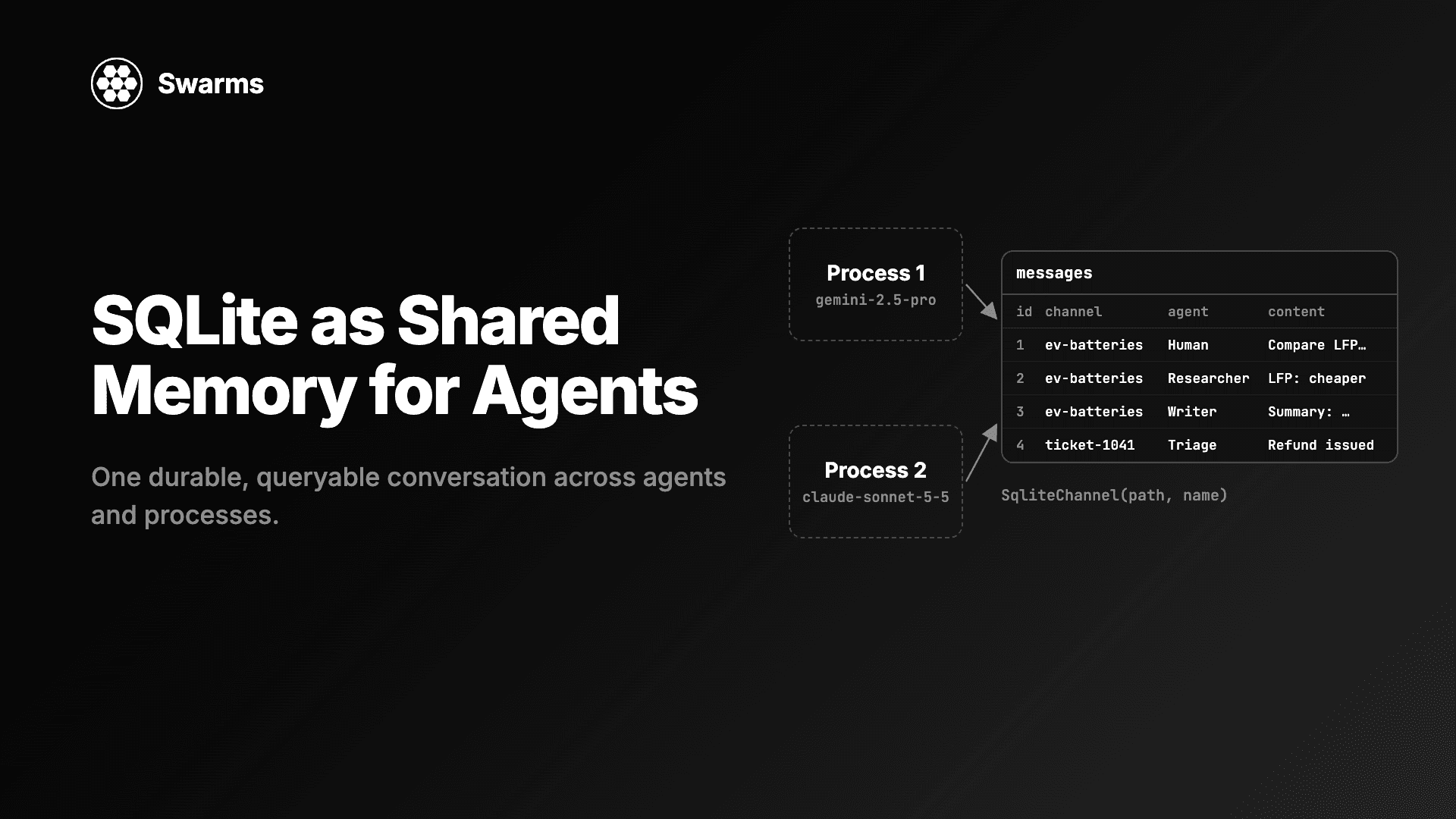
When several agents work on the same problem, they need shared memory: one place where each agent can read what the others said and add what it says. Most teams start with an in-process list, then find out they also want the history to survive a restart, to be shared between worker processes, and to be queryable when something goes wrong. A SQLite file does all three with no server to run.
This guide shows how to use SQLite as shared memory for AI agents with SqliteChannel, which shipped in Swarms v17 "InterLink". You will connect agents on different providers to one conversation, continue it in a later run, keep many conversations in one file, give a whole workflow one memory, run SQL over the history, write to it from several processes at once, and clean it up. Every code block was run against Swarms 17.0.0, with the model calls simulated and everything else (SQLite, threads, processes, files) running for real.
"Agent memory" covers a few different things, and it helps to separate them:
Agent keeps a conversation in process for its current task. Other agents cannot see it, and it is gone when the process exits.long_term_memory parameter on Agent.SqliteChannel is the third kind. It stores every message verbatim, in order, with the speaker's name and a timestamp. It does no embedding and no similarity search; an agent attached to it reads the whole conversation. That makes it a good fit for handoffs between agents, audit trails and resumable runs, and a poor fit for searching a large knowledge base, where a vector store belongs.
A SqliteChannel is one of the comms channels in v17. A channel is anything with post(agent_name, content) and messages(), and the same interface also ships as a Markdown file, a queue, an HTTP server and an email thread. How to Make AI Agents Talk to Each Other in Python compares them.
SqliteChannel(path, name="default") opens (or creates) the database file at path, and name picks which conversation in that file this channel is. On open it switches the file to WAL mode and creates one table and one index if they do not exist yet. This is the exact SQL from the Swarms source:
PRAGMA journal_mode=WAL;

CREATE TABLE IF NOT EXISTS messages (
    id INTEGER PRIMARY KEY,
    channel TEXT NOT NULL,
    agent_name TEXT NOT NULL,
    content TEXT NOT NULL,
    created_at TEXT NOT NULL DEFAULT CURRENT_TIMESTAMP
);

CREATE INDEX IF NOT EXISTS messages_channel ON messages (channel, id);
Every conversation in the file shares this table, told apart by the channel column. id gives the order, and created_at is SQLite's CURRENT_TIMESTAMP, which is UTC in YYYY-MM-DD HH:MM:SS form. The methods map directly onto it:
| Method | What it does |
|---|---|
post(agent_name, content) | Inserts one row into this conversation |
messages() | Returns [{"agent_name", "content"}, ...] for this conversation, oldest first |
fetch_messages(agent_name=None, limit=None) | The same rows with id and created_at, optionally filtered by speaker and limited to the latest N |
SqliteChannel.list_conversations(path) | Every conversation name in the file, in the order their first message arrived |
clear() | Deletes this conversation's rows only |
close() | Closes the connection; the file keeps every message |
Passing ":memory:" as the path keeps the conversation in the current process only, which is handy in tests.
pip install -U swarmsThe examples use several providers. Each one needs its key in the environment (OPENAI_API_KEY, ANTHROPIC_API_KEY, GEMINI_API_KEY, DEEPSEEK_API_KEY, MISTRAL_API_KEY, GROQ_API_KEY), and only for the providers you use. SQLite ships with Python, so there is nothing else to install.
Give two agents the same channel and they share a conversation. Here a researcher on Gemini gathers facts and a writer on Claude turns them into a summary:
from swarms import Agent, SqliteChannel

channel = SqliteChannel("agent_memory.db", name="ev-batteries")

researcher = Agent(
    agent_name="Researcher",
    system_prompt="You gather facts and figures. Answer in a short bullet list.",
    model_name="gemini/gemini-2.5-pro",
    max_loops=1,
    output_type="final",
    print_on=False,
    channel=channel,
)
writer = Agent(
    agent_name="Writer",
    system_prompt="Turn the facts in the conversation into a three-sentence summary.",
    model_name="anthropic/claude-sonnet-5-5",
    max_loops=1,
    output_type="final",
    print_on=False,
    channel=channel,
)

task = "Summarize the state of solid-state EV batteries."
researcher.run(task)
print(writer.run(task))

for row in channel.fetch_messages():
    print(row["id"], row["created_at"], row["agent_name"], "|", row["content"][:50])
Gemini 2.5 Pro handles the research step because it is strong on long source material, and Claude Sonnet 5.5 writes the prose. output_type="final" makes run() return the reply alone.
An agent with a channel follows three rules. Before it runs, it reads the channel's messages as prior turns. It posts the task once, under its user_name ("Human" by default), so two agents given the same task produce one copy. After a successful run it posts its answer under its agent_name; a failed run posts nothing. On a fresh database the loop prints three rows:
1 2026-11-04 19:25:41 Human | Summarize the state of solid-state EV batteries.
2 2026-11-04 19:25:41 Researcher | ...
3 2026-11-04 19:25:41 Writer | ...
When the writer runs, its request contains the researcher's answer followed by the task. The model sees the text of earlier messages; the agent_name column is for you and your queries. So write prompts that point at "the facts above" or "the summary above" instead of naming another agent.
The file outlives the process. Open the same path with the same name from a new script, a cron job or a restarted worker, and the next agent picks up where the last one stopped:
from swarms import Agent, SqliteChannel

# A later run, in a new process: same file, same conversation name.
channel = SqliteChannel("agent_memory.db", name="ev-batteries")
print(len(channel.messages()), "messages already in the conversation")

editor = Agent(
    agent_name="Editor",
    system_prompt="You edit drafts for length and clarity.",
    model_name="gpt-5.4",
    max_loops=1,
    output_type="final",
    print_on=False,
    channel=channel,
)

print(editor.run("Cut the summary above to one sentence."))
print(len(channel.messages()), "messages now")
Run after the previous script, this printed 3 messages already in the conversation and then 5 messages now (the new task and the editor's answer). The editor's request carried all three earlier messages before its own task.
When an agent has a channel, the channel is its memory. Each request is built from the channel's rows plus the new task, so the agent's own in-process history from earlier runs is left out. That is also why one database can safely back many separate conversations.
name selects a conversation, so one file can hold a conversation per customer ticket, per user session or per job. Here a triage agent on Groq handles two tickets, each in its own conversation:
from swarms import Agent, SqliteChannel

DB = "agent_memory.db"
tickets = {
    "ticket-1041": "My March invoice charged me twice.",
    "ticket-1042": "The export button returns a 500 error.",
}

for name, text in tickets.items():
    channel = SqliteChannel(DB, name=name)  # one conversation per ticket, one file
    triage = Agent(
        agent_name="Triage",
        system_prompt="Classify the ticket as billing, bug or other, and say why in one line.",
        model_name="groq/openai/gpt-oss-120b",  # fast and cheap for high-volume triage
        max_loops=1,
        output_type="final",
        print_on=False,
        user_name="Customer",  # the task is posted under this name
        channel=channel,
    )
    triage.run(text)
    channel.close()

print(SqliteChannel.list_conversations(DB))
print(SqliteChannel(DB, name="ticket-1042").messages())
Groq's gpt-oss-120b suits a step that runs on every incoming ticket, where speed and price matter more than depth. Setting user_name="Customer" records the ticket text under that speaker. In the same file as the earlier examples, the script printed ['ev-batteries', 'ticket-1041', 'ticket-1042'], and the second ticket's conversation was two rows, one from Customer and one from Triage.
Structures take a channel too. SequentialWorkflow, ConcurrentWorkflow, AgentRearrange, GraphWorkflow, MixtureOfAgents, GroupChat, HierarchicalSwarm, PlannerWorkerSwarm and MajorityVoting accept channel= and write their transcript to it. The structure owns the channel and detaches any channels on its member agents (with a warning), so every message is written exactly once:
from swarms import Agent, SequentialWorkflow, SqliteChannel

channel = SqliteChannel("agent_memory.db", name="semiconductor-brief")

researcher = Agent(
    agent_name="Researcher",
    system_prompt="Collect the key facts and figures as a bullet list.",
    model_name="gemini/gemini-2.5-pro",  # long context for source material
    max_loops=1,
    print_on=False,
)
analyst = Agent(
    agent_name="Analyst",
    system_prompt="Interpret the facts above: trends, risks, open questions.",
    model_name="deepseek/deepseek-v4-pro",
    max_loops=1,
    print_on=False,
)
writer = Agent(
    agent_name="Writer",
    system_prompt="Write a one-page brief from the conversation.",
    model_name="anthropic/claude-sonnet-5-5",
    max_loops=1,
    print_on=False,
)

workflow = SequentialWorkflow(
    agents=[researcher, analyst, writer],
    max_loops=1,
    channel=channel,
)
workflow.run("Brief me on the US semiconductor sector.")

for row in channel.fetch_messages():
    print(row["id"], row["agent_name"], len(row["content"]), "chars")

print("Writer's latest message:", channel.fetch_messages(agent_name="Writer", limit=1)[0]["id"])
The workflow posts the task under User, then one row per agent in order: User, Researcher, Analyst, Writer. fetch_messages(agent_name="Writer", limit=1) is the quick way to get one speaker's latest message without writing SQL. DeepSeek V4 Pro sits in the middle as the analyst, a capable model at a lower price than the writer's.
A non-empty channel continues a run, the same way it does for a single agent: point a new workflow at name="semiconductor-brief" tomorrow and it starts from this transcript.
Because the history is a plain table, any SQLite client can query it: Python's sqlite3, the sqlite3 command-line shell, a BI tool, or pandas. Open it read-only for analytics, so a reporting script can never change what the agents remember:
import sqlite3

# Read-only connection: analytics can never modify agent memory.
conn = sqlite3.connect("file:agent_memory.db?mode=ro", uri=True)

print("Messages per speaker, per conversation:")
for row in conn.execute(
    """
    SELECT channel, agent_name, COUNT(*) AS n
    FROM messages
    GROUP BY channel, agent_name
    ORDER BY channel, n DESC
    """
):
    print(" ", row)

print("Every message that mentions a 500 error:")
for row in conn.execute(
    """
    SELECT channel, id, agent_name, substr(content, 1, 60)
    FROM messages
    WHERE content LIKE ?
    ORDER BY id
    """,
    ("%500 error%",),
):
    print(" ", row)

print("Latest message in each conversation:")
for row in conn.execute(
    """
    SELECT m.channel, m.agent_name, m.created_at
    FROM messages AS m
    JOIN (SELECT channel, MAX(id) AS id FROM messages GROUP BY channel) AS last
      ON m.id = last.id
    ORDER BY m.id
    """
):
    print(" ", row)

print("Conversations active in the last 24 hours (created_at is UTC):")
for row in conn.execute(
    """
    SELECT channel, COUNT(*)
    FROM messages
    WHERE created_at >= datetime('now', '-1 day')
    GROUP BY channel
    """
):
    print(" ", row)

conn.close()
Against the database built by the examples above, the first query printed rows such as ('ev-batteries', 'Human', 2), ('semiconductor-brief', 'Analyst', 1) and ('ticket-1042', 'Customer', 1), and the search found the customer's message in ticket-1042. The (channel, id) index covers the per-conversation lookups the channel itself makes. For a search-heavy workload over a large history, add your own index or an FTS5 table next to messages; the channel only reads and writes its own table.
SqliteChannel is safe for threads and processes. Within one process, a lock on the connection serializes posts, so a fan-out step can post from many threads at once (the v17 pull request tests 40 messages from 8 threads). Across processes, SQLite's own file locking serializes writers, and WAL mode lets readers keep reading while a write is in progress.
The rule for processes is simple: each process opens its own SqliteChannel. A connection cannot be passed to another process, so pass the path and the name instead. Here a pool of four worker processes answers eight tickets on four providers, and every worker also writes to one shared ops-log conversation:
import os
import sqlite3
from concurrent.futures import ProcessPoolExecutor

from swarms import Agent, SqliteChannel

DB = "support.db"
MODELS = [
    "gpt-5.4-mini",
    "anthropic/claude-haiku-5-5",
    "mistral/mistral-large-latest",
    "groq/openai/gpt-oss-120b",
]


def handle_ticket(job):
    ticket_id, text, model = job
    # Each process opens its own connection; never pass a channel between processes.
    channel = SqliteChannel(DB, name=ticket_id)
    ops_log = SqliteChannel(DB, name="ops-log")  # one conversation every process writes to
    try:
        agent = Agent(
            agent_name="Support-Agent",
            system_prompt="Draft a short, friendly first reply to the customer.",
            model_name=model,
            max_loops=1,
            output_type="final",
            print_on=False,
            user_name="Customer",
            channel=channel,
        )
        agent.run(text)
        ops_log.post("Support-Agent", f"{ticket_id} answered by {model} in pid {os.getpid()}")
    finally:
        channel.close()
        ops_log.close()
    return ticket_id


if __name__ == "__main__":
    # Open the file once up front so the table and WAL mode exist before workers start.
    SqliteChannel(DB, name="ops-log").close()

    jobs = [
        (f"ticket-{2000 + i}", f"Customer message number {i}", MODELS[i % len(MODELS)])
        for i in range(8)
    ]
    with ProcessPoolExecutor(max_workers=4) as pool:
        finished = list(pool.map(handle_ticket, jobs))

    conn = sqlite3.connect(DB)
    print("tickets answered:", len(finished))
    print("conversations:", len(SqliteChannel.list_conversations(DB)))
    print(
        "processes that wrote to ops-log:",
        conn.execute(
            "SELECT COUNT(DISTINCT substr(content, instr(content, 'pid '))) "
            "FROM messages WHERE channel = 'ops-log'"
        ).fetchone()[0],
    )
    print(
        "rows per ticket:",
        conn.execute(
            "SELECT MIN(n), MAX(n) FROM (SELECT COUNT(*) AS n FROM messages "
            "WHERE channel LIKE 'ticket-%' GROUP BY channel)"
        ).fetchone(),
    )
    conn.close()
The four small models are spread over four providers, so a rate limit or outage on one account affects a quarter of the tickets at most. The if __name__ == "__main__": guard is required, because on macOS and Windows worker processes start by importing your script. We ran it with Python's default spawn start method on macOS:
tickets answered: 8
conversations: 9
processes that wrote to ops-log: 4
rows per ticket: (2, 2)
Four separate processes wrote 24 rows into one file (two per ticket plus eight in ops-log), and none were lost.
SqliteChannel uses Python's default busy timeout of 5 seconds, so a post waits up to that long for the lock before raising sqlite3.OperationalError: database is locked. Agent posts are tiny and infrequent next to model calls, so this rarely matters, but a script that holds a long write transaction on the same file can trigger it.HttpChannel in front of a database you run; How to Run AI Agents Across Multiple Machines walks through it.agent_memory.db-wal and agent_memory.db-shm sit next to the database while connections are open. Back up with SQLite's backup API or VACUUM INTO rather than copying the .db file alone mid-run.Agent memory grows with every run, and an agent attached to a channel sends the whole conversation with each request, so long conversations cost tokens. Scope conversations narrowly (per ticket, per job) and remove them when they are done. clear() deletes one conversation; anything broader is plain SQL on the same table:
import json
import sqlite3

from swarms import SqliteChannel

DB = "agent_memory.db"

# Archive one finished conversation to JSON Lines, then remove it from the database.
ticket = SqliteChannel(DB, name="ticket-1041")
with open("ticket-1041.jsonl", "w") as f:
    for row in ticket.fetch_messages():
        f.write(json.dumps(row) + "\n")
ticket.clear()  # deletes this conversation's rows only
ticket.close()

# Age-based retention across every conversation is plain SQL on the same table.
conn = sqlite3.connect(DB)
with conn:
    expired = conn.execute(
        "DELETE FROM messages WHERE created_at < datetime('now', '-30 days')"
    ).rowcount
conn.execute("VACUUM")  # give the freed pages back to the filesystem
conn.close()

print("expired rows deleted:", expired)
print(SqliteChannel.list_conversations(DB))
After this ran, ticket-1041 was gone from list_conversations and its two rows were in ticket-1041.jsonl. To check the age-based delete, we inserted a row dated 45 days back and ran the script again: it printed expired rows deleted: 1. Run VACUUM when no agents are writing, since it needs the database to itself.
fallback_models and SwarmRouter(fallback_swarms=...).clear() a natural end-of-job step.close() releases the connection; the messages stay in the file.It is a store that several agents read from and write to, so each one can build on what the others did. With SqliteChannel it is an ordered conversation (speaker, text, timestamp) in a SQLite table, which agents read as prior turns before each run.
No. It stores messages verbatim and returns them in order, with no embeddings or similarity search. Use it for shared conversation history and handoffs, and use a vector store (the long_term_memory parameter on Agent) for retrieval over large document sets.
Yes. Each process opens its own SqliteChannel on the same path, and SQLite serializes the writes. Within a process, the channel's lock makes it safe to post from many threads. Keep the file on a local disk.
Every message is a row in the messages table with id, channel, agent_name, content and created_at. Open the file with any SQLite client, ideally read-only (file:agent_memory.db?mode=ro), and filter by channel to select one conversation.
Call clear() on a channel to delete that conversation, or run DELETE FROM messages WHERE created_at < datetime('now', '-30 days') for age-based retention across every conversation, then VACUUM to reclaim the space.
pip install -U swarmsThe Swarms v17 "InterLink" changelog covers every comms channel and the structures that accept one, and runnable channel examples (including SQLite) live in examples/channel_examples/ in the Swarms repository. The API reference is at docs.swarms.world.
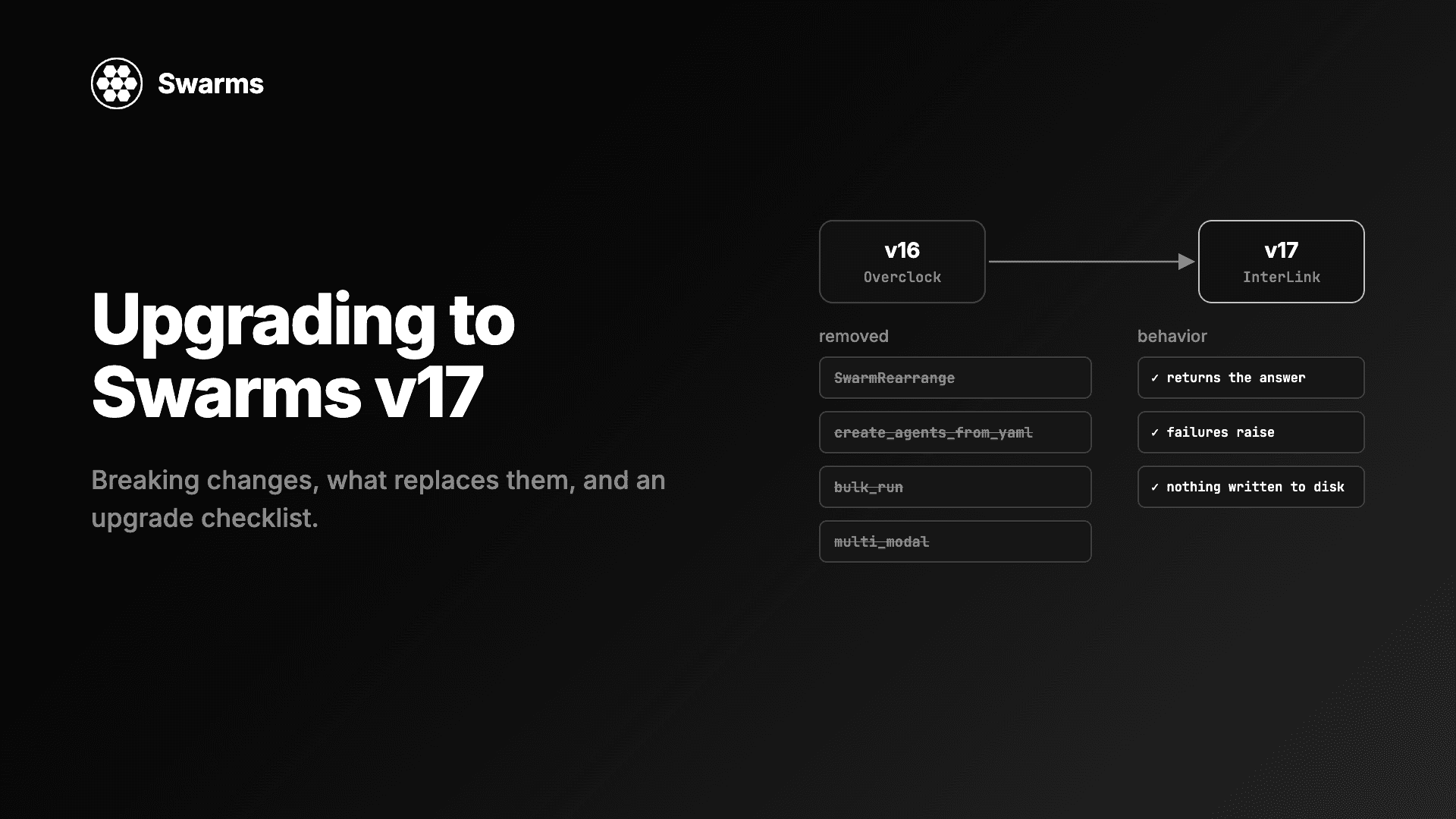
Swarms v17 upgrade and migration guide: every removed class and parameter in InterLink, what to use instead, the changed defaults, and an upgrade checklist.
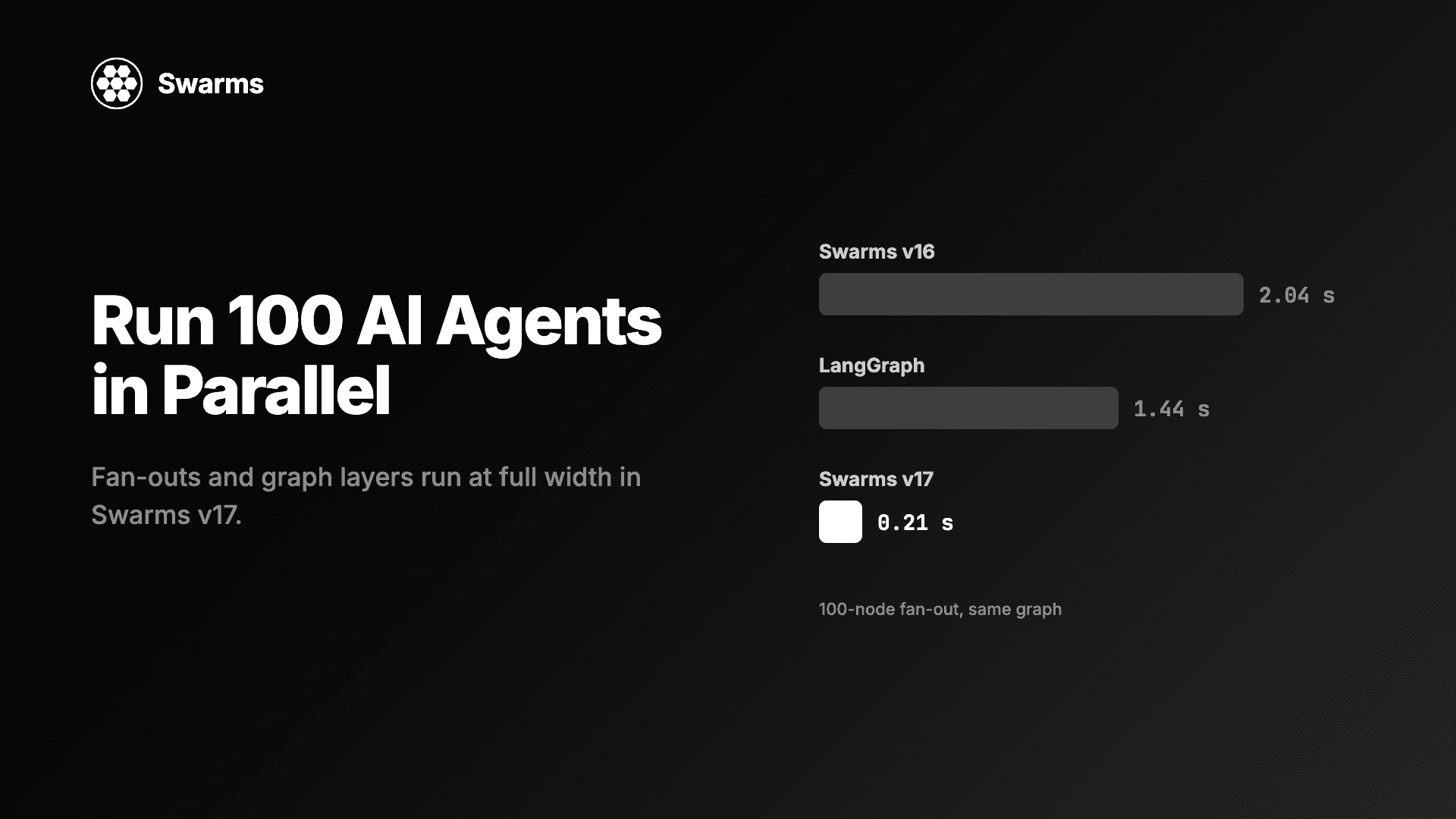
Run AI agents in parallel in Python: a 100-agent fan-out in Swarms v17 takes 0.21 s, down from 2.04 s (LangGraph: 1.44 s). Code for full width and async caps.
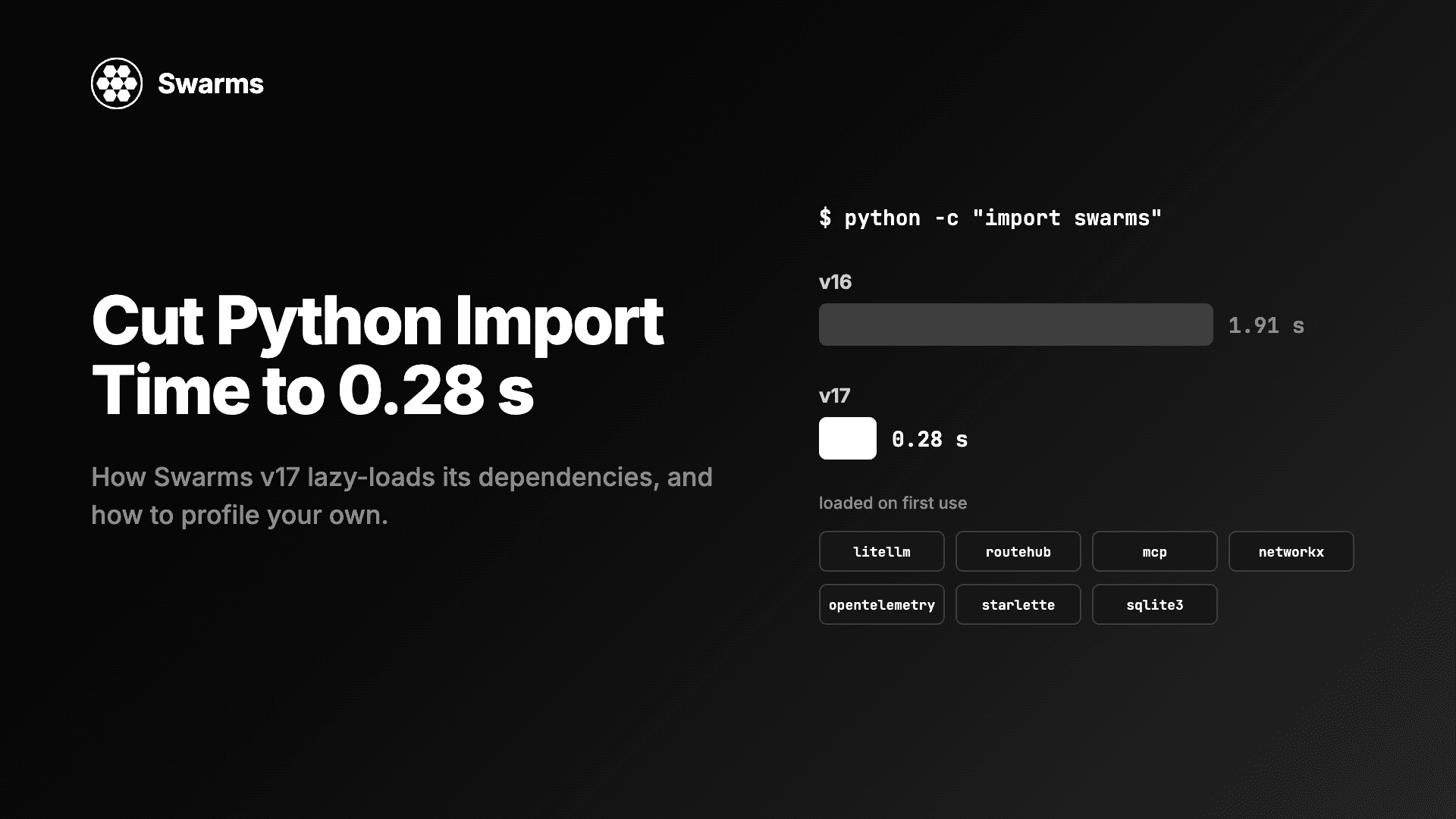
Reduce Python import time and agent cold start: import swarms fell from 1.91 s to 0.28 s with lazy loading and no disk writes. How to profile your own imports.