GuidesEngineering
How to Make AI Agents Talk to Each Other in Python
Multi-agent communication in Python with Swarms comms channels: give agents one shared conversation through a Markdown file, a queue, SQLite or HTTP.
Kye Gomez11 min read

Multi-agent communication in Python with Swarms comms channels: give agents one shared conversation through a Markdown file, a queue, SQLite or HTTP.
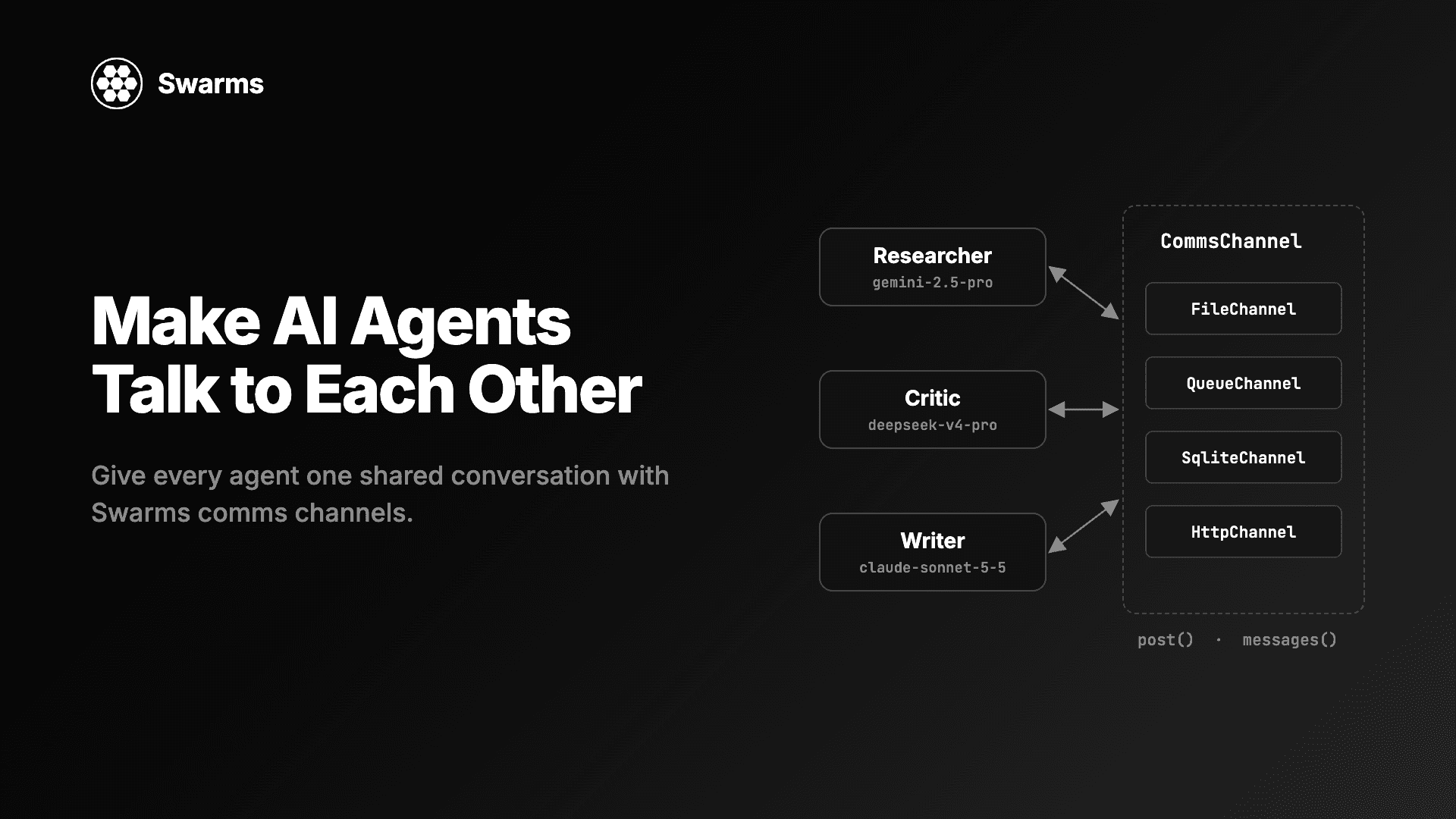
Most multi-agent communication in Python is string passing: agent A returns text, you paste it into agent B's prompt, and the conversation exists only in your variables. That works for two agents in one script. It stops working when you want a third agent to join later, a second run to pick up where the first ended, a consumer thread to react to each message, or agents on two machines to share one thread. This guide shows how to make AI agents talk to each other through a comms channel, the shared conversation object that shipped in Swarms v17 "InterLink". You give every agent the same channel, and each one reads what the others said before it runs and posts its own answer after.
Every Python block below is a complete program and was run against Swarms 17.0.0 before publishing.
pip install -U swarmsThe examples mix providers on purpose, so each agent can use the model that suits its role. Set the key for each provider you use: OPENAI_API_KEY, ANTHROPIC_API_KEY, GEMINI_API_KEY, DEEPSEEK_API_KEY, MISTRAL_API_KEY or GROQ_API_KEY. Swarms also reads them from a .env file. If you only have one key, swap every model_name for a model from that provider and the code runs the same.
A CommsChannel is a place agents read what others said and post what they say. The interface is small:
post(agent_name, content) appends one message.messages() returns every message so far, oldest first, as rows shaped like {"agent_name": ..., "content": ...}.clear() removes every message. It is optional; the base class raises NotImplementedError for channels that cannot be cleared.You can use a channel by hand, with no model involved:
from swarms import FileChannel

channel = FileChannel("runs/hello.md")
channel.clear()  # start from an empty file every time you run this

channel.post("Human", "What should we call the new CLI?")
channel.post("Namer", "Three options: swarmctl, hive, colony.")

for message in channel.messages():
    print(f"{message['agent_name']}: {message['content']}")
Human: What should we call the new CLI?
Namer: Three options: swarmctl, hive, colony.
When you pass a channel to an Agent, three things happen on every run():
channel.messages() and sends them to the model as prior turns. Rows the agent posted itself become assistant turns; rows from anyone else become user turns.user_name ("Human" by default), unless that exact task row is already in the channel. Three agents given the same task produce one copy of it.agent_name. A failed run posts nothing.If you pass messages= to run() yourself, the agent treats you as the owner of the transcript: it skips reading the channel and only posts its answer.
All six ship in swarms 17 and are importable from the top-level package.
| Channel | Where the conversation lives | Pick it when |
|---|---|---|
FileChannel(path) | A .md or .txt file with one ## @name header per message | You want to read the conversation while it happens, or edit it between runs |
QueueChannel(q=None) | In-process history plus a queue.Queue | A consumer thread should block on each new message |
SqliteChannel(path, name="default") | Rows in a SQLite table, many conversations per file | Several threads or processes share state, or you want SQL over the history |
HttpChannel(url, headers=None, timeout=30.0) | A server you run, over GET, POST and DELETE | Agents on different machines share one conversation |
SmtpChannel(...) | An email thread in your own mailbox, sent over SMTP and read over IMAP | People should reply to agents from their mail client |
AgentMailChannel(inbox_id, to) | An email thread in an AgentMail inbox | The same, without running a mail server |
A reasonable default is FileChannel during development, because you can open the file, and SqliteChannel once more than one process writes to the conversation.
Here three agents research, critique and write a short comparison of two vector databases. Each runs on a different provider, chosen for its role: Gemini 2.5 Pro gathers facts (a strong model with a large context window), DeepSeek V4 Pro does the critique (a reasoning model at a lower price), and Claude Sonnet 5.5 writes the final prose.
from swarms import Agent, FileChannel

channel = FileChannel("runs/vector_db_report.md")
channel.clear()  # this script starts a fresh conversation

researcher = Agent(
    agent_name="Researcher",
    system_prompt="You gather facts and figures. Answer in a short bullet list.",
    model_name="gemini/gemini-2.5-pro",
    max_loops=1,
    output_type="final",
    print_on=False,
    channel=channel,
)
critic = Agent(
    agent_name="Critic",
    system_prompt=(
        "You read the conversation so far and list every claim that is "
        "unsupported or likely wrong, with one line on why."
    ),
    model_name="deepseek/deepseek-v4-pro",
    max_loops=1,
    output_type="final",
    print_on=False,
    channel=channel,
)
writer = Agent(
    agent_name="Writer",
    system_prompt=(
        "You write a short report from the research and the critique in the "
        "conversation. Leave out any claim the critique flagged."
    ),
    model_name="anthropic/claude-sonnet-5-5",
    max_loops=1,
    output_type="final",
    print_on=False,
    channel=channel,
)

task = "Compare pgvector and Qdrant for a 10M-vector semantic search workload."
for agent in (researcher, critic, writer):
    agent.run(task)

for message in channel.messages():
    print(f"--- {message['agent_name']} ---")
    print(message["content"][:300])
The channel ends up with four messages: Human (the task, posted once), Researcher, Critic and Writer. When the Critic runs, its model receives the Researcher's answer as a prior turn followed by the task. When the Writer runs, it receives both earlier answers and then the task. No agent was wired to another; they only share the channel.
output_type="final" makes run() return just the agent's answer. Under the default output_type, run() returns the agent's conversation so far. The channel always records the answer either way.
One detail matters for prompt design. At the Agent level, the speaker names stay in the channel and are not added to the text the model sees, so the Writer's model reads the research and the critique as two user turns. If you want each turn labelled with its speaker, run the agents through a structure: SequentialWorkflow, for example, sends the previous output as Researcher: ....
A channel that already holds messages is a conversation to continue. Run this as a separate script after the one above, a minute or a week later:
from swarms import Agent, FileChannel

channel = FileChannel("runs/vector_db_report.md")
print(f"{len(channel.messages())} messages already in the channel")

editor = Agent(
    agent_name="Editor",
    system_prompt="You cut reports to half their length and keep every number.",
    model_name="gpt-5.4",
    max_loops=1,
    output_type="final",
    print_on=False,
    channel=channel,
)

print(editor.run("Cut the report above to five sentences."))
It prints 4 messages already in the channel, then the Editor's answer. The Editor's model receives all four earlier messages, then the new task. Afterwards the file holds six messages: the original four, the new Human task and the Editor reply. This is why the first script calls channel.clear(): without it, every rerun would continue the old conversation instead of starting a new one.
Structures take channel= too. In 17.0.0 these accept it: SequentialWorkflow, AgentRearrange, ConcurrentWorkflow, GraphWorkflow, MixtureOfAgents, GroupChat, HierarchicalSwarm, PlannerWorkerSwarm and MajorityVoting, and SwarmRouter forwards it to whichever swarm it builds. The structure seeds its conversation from the channel and posts every later message to it, so a second run on a non-empty channel continues the first.
The structure owns the transcript. If a member agent also has a channel, the structure detaches it and logs a warning (SequentialWorkflow owns the comms channel; ignoring the one on agent 'Researcher'), so each message is written once. Structures post the task under User.
This example runs a three-step pipeline into a SQLite conversation. The cheap gpt-5.4-mini does the list-making step, Claude Sonnet 5.5 writes the copy, and Gemini 2.5 Pro reviews it.
from swarms import Agent, SequentialWorkflow, SqliteChannel


def make_agent(name: str, model: str, prompt: str) -> Agent:
    return Agent(
        agent_name=name,
        system_prompt=prompt,
        model_name=model,
        max_loops=1,
        print_on=False,
    )


channel = SqliteChannel("runs/channels.db", name="pricing-page")

workflow = SequentialWorkflow(
    agents=[
        make_agent("Analyst", "gpt-5.4-mini", "List what buyers compare when they read an API pricing page."),
        make_agent("Copywriter", "anthropic/claude-sonnet-5-5", "Write pricing page copy from the analysis in the conversation."),
        make_agent("Reviewer", "gemini/gemini-2.5-pro", "Point out anything in the copy that is vague or could mislead a buyer."),
    ],
    max_loops=1,
    channel=channel,
)
workflow.run("Draft the pricing page copy for a usage-based API.")

for row in channel.fetch_messages():
    print(row["id"], row["created_at"], row["agent_name"], row["content"][:50])

print(SqliteChannel.list_conversations("runs/channels.db"))
channel.close()
fetch_messages() returns rows with an id and a created_at timestamp, and takes agent_name= to filter by speaker and limit= to get only the latest rows. One database file holds as many conversations as you like, told apart by name; list_conversations() returns their names (['pricing-page'] here). The connection uses SQLite's WAL mode and a lock, so several threads can post at once. close() closes the connection and the file keeps every message.
Sometimes you want to act on each message as it lands: push it to a websocket, update a UI, or log it somewhere. QueueChannel puts every post on a queue. A consumer calls wait() or iterates the channel, which blocks until the next post, and close() ends the iteration.
Here three agents argue a trade in parallel with a ConcurrentWorkflow. They are many-and-fast workers, so they use cheaper models from three providers.
import threading

from swarms import Agent, ConcurrentWorkflow, QueueChannel


def make_agent(name: str, model: str, prompt: str) -> Agent:
    return Agent(
        agent_name=name,
        system_prompt=prompt,
        model_name=model,
        max_loops=1,
        print_on=False,
    )


channel = QueueChannel()
workflow = ConcurrentWorkflow(
    agents=[
        make_agent("Bull", "gpt-5.4-mini", "Make the strongest case for the trade."),
        make_agent("Bear", "groq/openai/gpt-oss-120b", "Make the strongest case against the trade."),
        make_agent("Risk", "anthropic/claude-haiku-5-5", "List the risks a desk manager would ask about."),
    ],
    channel=channel,
)


def produce():
    try:
        workflow.run("Should we buy two-year US Treasuries this week?")
    finally:
        channel.close()  # ends the consumer loop, even if the run fails


threading.Thread(target=produce, daemon=True).start()

for message in channel:  # blocks until the next post
    print(f"[{message['agent_name']}] {message['content'][:80]}")

print(f"{len(channel.messages())} messages in the history")
The consumer prints the User task first, then Bull, Bear and Risk, then 4 messages in the history. A fan-out structure posts its answers in agent order, so the messages arrive in the order of the agents list. Put close() in a finally block; if the run raises and nothing calls close(), the consumer waits forever. wait(timeout=5) returns None after five seconds instead of blocking.
To cross process boundaries, pass a multiprocessing.Queue as q. Only the queue is shared then: messages() returns what the current process posted.
HttpChannel keeps the conversation on a server you run. The URL names one conversation, and the server answers three calls on it: GET returns every message as a JSON list, POST appends one {"agent_name": ..., "content": ...} object, and DELETE removes them all. A non-2xx reply raises httpx.HTTPStatusError. The Swarms repository includes a standard-library reference server at examples/channel_examples/http_channel_server.py.
from swarms import Agent, HttpChannel

channel = HttpChannel(
    "http://localhost:8077/channels/ev-report",
    headers={"Authorization": "Bearer dev-token"},
)

agent = Agent(
    agent_name="Researcher",
    model_name="mistral/mistral-large-latest",
    max_loops=1,
    output_type="final",
    print_on=False,
    channel=channel,
)
print(agent.run("Summarize the EV battery market in three bullets."))
print([m["agent_name"] for m in channel.messages()])
channel.close()
We ran this against a local server on port 8077 that checks the bearer token; it printed the answer and then ['Human', 'Researcher']. Any agent on any machine that points at the same URL joins the same conversation. A separate guide covers running the server side in production.
The two email channels work the same way from the agent's side. SmtpChannel keeps the conversation as one thread in a mailbox you already run, and AgentMailChannel keeps it in an AgentMail inbox through its API. In both, a person can reply from their own mail client and the reply comes back as a turn. Another guide covers them in depth.
Anything with post and messages is a channel. Subclass CommsChannel to put the conversation in Redis, a Slack thread, or a table you already have. This one writes JSON Lines, which are easy to grep, diff and load into pandas:
import json
from pathlib import Path

from swarms import Agent, CommsChannel


class JsonlChannel(CommsChannel):
    """One JSON object per line: easy to grep, diff and load into pandas."""

    def __init__(self, path: str):
        self.path = Path(path)

    def post(self, agent_name: str, content: str) -> None:
        self.path.parent.mkdir(parents=True, exist_ok=True)
        row = {"agent_name": agent_name, "content": str(content)}
        with self.path.open("a", encoding="utf-8") as f:
            f.write(json.dumps(row) + "\n")

    def messages(self):
        if not self.path.exists():
            return []
        with self.path.open(encoding="utf-8") as f:
            return [json.loads(line) for line in f if line.strip()]

    def clear(self) -> None:
        self.path.unlink(missing_ok=True)


channel = JsonlChannel("runs/triage.jsonl")
channel.clear()

triager = Agent(
    agent_name="Triager",
    system_prompt="Classify the bug report by severity and component.",
    model_name="gpt-5.4-mini",
    max_loops=1,
    output_type="final",
    print_on=False,
    channel=channel,
)
fixer = Agent(
    agent_name="Fixer",
    system_prompt="Propose a fix for the bug, using the triage in the conversation.",
    model_name="anthropic/claude-opus-5-5",
    max_loops=1,
    output_type="final",
    print_on=False,
    channel=channel,
)

report = "Uploading a 2 GB file returns HTTP 500 after 30 seconds."
triager.run(report)
fixer.run(report)

print(channel.path.read_text())
The file ends with three lines: the Human report, the Triager row and the Fixer row. Triage is a classification job, so it runs on gpt-5.4-mini; proposing a fix is the hard step, so it gets Claude Opus 5.5.
Return rows with exactly two keys, agent_name and content, from messages(). Agent.run finds the task it already posted by comparing whole rows, so if your rows also carry a timestamp, the second agent does not recognise the task, posts it again, and sends it to its model twice. Store extra fields if you need them, but leave them out of what messages() returns.
clear() at the start of a script that should start fresh, or use a new file or a new SQLite name per run.agent_name. It is the speaker label in the channel and decides which rows come back to an agent as its own assistant turns on the next run.fallback_models=[primary, backup] to an Agent to try a second model; only the answer that succeeds is posted. ConcurrentWorkflow differs by default (on_error="store"): it posts a failed agent as Name (failed) with the error text and lets the others finish.## @ inside an answer would read back as a new message. Ordinary Markdown headings such as ## Summary are fine.The companion guide on watching your multi-agent system think with live transcripts goes deeper on FileChannel for debugging: tailing the file during a run, editing it to steer the next run, and reading failed runs. For patterns to put on top of a shared conversation, see multi-agent collaboration patterns.
Create one channel, such as FileChannel("runs/chat.md"), and pass it as channel= to every Agent. Before each run an agent reads the channel as prior turns, and after a successful run it posts its answer, so the next agent sees it. With Swarms you do not pass outputs between agents by hand.
Yes. The channel stores plain text rows, so it does not matter which model produced them. The examples above put Gemini, DeepSeek, Claude, OpenAI, Groq and Mistral models on shared channels, each with its own provider key.
In Swarms 17.0.0: SequentialWorkflow, AgentRearrange, ConcurrentWorkflow, GraphWorkflow, MixtureOfAgents, GroupChat, HierarchicalSwarm, PlannerWorkerSwarm and MajorityVoting. SwarmRouter forwards channel= to the swarm it builds.
Point a new agent or structure at the same channel (the same file path, SQLite name or HTTP URL). It reads every earlier message as context and appends to the conversation. To start over instead, call channel.clear().
FileChannel is a Markdown file you can read and edit. QueueChannel lets a consumer thread block on each new message. SqliteChannel stores many named conversations in one database that several threads and processes can write to safely.
pip install -U swarmsStart with FileChannel and two agents, open the file while they run, then move to SqliteChannel or HttpChannel when more than one process joins. The full list of what shipped with channels, including the 18 runnable scripts in examples/channel_examples/, is in the Swarms v17 changelog. Documentation is at docs.swarms.world and the source is on GitHub.
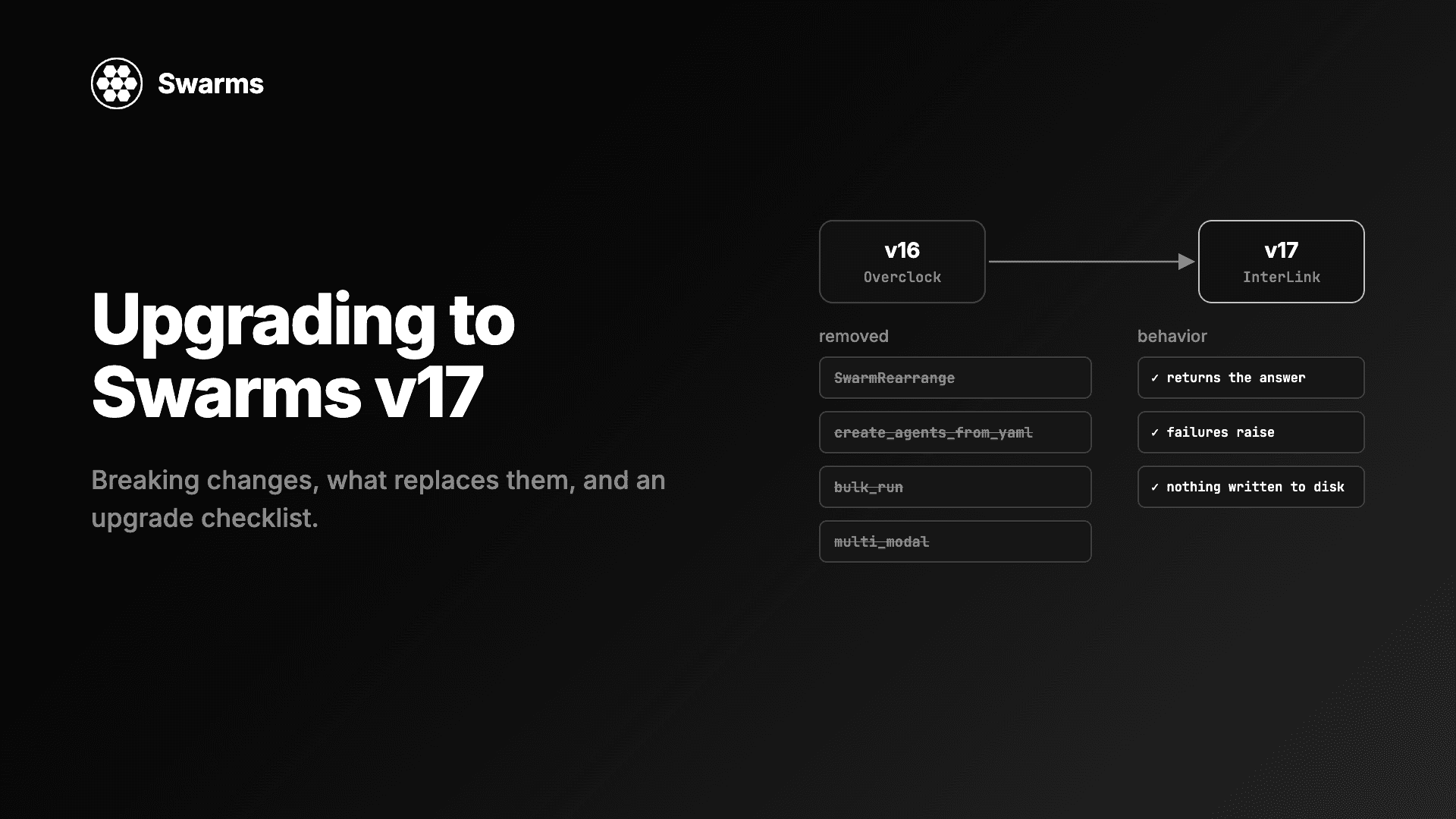
Swarms v17 upgrade and migration guide: every removed class and parameter in InterLink, what to use instead, the changed defaults, and an upgrade checklist.
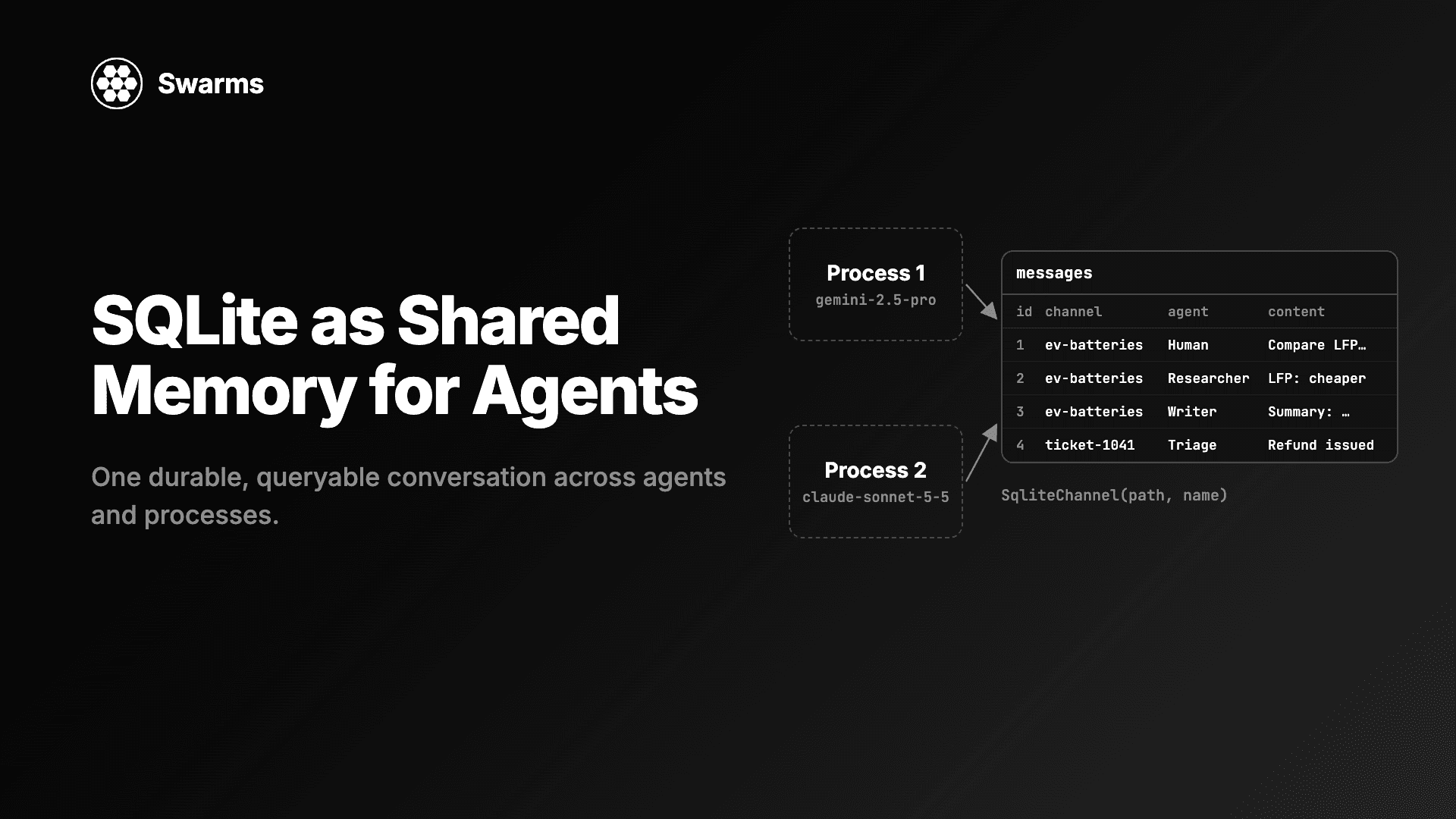
Shared memory for AI agents with SQLite: SqliteChannel gives agents and processes one durable, queryable conversation history. Store, share and run SQL over it.
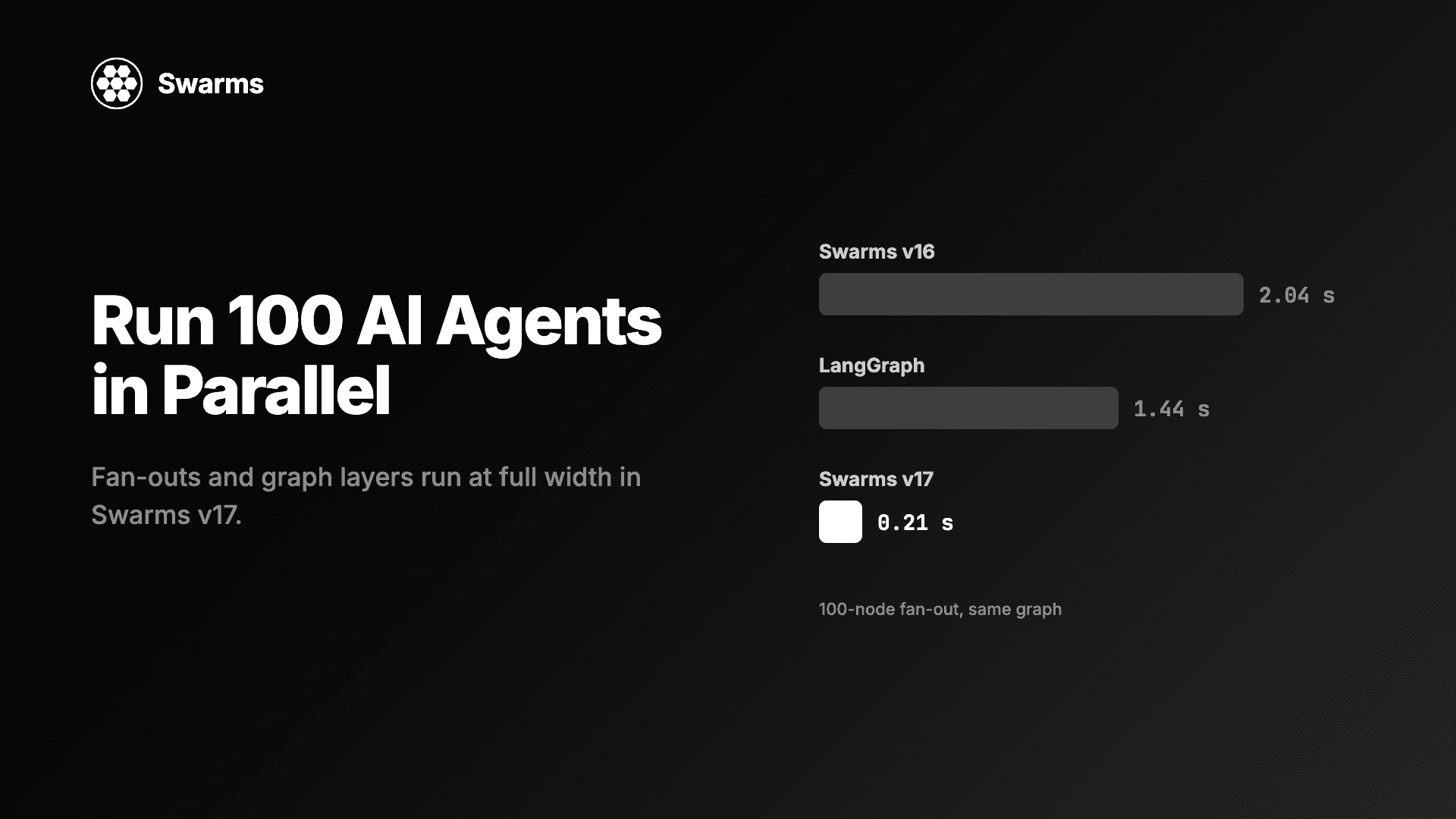
Run AI agents in parallel in Python: a 100-agent fan-out in Swarms v17 takes 0.21 s, down from 2.04 s (LangGraph: 1.44 s). Code for full width and async caps.