指南工程
如何在 Python 中让 AI 智能体彼此对话
用 Swarms 通信频道在 Python 中实现多智能体通信:通过一个 Markdown 文件、一个队列、SQLite 或 HTTP,让多个智能体共享同一段对话,只需几行代码。
Kye Gomez11 分钟阅读

用 Swarms 通信频道在 Python 中实现多智能体通信:通过一个 Markdown 文件、一个队列、SQLite 或 HTTP,让多个智能体共享同一段对话,只需几行代码。
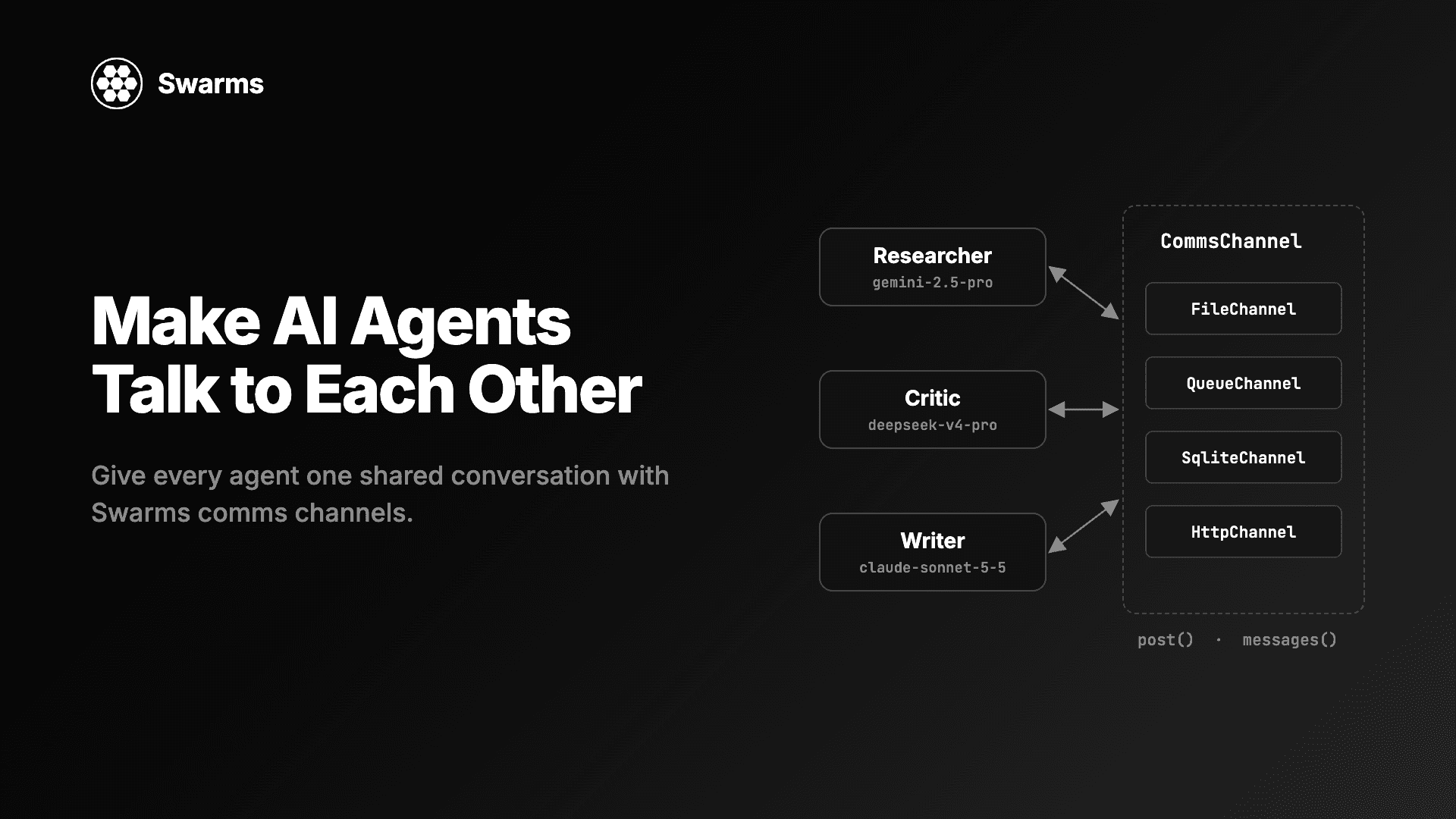
在 Python 里做多智能体通信,大多数做法其实是传字符串:智能体 A 返回一段文本,你把它粘进智能体 B 的提示词,整段对话只存在于你的变量里。一个脚本里两个智能体,这样够用。可一旦你想让第三个智能体中途加入、让第二次运行接着第一次的结尾继续、让一个消费者线程对每条消息做出反应,或者让两台机器上的智能体共享同一个对话线程,这种做法就行不通了。本指南演示如何通过通信频道(comms channel)让 AI 智能体彼此对话。通信频道是随 Swarms v17「InterLink」 发布的共享对话对象:你把同一个频道交给每个智能体,每个智能体在运行前读取其他智能体说过的话,运行后发布自己的回答。
下面每个 Python 代码块都是完整的程序,发布前都针对 Swarms 17.0.0 实际运行过。
pip install -U swarms示例有意混用多家提供商,让每个智能体使用适合自己角色的模型。为你用到的每家提供商设置 key:OPENAI_API_KEY、ANTHROPIC_API_KEY、GEMINI_API_KEY、DEEPSEEK_API_KEY、MISTRAL_API_KEY 或 GROQ_API_KEY。Swarms 也会从 .env 文件读取它们。如果你只有一家的 key,把每个 model_name 换成这家的模型,代码照样能跑。
CommsChannel 是智能体读取别人说过的话、发布自己要说的话的地方。接口很小:
post(agent_name, content) 追加一条消息。messages() 按从旧到新的顺序返回目前为止的所有消息,每行形如 {"agent_name": ..., "content": ...}。clear() 删除所有消息。它是可选的;对于无法清空的频道,基类会抛出 NotImplementedError。不调用任何模型,你也可以直接使用频道:
from swarms import FileChannel

channel = FileChannel("runs/hello.md")
channel.clear()  # start from an empty file every time you run this

channel.post("Human", "What should we call the new CLI?")
channel.post("Namer", "Three options: swarmctl, hive, colony.")

for message in channel.messages():
    print(f"{message['agent_name']}: {message['content']}")
Human: What should we call the new CLI?
Namer: Three options: swarmctl, hive, colony.
把频道传给一个 Agent 之后,每次 run() 都会发生三件事:
channel.messages(),把它们作为之前的轮次发给模型。智能体自己发布过的行变成 assistant 轮次,其他任何人发布的行变成 user 轮次。user_name(默认是 "Human")发布任务,除非频道里已经有完全相同的任务行。三个智能体拿到同一个任务,频道里只会有一份。agent_name 发布最终回答。运行失败则什么都不发布。如果你自己给 run() 传了 messages=,智能体会认为对话记录由你负责:它不再读取频道,只发布自己的回答。
这六种频道都随 swarms 17 发布,都可以从顶层包导入。
| 频道 | 对话存放在哪里 | 适合的场景 |
|---|---|---|
FileChannel(path) | 一个 .md 或 .txt 文件,每条消息一个 ## @name 标题 | 你想在对话进行时阅读它,或在两次运行之间编辑它 |
QueueChannel(q=None) | 进程内的历史记录加一个 queue.Queue | 一个消费者线程需要阻塞等待每条新消息 |
SqliteChannel(path, name="default") | SQLite 表中的行,一个文件可存多段对话 | 多个线程或进程共享状态,或者你想用 SQL 查询历史 |
HttpChannel(url, headers=None, timeout=30.0) | 你自己运行的服务器,通过 GET、POST 和 DELETE 访问 | 不同机器上的智能体共享同一段对话 |
SmtpChannel(...) | 你自己邮箱中的一个邮件线程,通过 SMTP 发送、IMAP 读取 | 让人从自己的邮件客户端回复智能体 |
AgentMailChannel(inbox_id, to) | AgentMail 收件箱中的一个邮件线程 | 同上,但不用自己运行邮件服务器 |
一个合理的默认选择是:开发阶段用 FileChannel,因为你可以直接打开文件;一旦有多个进程往对话里写,就换成 SqliteChannel。
这里有三个智能体,分别负责调研、评审和撰写一份两种向量数据库的简短对比。每个智能体运行在不同的提供商上,按角色挑选:Gemini 2.5 Pro 收集事实(能力强、上下文窗口大),DeepSeek V4 Pro 做评审(价格更低的推理模型),Claude Sonnet 5.5 撰写最终文字。
from swarms import Agent, FileChannel

channel = FileChannel("runs/vector_db_report.md")
channel.clear()  # this script starts a fresh conversation

researcher = Agent(
    agent_name="Researcher",
    system_prompt="You gather facts and figures. Answer in a short bullet list.",
    model_name="gemini/gemini-2.5-pro",
    max_loops=1,
    output_type="final",
    print_on=False,
    channel=channel,
)
critic = Agent(
    agent_name="Critic",
    system_prompt=(
        "You read the conversation so far and list every claim that is "
        "unsupported or likely wrong, with one line on why."
    ),
    model_name="deepseek/deepseek-v4-pro",
    max_loops=1,
    output_type="final",
    print_on=False,
    channel=channel,
)
writer = Agent(
    agent_name="Writer",
    system_prompt=(
        "You write a short report from the research and the critique in the "
        "conversation. Leave out any claim the critique flagged."
    ),
    model_name="anthropic/claude-sonnet-5-5",
    max_loops=1,
    output_type="final",
    print_on=False,
    channel=channel,
)

task = "Compare pgvector and Qdrant for a 10M-vector semantic search workload."
for agent in (researcher, critic, writer):
    agent.run(task)

for message in channel.messages():
    print(f"--- {message['agent_name']} ---")
print(message["content"][:300])频道最后有四条消息:Human(任务,只发布一次)、Researcher、Critic 和 Writer。Critic 运行时,它的模型先收到 Researcher 的回答作为之前的轮次,然后是任务。Writer 运行时,它收到前面两条回答,然后是任务。没有任何智能体被连接到另一个智能体上,它们只是共享同一个频道。
output_type="final" 让 run() 只返回智能体的回答。在默认的 output_type 下,run() 返回的是智能体到目前为止的对话。无论哪种设置,频道记录的都是回答本身。
有一个细节会影响提示词设计。在 Agent 这一层,说话者的名字留在频道里,不会加进模型看到的文本,所以 Writer 的模型把调研和评审当作两条 user 轮次来读。如果你希望每一轮都标注说话者,就通过一个结构来运行这些智能体:比如 SequentialWorkflow 会把上一步的输出以 Researcher: ... 的形式发送。
一个已经有消息的频道,就是一段可以继续的对话。在上面的脚本之后,把下面这段作为单独的脚本运行,隔一分钟或一周都可以:
from swarms import Agent, FileChannel

channel = FileChannel("runs/vector_db_report.md")
print(f"{len(channel.messages())} messages already in the channel")

editor = Agent(
    agent_name="Editor",
    system_prompt="You cut reports to half their length and keep every number.",
    model_name="gpt-5.4",
    max_loops=1,
    output_type="final",
    print_on=False,
    channel=channel,
)

print(editor.run("Cut the report above to five sentences."))
它会先打印 4 messages already in the channel,然后是 Editor 的回答。Editor 的模型会收到之前全部四条消息,然后是新任务。运行结束后,文件里有六条消息:原来的四条、新的 Human 任务和 Editor 的回复。这就是第一个脚本调用 channel.clear() 的原因:如果不清空,每次重新运行都会接着旧对话往下写,而不是开始一段新对话。
结构也接受 channel=。在 17.0.0 中,接受它的有:SequentialWorkflow、AgentRearrange、ConcurrentWorkflow、GraphWorkflow、MixtureOfAgents、GroupChat、HierarchicalSwarm、PlannerWorkerSwarm 和 MajorityVoting,SwarmRouter 则会把它转交给自己构建的那个 swarm。结构用频道里的内容初始化自己的对话,并把之后的每条消息都发布到频道,所以在非空频道上的第二次运行会接着第一次继续。
对话记录归结构所有。如果某个成员智能体自己也带着频道,结构会把它摘掉并记录一条警告(SequentialWorkflow owns the comms channel; ignoring the one on agent 'Researcher'),这样每条消息只写一次。结构以 User 的名义发布任务。
下面这个例子把一条三步流水线写进一段 SQLite 对话。便宜的 gpt-5.4-mini 负责列清单这一步,Claude Sonnet 5.5 撰写文案,Gemini 2.5 Pro 负责审阅。
from swarms import Agent, SequentialWorkflow, SqliteChannel


def make_agent(name: str, model: str, prompt: str) -> Agent:
    return Agent(
        agent_name=name,
        system_prompt=prompt,
        model_name=model,
        max_loops=1,
        print_on=False,
    )


channel = SqliteChannel("runs/channels.db", name="pricing-page")

workflow = SequentialWorkflow(
    agents=[
        make_agent("Analyst", "gpt-5.4-mini", "List what buyers compare when they read an API pricing page."),
        make_agent("Copywriter", "anthropic/claude-sonnet-5-5", "Write pricing page copy from the analysis in the conversation."),
        make_agent("Reviewer", "gemini/gemini-2.5-pro", "Point out anything in the copy that is vague or could mislead a buyer."),
    ],
    max_loops=1,
    channel=channel,
)
workflow.run("Draft the pricing page copy for a usage-based API.")

for row in channel.fetch_messages():
    print(row["id"], row["created_at"], row["agent_name"], row["content"][:50])

print(SqliteChannel.list_conversations("runs/channels.db"))
channel.close()
fetch_messages() 返回带 id 和 created_at 时间戳的行,可以用 agent_name= 按说话者过滤,用 limit= 只取最新的若干行。一个数据库文件可以存放任意多段对话,用 name 区分;list_conversations() 返回它们的名字(这里是 ['pricing-page'])。连接使用 SQLite 的 WAL 模式并加了锁,所以多个线程可以同时发布。close() 关闭连接,文件会保留所有消息。
有时你想在每条消息到达时立刻处理它:推送到 websocket、更新界面,或者记录到别处。QueueChannel 会把每次发布放进一个队列。消费者调用 wait() 或遍历频道,会一直阻塞到下一条消息到达,close() 则结束遍历。
这里三个智能体用 ConcurrentWorkflow 并行讨论一笔交易。它们是数量多、要求快的工作者,所以用的是三家提供商的更便宜的模型。
import threading

from swarms import Agent, ConcurrentWorkflow, QueueChannel


def make_agent(name: str, model: str, prompt: str) -> Agent:
    return Agent(
        agent_name=name,
        system_prompt=prompt,
        model_name=model,
        max_loops=1,
        print_on=False,
    )


channel = QueueChannel()
workflow = ConcurrentWorkflow(
    agents=[
        make_agent("Bull", "gpt-5.4-mini", "Make the strongest case for the trade."),
        make_agent("Bear", "groq/openai/gpt-oss-120b", "Make the strongest case against the trade."),
        make_agent("Risk", "anthropic/claude-haiku-5-5", "List the risks a desk manager would ask about."),
    ],
    channel=channel,
)


def produce():
    try:
        workflow.run("Should we buy two-year US Treasuries this week?")
    finally:
        channel.close()  # ends the consumer loop, even if the run fails


threading.Thread(target=produce, daemon=True).start()

for message in channel:  # blocks until the next post
    print(f"[{message['agent_name']}] {message['content'][:80]}")

print(f"{len(channel.messages())} messages in the history")
消费者先打印 User 任务,然后是 Bull、Bear 和 Risk,最后是 4 messages in the history。扇出类结构按智能体顺序发布回答,所以消息按 agents 列表的顺序到达。把 close() 放进 finally 块里;如果运行抛出异常而没有任何地方调用 close(),消费者会永远等下去。wait(timeout=5) 会在五秒后返回 None,而不是一直阻塞。
要跨进程,就把一个 multiprocessing.Queue 作为 q 传进去。此时只有队列是共享的:messages() 返回的是当前进程发布过的消息。
HttpChannel 把对话存放在你自己运行的服务器上。URL 对应一段对话,服务器在这个 URL 上响应三种调用:GET 以 JSON 列表返回所有消息,POST 追加一个 {"agent_name": ..., "content": ...} 对象,DELETE 删除全部消息。非 2xx 的响应会抛出 httpx.HTTPStatusError。Swarms 仓库在 examples/channel_examples/http_channel_server.py 提供了一个只用标准库实现的参考服务器。
from swarms import Agent, HttpChannel

channel = HttpChannel(
    "http://localhost:8077/channels/ev-report",
    headers={"Authorization": "Bearer dev-token"},
)

agent = Agent(
    agent_name="Researcher",
    model_name="mistral/mistral-large-latest",
    max_loops=1,
    output_type="final",
    print_on=False,
    channel=channel,
)
print(agent.run("Summarize the EV battery market in three bullets."))
print([m["agent_name"] for m in channel.messages()])
channel.close()
我们在 8077 端口上运行了一个会校验 bearer token 的本地服务器来测试这段代码;它先打印回答,然后打印 ['Human', 'Researcher']。任何机器上的任何智能体,只要指向同一个 URL,就会加入同一段对话。另有一篇指南专门讲如何在生产环境中运行服务器端。
两个邮件频道在智能体这一侧的用法完全一样。SmtpChannel 把对话保存为你已有邮箱中的一个线程,AgentMailChannel 则通过 AgentMail 的 API 把对话保存在它的收件箱里。两者都允许人从自己的邮件客户端回复,回复会作为一个轮次回到对话中。另一篇指南会深入介绍它们。
任何带有 post 和 messages 的东西都是频道。继承 CommsChannel,就可以把对话放进 Redis、Slack 线程,或者你已有的一张表里。下面这个频道写的是 JSON Lines,便于 grep、diff,也便于载入 pandas:
import json
from pathlib import Path

from swarms import Agent, CommsChannel


class JsonlChannel(CommsChannel):
    """One JSON object per line: easy to grep, diff and load into pandas."""

    def __init__(self, path: str):
        self.path = Path(path)

    def post(self, agent_name: str, content: str) -> None:
        self.path.parent.mkdir(parents=True, exist_ok=True)
        row = {"agent_name": agent_name, "content": str(content)}
        with self.path.open("a", encoding="utf-8") as f:
            f.write(json.dumps(row) + "\n")

    def messages(self):
        if not self.path.exists():
            return []
        with self.path.open(encoding="utf-8") as f:
            return [json.loads(line) for line in f if line.strip()]

    def clear(self) -> None:
        self.path.unlink(missing_ok=True)


channel = JsonlChannel("runs/triage.jsonl")
channel.clear()

triager = Agent(
    agent_name="Triager",
    system_prompt="Classify the bug report by severity and component.",
    model_name="gpt-5.4-mini",
    max_loops=1,
    output_type="final",
    print_on=False,
    channel=channel,
)
fixer = Agent(
    agent_name="Fixer",
    system_prompt="Propose a fix for the bug, using the triage in the conversation.",
    model_name="anthropic/claude-opus-5-5",
    max_loops=1,
    output_type="final",
    print_on=False,
    channel=channel,
)

report = "Uploading a 2 GB file returns HTTP 500 after 30 seconds."
triager.run(report)
fixer.run(report)

print(channel.path.read_text())文件最后有三行:Human 的问题报告、Triager 的一行和 Fixer 的一行。分诊是分类工作,所以用 gpt-5.4-mini;提出修复方案是最难的一步,所以交给 Claude Opus 5.5。
messages() 返回的行只应包含两个键:agent_name 和 content。Agent.run 通过比较整行来找到自己已经发布过的任务,所以如果你的行还带着时间戳,第二个智能体就认不出这个任务,会再发布一次,并把它两次发给自己的模型。需要额外字段的话尽管存,但不要把它们放进 messages() 的返回值。
clear(),或者每次运行使用新文件或新的 SQLite name。agent_name。 它是频道里的说话者标签,也决定了下一次运行时哪些行会作为智能体自己的 assistant 轮次回来。Agent 加上 fallback_models=[primary, backup] 就能尝试第二个模型;只有成功的那个回答会被发布。ConcurrentWorkflow 的默认行为不同(on_error="store"):它会以 Name (failed) 的名义发布失败智能体的错误文本,并让其他智能体继续完成。## @ 开头的一行,读回来时会被当成一条新消息。## Summary 这样的普通 Markdown 标题没有问题。配套指南观察多智能体系统如何思考:可打开、可编辑的实时对话记录更深入地介绍了如何用 FileChannel 调试:运行期间 tail 文件、编辑文件来引导下一次运行,以及解读失败的运行。想了解在共享对话之上可以搭建哪些模式,请看多智能体协作模式。
创建一个频道,比如 FileChannel("runs/chat.md"),把它作为 channel= 传给每个 Agent。每次运行前智能体都会把频道读作之前的轮次,运行成功后发布自己的回答,于是下一个智能体就能看到。用 Swarms,你不需要手动在智能体之间传递输出。
可以。频道存的是纯文本行,哪个模型生成的并不重要。上面的示例把 Gemini、DeepSeek、Claude、OpenAI、Groq 和 Mistral 的模型放在共享频道上,每个都使用各自提供商的 key。
在 Swarms 17.0.0 中:SequentialWorkflow、AgentRearrange、ConcurrentWorkflow、GraphWorkflow、MixtureOfAgents、GroupChat、HierarchicalSwarm、PlannerWorkerSwarm 和 MajorityVoting。SwarmRouter 会把 channel= 转交给它构建的 swarm。
让一个新的智能体或结构指向同一个频道(同一个文件路径、SQLite 名称或 HTTP URL)。它会把之前的每条消息读作上下文,并在对话末尾追加。若想重新开始,调用 channel.clear()。
FileChannel 是一个你可以阅读和编辑的 Markdown 文件。QueueChannel 让消费者线程阻塞等待每条新消息。SqliteChannel 在一个数据库里存放多段具名对话,多个线程和进程都可以安全地写入。
pip install -U swarms先用 FileChannel 和两个智能体开始,在它们运行时打开文件看看;当有多个进程加入时,再换成 SqliteChannel 或 HttpChannel。随频道一起发布的全部内容,包括 examples/channel_examples/ 中的 18 个可运行脚本,都在 Swarms v17 更新日志里。文档在 docs.swarms.world,源代码在 GitHub。
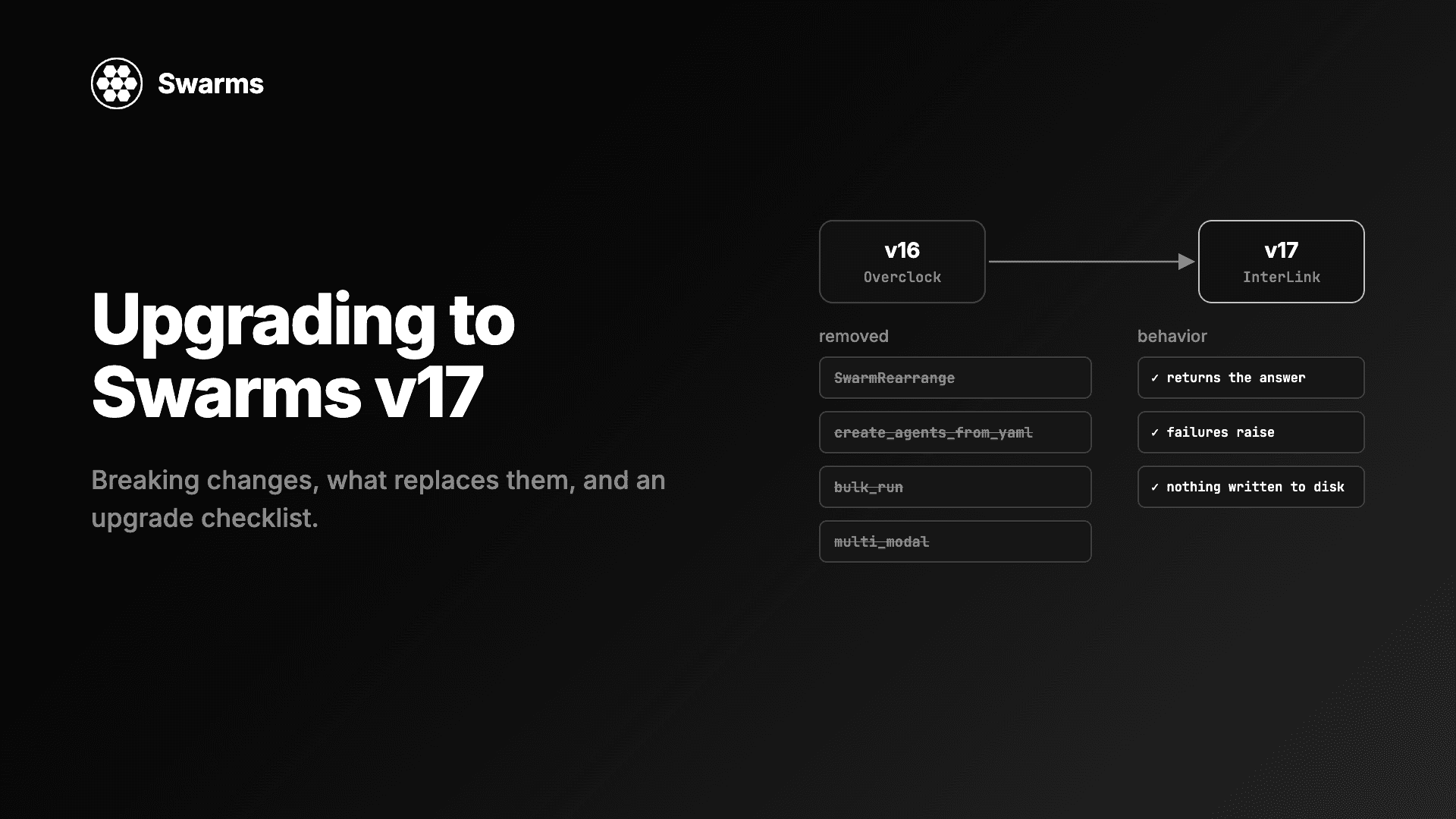
Swarms v17 升级与迁移指南:InterLink 中移除的每个类和参数、应该改用什么、变更的默认行为,以及一份升级检查清单。
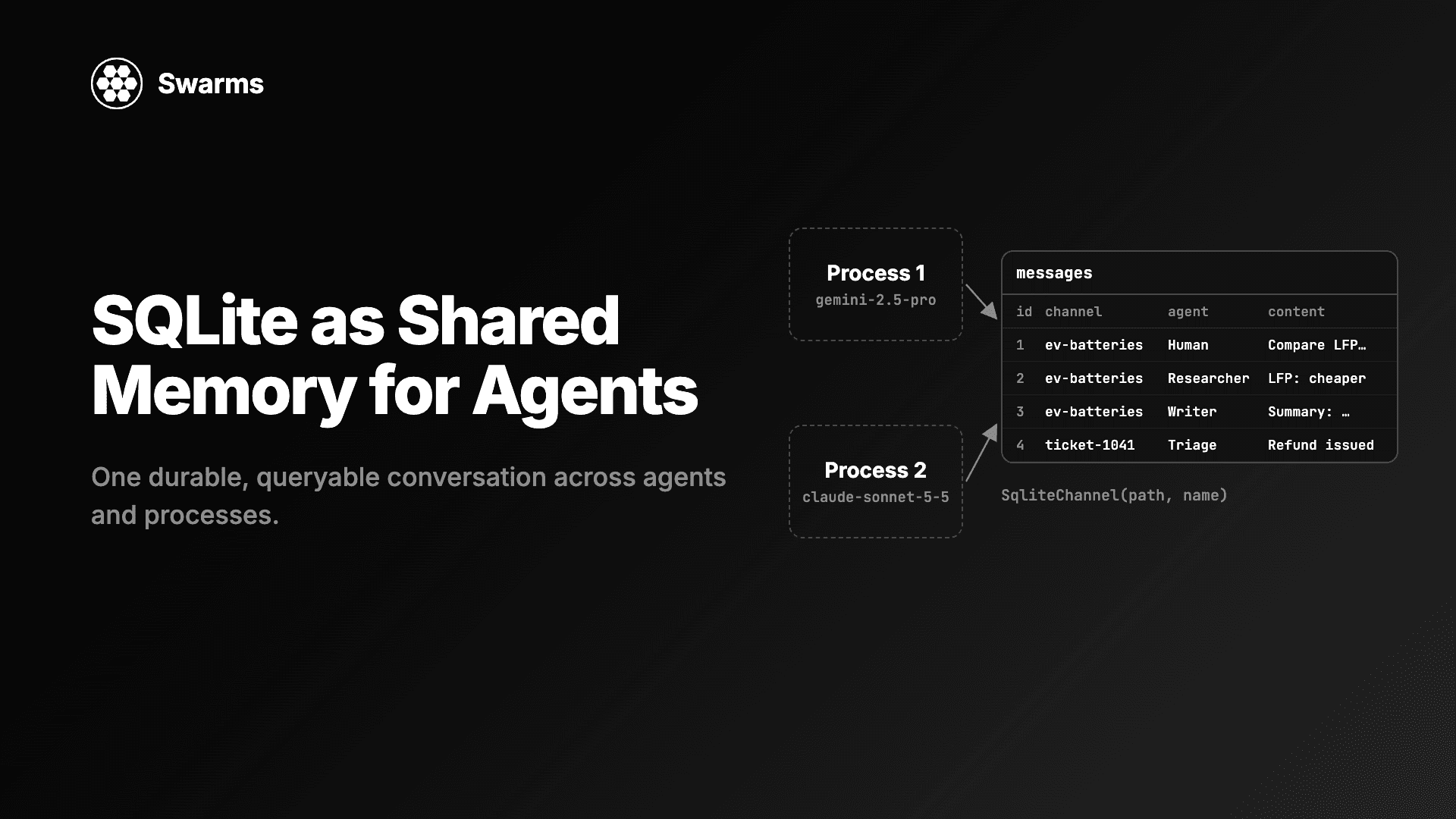
用 SQLite 实现 AI 智能体的共享记忆:SqliteChannel 让多个智能体和进程共用一份持久、可查询的对话历史。用 Swarms 存储、共享这份记忆,并对它运行 SQL。
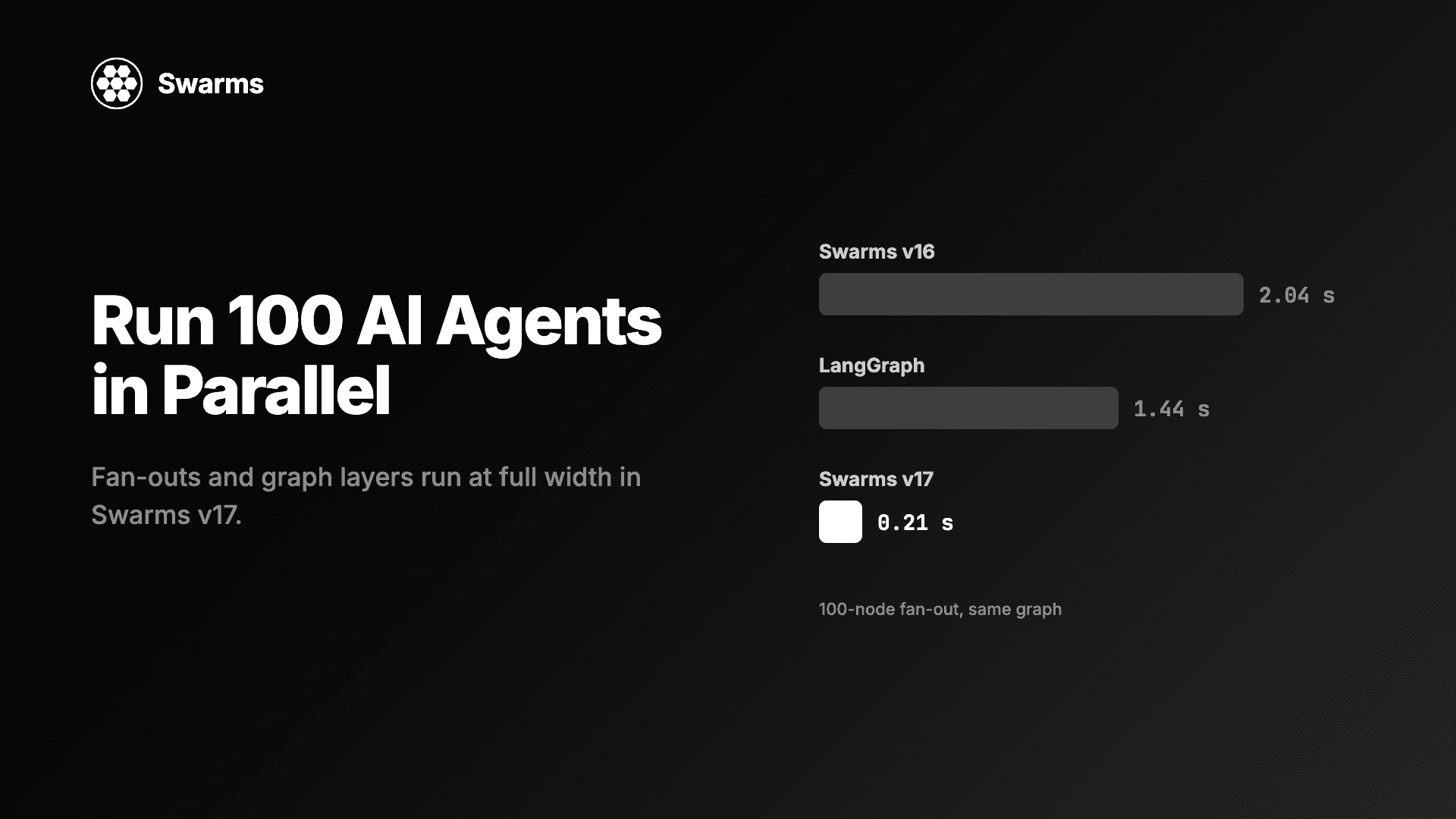
在 Python 中并行运行 AI 智能体:Swarms v17 中 100 个智能体的扇出只需 0.21 秒,此前为 2.04 秒(LangGraph:1.44 秒)。附满宽并发与异步上限的代码。